
Przegląd Avant STAMPe
Avant STAMPe to internetowy test oceniający biegłość językową. Składa się z 4 sekcji: Czytanie, Pisanie, Słuchanie i Mówienie.

~30 pytań wielokrotnego wyboru

2 monity

~30 pytań wielokrotnego wyboru

2 monity
Rozpoczynając Ocenę
- Twój nauczyciel lub egzaminator pomoże Ci się zalogować.
- Po tym, będziesz tworzyć profil.
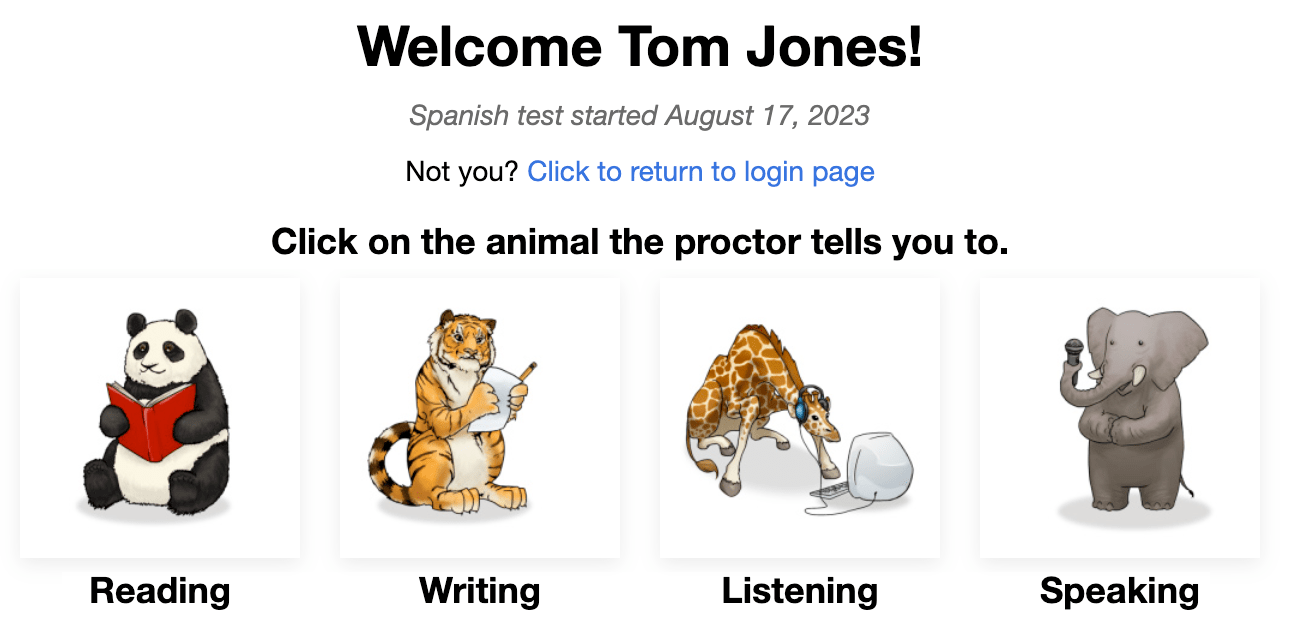
Następnie zobaczysz ekran z obrazkiem czterech zwierząt - jedno dla każdej sekcji testu. Twój nauczyciel powie Ci, na które zwierzę kliknąć.
Na początku każdej sekcji zobaczysz:
- Instrukcje. Proszę przeczytać je uważnie. Możesz również posłuchać ich w języku testowym.
- Pytanie/temat do ćwiczenia. Nie poświęcaj zbyt dużo czasu na to pytanie. Pamiętaj, że jest to tylko PYTANIE/TEMAT DO ĆWICZENIA, nie liczy się do końcowego wyniku.
Po odpowiedzeniu na każde pytanie, kliknij przycisk NEXT button w prawym dolnym rogu ekranu. Przewiń w dół, jeśli to konieczne. Po kliknięciu przycisku NEXT button, nie będziesz mógł wrócić do tyłu.
Po ostatnim pytaniu w każdej sekcji testu, pojawia się komunikat informujący, że skończyłeś daną sekcję. Kliknij przycisk, aby wybrać inną sekcję, a następnie kliknij na zwierzę, które nauczyciel Ci poda.

Czytanie i Słuchanie to pytania typu wielokrotnego wyboru, które są oceniane automatycznie. Test jest dostosowywany komputerowo, co oznacza, że staje się łatwiejszy lub trudniejszy w zależności od odpowiedzi osoby przystępującej do testu.
Pisanie i Mówienie - pytania będą bardziej lub mniej trudne w zależności od tego, jak dobrze zdający poradzi sobie w sekcjach Czytanie i Słuchanie. Odpowiedzi są oceniane przez Certyfikowanych Oceniarek Avant, którzy korzystają z Rubryki Oceny, która zawiera kryteria spełnienia Poziomów Benchmarkowych.
Zasady Testu
Testy są przeprowadzane w nadzorowanym środowisku bez dostępu do zewnętrznych źródeł.

- Nie klikaj poza oknem testu. To jest śledzone i spowoduje wylogowanie z testu.

- Nie korzystaj z żadnych materiałów pomocniczych (np. słowników, podręczników, telefonów komórkowych, aplikacji, narzędzi do komunikacji, czy pomocy tłumaczeniowych takich jak Google Translate).

- Nie rób notatek (na papierze lub elektronicznych). Papier, długopisy, ołówki, rysiki itp. są niedozwolone.

- Nie czytaj/korzystaj z żadnych notatek czy materiałów pomocniczych podczas udzielania odpowiedzi mówionych/wyrażania swoich myśli.

- Nie komunikuj się z nikim, z wyjątkiem nadzorcy podczas testu.

- Nie udostępniaj pytań testowych ani poleceń. Nie kopiuj, nie drukuj ani nie robią zrzutów ekranu z testu.

- Nie używaj przemocowego, wulgarnego lub niewłaściwego języka w swoich odpowiedziach.
Sekcja Czytania
Liczba pytań: około 24 pytania wielokrotnego wyboru
Średni czas: 25-35 minut 
Proszę uważnie przeczytać instrukcje. Kliknij na niebieski przycisk odtwarzania, aby posłuchać ich w języku testowym. Kliknij przycisk NASTĘPNY, aby przejść do pytań.

- Odpowiedz na pytanie.
- Kliknij przycisk NASTĘPNY, znajdujący się w prawym dolnym rogu ekranu. Przewiń w dół, jeśli to konieczne. Po kliknięciu przycisku NASTĘPNY, nie będziesz mógł wrócić do pytania.

Sekcja Pisania
Liczba poleceń: 1 polecenie praktyczne i 2 polecenia testowe
Limit znaków: Do 2500 znaków (400-600 słów) dla każdej odpowiedzi
Średni czas: 15 minut
- Proszę uważnie przeczytać instrukcje. Kliknij niebieski przycisk odtwarzania, aby posłuchać polecenia w języku testowym. Możesz odsłuchać nagranie dwa (2) razy. Po dwóch próbach przycisk stanie się nieaktywny.
- Kliknij przycisk NEXT, aby przejść do następnego ekranu.

- Przeczytaj całe polecenie najpierw. Kliknij niebieski przycisk odtwarzania, aby posłuchać polecenia w języku testowym. ...
- Wpisz swoją odpowiedź w polu tekstowym. Test będzie automatycznie zapisywał ją co 10 sekund.
- Kliknij NEXT, aby przesłać odpowiedź i przejść do następnego polecenia. Po kliknięciu NEXT, nie będziesz mógł wrócić.

Porady dotyczące sekcji pisania:
- Przeczytaj najpierw całe polecenie. Zachowaj dokładnie ....
- Napisz w języku, który testujesz.
- Używaj pełnych zdań. Zachowaj dokładnie ....
- Pisz jak najwięcej. Dołącz jak najwięcej szczegółów.
- Zorganizuj swoje myśli.
Sekcja Słuchania
Liczba pytań: około 24 pytania wielokrotnego wyboru
Average Time: 25-35 minutes
Proszę uważnie przeczytać instrukcje. Kliknij na niebieski przycisk odtwarzania, aby posłuchać ich w języku testowym. Kliknij przycisk NASTĘPNY, aby przejść do pytań.

- Kliknij niebieski przycisk odtwarzania, aby posłuchać nagrania i pytania, które zostaną odtworzone dwa razy. Możesz kliknąć niebieski przycisk odtwarzania tylko dwa (2) razy.
- Odpowiedz na pytanie.
- Kliknij przycisk NASTĘPNY, znajdujący się w prawym dolnym rogu ekranu. Przewiń w dół, jeśli to konieczne. Po kliknięciu przycisku NASTĘPNY, nie będziesz mógł wrócić do pytania.

Sekcja Mówienia
Liczba poleceń: 1 polecenie praktyczne i 2 polecenia testowe
Limit czasu nagrania: Będziesz miał trzy (3) minuty na nagranie każdej odpowiedzi ustnej
Średni czas: 15 minut
Proszę uważnie przeczytać instrukcje. Kliknij na niebieski przycisk odtwarzania, aby posłuchać ich w języku testowym. Kliknij przycisk NASTĘPNY, aby przejść do następnego ekranu.

- Proszę uważnie przeczytać instrukcje. Kliknij niebieski przycisk odtwarzania, aby posłuchać polecenia w języku testowym. Możesz odsłuchać nagranie dwa (2) razy. Po dwóch próbach przycisk stanie się nieaktywny.
- Kliknij "Rozpocznij nagrywanie", aby nagrać swoją odpowiedź.
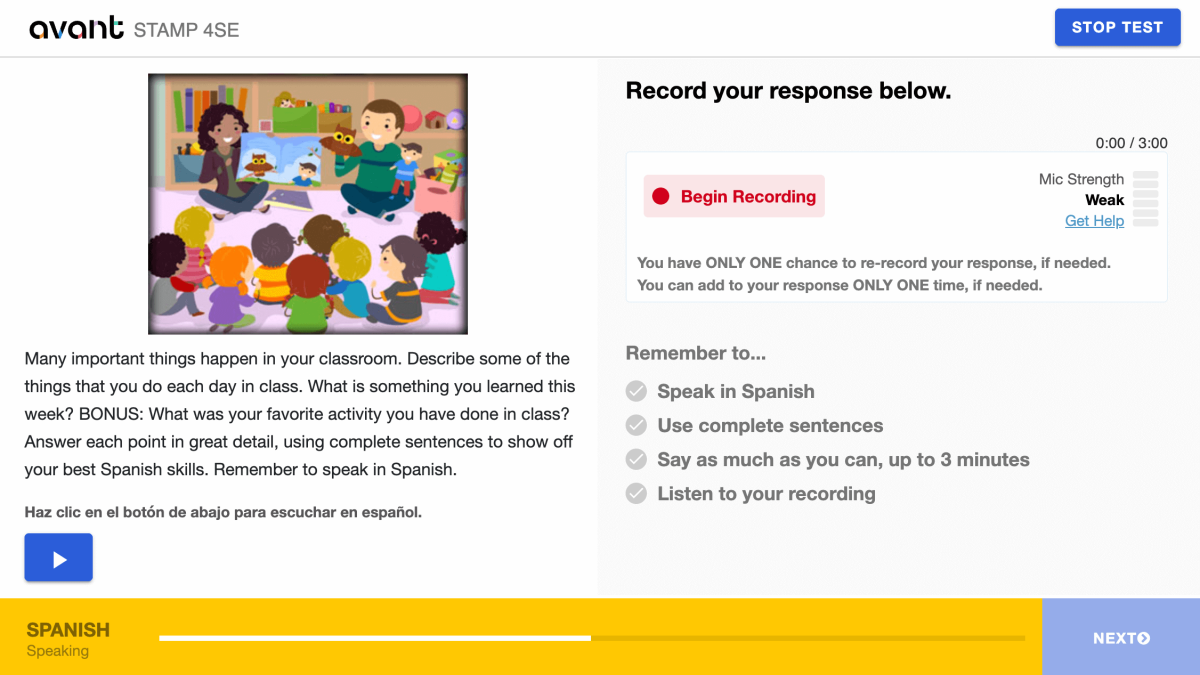
- Kliknij „Zatrzymaj nagrywanie” kiedy skończysz.

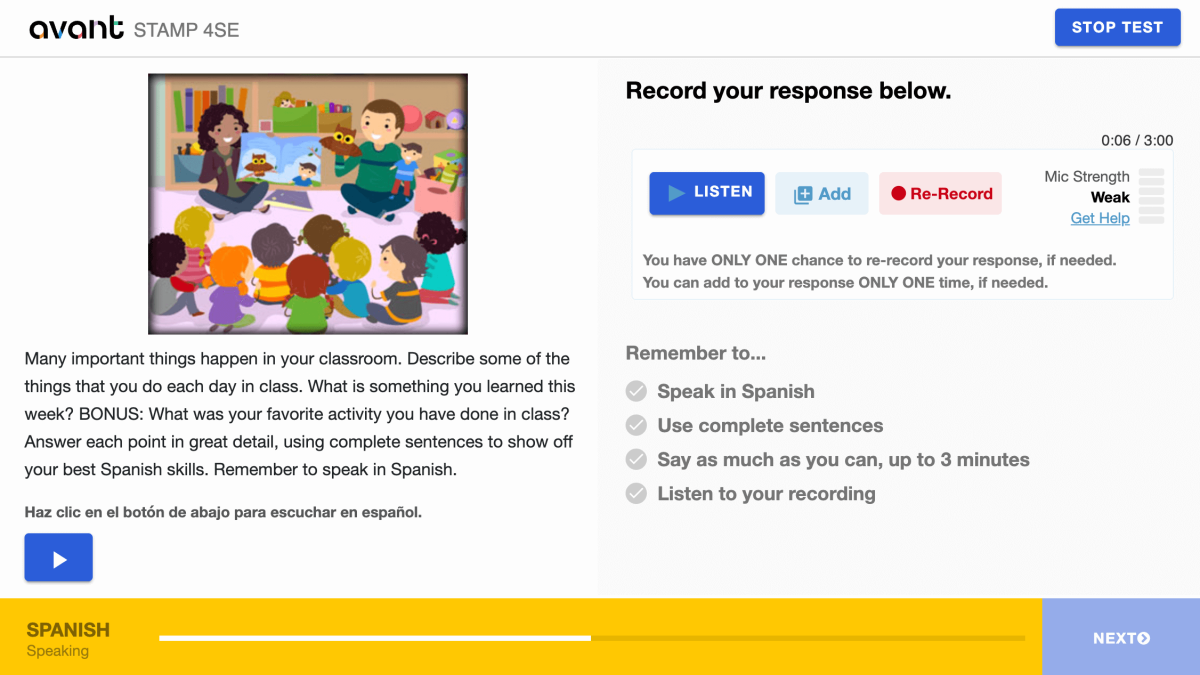
- Kliknij “Słuchaj”, aby odtworzyć swoje nagranie.

- Kliknij + Dodaj jeśli chcesz dodać do swojego nagrania. Możesz dodać do swojej odpowiedzi TYLKO RAZ, jeśli to konieczne.
- Kliknij na Ponów nagranie jeśli chcesz usunąć swoją odpowiedź i nagrać ją ponownie. Masz TYLKO JEDNĄ szansę na ponowne nagranie swojej odpowiedzi, jeśli to konieczne.
- Kliknij przycisk NEXT, aby przesłać swoją odpowiedź. Po kliknięciu NEXT nie będziesz mógł wrócić.
Porady dla sekcji mówionej:
- Przeczytaj najpierw całe polecenie. Zachowaj dokładnie ....
- Mów w języku, który testujesz.
- Używaj pełnych zdań. Zachowaj dokładnie ....
- Mów jak najwięcej jak możesz. Dołącz jak najwięcej szczegółów. Zachowaj dokładnie ....
- Zorganizuj swoje myśli.
Wznowienie Oceny ...
Jeśli zostaniesz wylogowany, zaloguj się ponownie, używając tego samego Kodu Testu, Hasła i Nazwy Użytkownika. Test przeniesie cię do sekcji, w której skończyłeś. Skontaktuj się z nadzorcą lub nauczycielem w razie potrzeby:
- Kliknij Kontynuuj Test po wprowadzeniu Kodu Testu i Hasła.
- Wprowadź ponownie swoją Nazwę Użytkownika dokładnie tak, jak zrobiłeś to po raz pierwszy.
Ukończ wszystkie sekcje testu, aż test zostanie zakończony (chyba że wskazano inaczej). Zachowaj dokładnie ....
Ukończenie Oceny
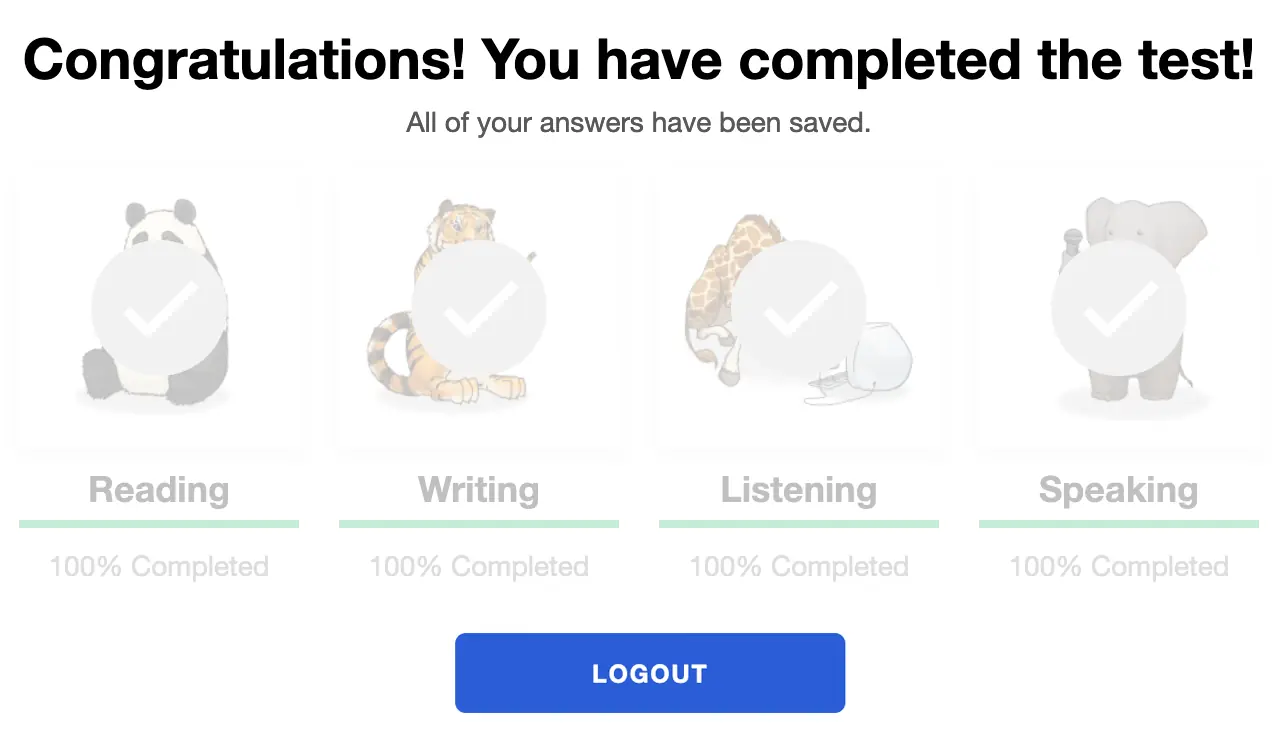
Po ukończeniu testu zobaczysz komunikat „Gratulacje! Ukończyłeś test!”. Musisz zakończyć test w ciągu 90 dni od jego rozpoczęcia.
Otrzymywanie Wyników Oceny
Wyniki testów są dostarczane do koordynatora testów po zakończeniu testu. Osoby przystępujące do testu powinny skontaktować się ze swoim koordynatorem testów, aby otrzymać wyniki testu.
Sprawdź Przewodnik po STAMP Benchmarkach i Rubryce oraz Przewodnik Power Up dla Osób Przystępujących do Testu, aby dowiedzieć się, co jest wymagane do osiągnięcia określonego poziomu testu.
Przygotowanie do Testu
Avant STAMP to test sprawności, który pokazuje, co osoba zdająca test potrafi zrobić z językiem w danym momencie. Nie ma tu "poprawnych" ani "błędnych" odpowiedzi, jest to po prostu demonstracja ich umiejętności.
Aby pomóc każdemu zdającemu się przygotować, mamy do dyspozycji kilka zasobów:
Przykładowe Testy
Pokazuje, jak będzie wyglądał test i podaje przykłady pytań i poleceń na poziomie początkującym, średnio zaawansowanym i zaawansowanym. Nie pokazuje adaptacyjnej natury testu komputerowego i nie poda wyniku na końcu.
Filmy Instruktażowe
Pomaga zdającemu zrozumieć, jak osiągnąć najlepsze wyniki i czego oczekiwać podczas testu.
Przykłady Pisania
Dla wielu języków, dostarczamy prawdziwe przykłady odpowiedzi pisemnych dla każdego poziomu. Osoby zdające test mogą porównać to, co wiedzą, aby zrozumieć, jakiego rodzaju języka oczekuje się na każdym poziomie.
Benchmarks i Rubryki
Ten przewodnik pomaga zrozumieć, jak test jest oceniany i podaje tematy pytań, które mogą być używane na każdym poziomie w sekcjach Czytania i Słuchania.
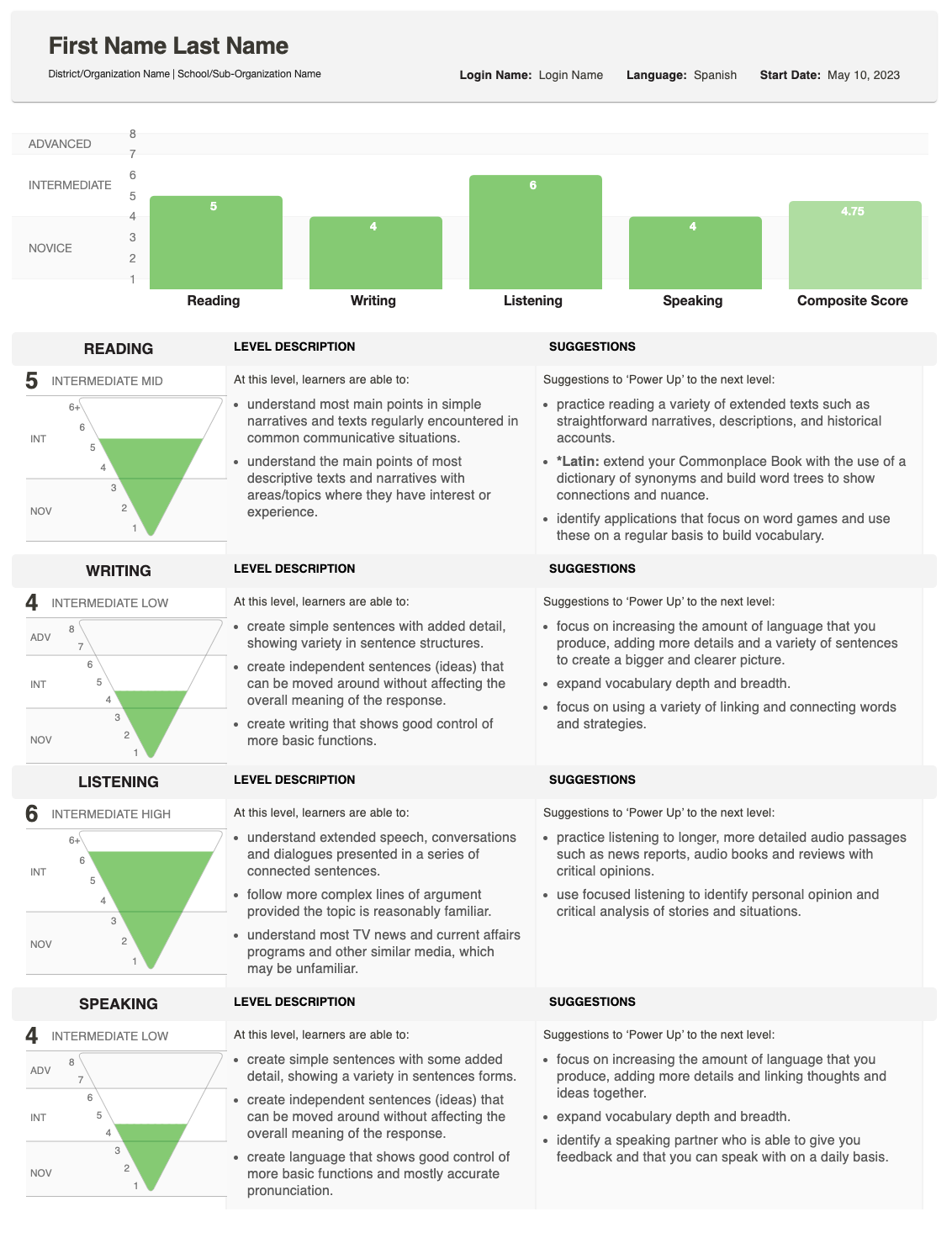
Wyniki Oceny
Po zakończeniu oceniania, wyniki zostaną dostarczone do szkoły lub organizacji przeprowadzającej test.
Raport pokazuje, jak twój uczeń poradził sobie w Pisaniu i Mówieniu i podaje łączny (kompozytowy) wynik.
Aby uzyskać szczegółowe wyjaśnienie, jak są wyznaczane wyniki, zobacz Przewodnik Benchmarku i Rubryki, który opisuje, czego oczekuje się na każdym poziomie. Jeśli masz pytania dotyczące wyników poszczególnego ucznia, skontaktuj się z szkołą lub organizacją, która przeprowadziła test.
Zrozumienie Wyników
Raport indywidualny pokazuje zdobyte punkty za każdą umiejętność, wraz z Wynikiem Kompozytowym Composite Score.

Piramida Wyników
Grafika w kształcie odwróconej piramidy prezentuje każdy wynik. Wypełniona sekcja pokazuje osiągnięty poziom.
- Do pisania i mówienia, dodatkowy zacieniony obszar może pojawić się, jeśli jedna odpowiedź została oceniona na wyższym poziomie.
- To wskazuje, że uczeń może działać na różnych poziomach biegłości w tej umiejętności.
Opisy Umiejętności
Obok piramidy zobaczysz opisy umiejętności (Czytanie, Pisanie, Słuchanie, Mówienie) oraz kategorię poziomu (Początkujący, Średnio zaawansowany, Zaawansowany).
- Jeśli sekcja testowa nie została zakończona, ta strefa zamiast tego pokaże status: Nie rozpoczęto lub W trakcie.

Propozycje do Power Up
Na dalekiej prawej stronie, raport zawiera Propozycje do Power Up — praktyczne wskazówki, które uczeń może wykorzystać do poprawy i osiągnięcia wyższych wyników w tej umiejętności.