
Avant STAMPe 개요
Avant STAMPe는 언어 능력을 평가하는 웹 기반 테스트입니다. 이 테스트는 읽기, 쓰기, 듣기, 말하기의 4개 섹션으로 구성되어 있습니다.

~30개의 객관식 질문

2 프롬프트

~30개의 객관식 질문

2 프롬프트
평가 시작하기
- 당신의 선생님 또는 감독관이 로그인하는 데 도움을 줄 것입니다.
- 그 후에, 당신은 프로필을 완성하게 될 것입니다.
그런 다음 시험의 각 부분을 대표하는 네 마리의 동물 그림이 있는 화면을 보게 될 것입니다. 선생님께서 어떤 동물을 클릭할지 알려주실 것입니다.
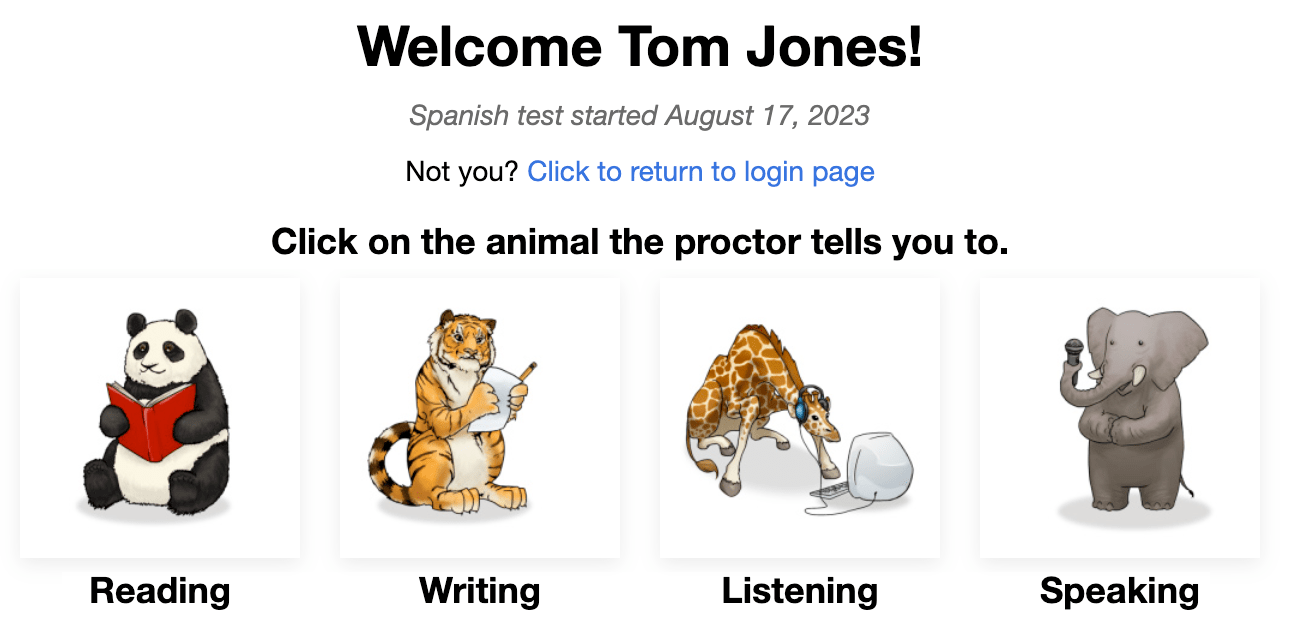
각 섹션의 시작 부분에서 다음을 확인하실 수 있습니다:
- 지시사항. 주의 깊게 읽어주십시오. 또한 시험 언어로 들을 수도 있습니다. ...
- 연습 질문/프롬프트. 이 질문에 너무 많은 시간을 쓰지 마세요. 이것은 단지 연습 질문/프롬프트일 뿐, 최종 점수에는 포함되지 않는다는 것을 기억하세요.
각 질문에 답한 후에는 화면의 오른쪽 하단에 있는 NEXT button을 클릭하세요. 필요하다면 아래로 스크롤하세요. NEXT button을 클릭한 후에는 뒤로 돌아갈 수 없습니다.
마지막 질문 후에 테스트의 각 섹션에서 메시지가 나타나면 그 섹션을 완료한 것입니다. 다른 섹션을 선택하려면 버튼을 클릭한 다음, 선생님이 지시하는 동물을 클릭하세요.

독해와 청취 문제는 객관식이며 자동으로 채점됩니다. 이 테스트는 컴퓨터 적응형이라는 것은 시험 응시자의 응답에 따라 더 쉬워지거나 어려워질 수 있다는 것을 의미합니다.
쓰기와 말하기 섹션의 문제는 읽기와 듣기 섹션에서 시험 응시자가 얼마나 잘하는지에 따라 더 어렵거나 쉽게 만들어집니다. 응답은 벤치마크 레벨을 충족시키는 기준을 나열한 스코어링 루브릭을 사용하는 Avant 인증 평가자들에 의해 평가됩니다.
테스트 규칙
테스트는 감독이 있는 환경에서 외부 자료를 허용하지 않고 진행됩니다.

- 테스트 창 외부를 클릭하지 마세요. 이는 추적되며 테스트에서 로그아웃시킵니다.

- 어떠한 지원 자료도 사용하지 마십시오 (예: 사전, 교과서, 휴대폰, 앱, 메시징 도구, Google 번역과 같은 번역 도움 도구).

- 노트를 작성하지 마세요 (종이나 전자 기반). 종이, 펜, 연필, 스타일러스 등은 허용되지 않습니다.

- 발화/표현 응답에 대해 어떠한 노트나 지원 자료도 읽거나 사용하지 마세요.

- 시험 중에는 감독관 외에는 아무와도 소통하지 마십시오.

- 시험 문제나 프롬프트를 공유하지 마세요. 시험을 복사하거나 인쇄하거나 스크린샷을 찍지 마세요.

- 응답에서 폭력적이거나, 불속된, 또는 부적절한 언어를 사용하지 마십시오
독서 섹션
문제 수: 대략 24개의 객관식 문제들
평균 시간: 25-35분 
주의 깊게 지시사항을 읽어주세요. 테스트 언어로 듣기 위해 파란색 재생 버튼을 클릭하세요. 질문으로 넘어가려면 NEXT 버튼을 클릭하세요.

- 질문에 답하십시오.
- 화면의 오른쪽 하단에 있는 the NEXT button,을 클릭하세요. 필요하다면 아래로 스크롤하세요. the NEXT button을 클릭한 후에는 질문으로 돌아갈 수 없습니다.

글쓰기 섹션
프롬프트 수: 1개의 연습 프롬프트와 2개의 테스트 프롬프트
문자 제한: 각 응답에 대해 최대 2500 문자 (400-600 단어)까지 가능합니다.
평균 시간: 15분
- 지시사항을 주의 깊게 읽어주세요. 테스트 언어로 된 프롬프트를 듣기 위해 파란색 재생 버튼을 클릭하세요. 녹음 내용은 두 (2) 번 들을 수 있습니다. 두 번의 시도 후에는 버튼이 비활성화됩니다.
- 다음 화면으로 이동하려면 다음 버튼을 클릭하세요. ...

- 전체 프롬프트를 먼저 읽으십시오. 테스트 언어로 프롬프트를 듣기 위해 파란색 재생 버튼을 클릭하십시오.
- 텍스트 상자에 답변을 입력하세요. 테스트는 10초마다 자동 저장을 수행합니다.
- 응답을 제출하고 다음 프롬프트로 이동하려면 NEXT를 클릭하세요. NEXT를 클릭한 후에는 돌아갈 수 없습니다.

작성 섹션 팁:
- 먼저 전체 프롬프트를 읽으십시오.
- 테스트하고 있는 언어로 작성하세요. ...
- 완전한 문장을 사용하십시오.
- 당신이 할 수 있는 만큼 많이 쓰세요. 가능한 한 많은 세부 사항을 포함하세요.
- 당신의 생각을 정리하세요.
듣기 섹션
질문 수: 대략 24개의 객관식 질문
Average Time: 25-35 minutes
주의 깊게 지시사항을 읽어주세요. 테스트 언어로 듣기 위해 파란색 재생 버튼을 클릭하세요. 질문으로 넘어가려면 NEXT 버튼을 클릭하세요.

- 녹음과 질문을 듣기 위해 파란색 재생 버튼을 클릭하십시오. 녹음과 질문은 두 번 재생됩니다. 파란색 재생 버튼은 두 번(2)만 클릭할 수 있습니다.
- 질문에 답하십시오.
- NEXT 버튼을 클릭하세요, 화면의 오른쪽 하단에 위치해 있습니다. 필요하다면 아래로 스크롤하세요. NEXT 버튼을 클릭한 후에는 질문으로 돌아갈 수 없습니다. ...은 그대로 유지하세요.

말하기 섹션
프롬프트 수: 1 연습 프롬프트와 2 테스트 프롬프트
녹음 시간 제한: 각각의 말하기 응답에 대해 세 (3) 분의 녹음 시간을 가질 수 있습니다.
평균 시간: 15분
설명서를 주의 깊게 읽어주세요. 테스트 언어로 듣기 위해 파란색 재생 버튼을 클릭하세요. NEXT 버튼을 클릭하여 다음 화면으로 이동하세요.

- 지시사항을 주의 깊게 읽어주세요. 테스트 언어로 된 프롬프트를 듣기 위해 파란색 재생 버튼을 클릭하세요. 녹음 내용은 두 (2) 번 들을 수 있습니다. 두 번의 시도 후에는 버튼이 비활성화됩니다.
- “녹음 시작”을 클릭하여 답변을 녹음하세요. ...
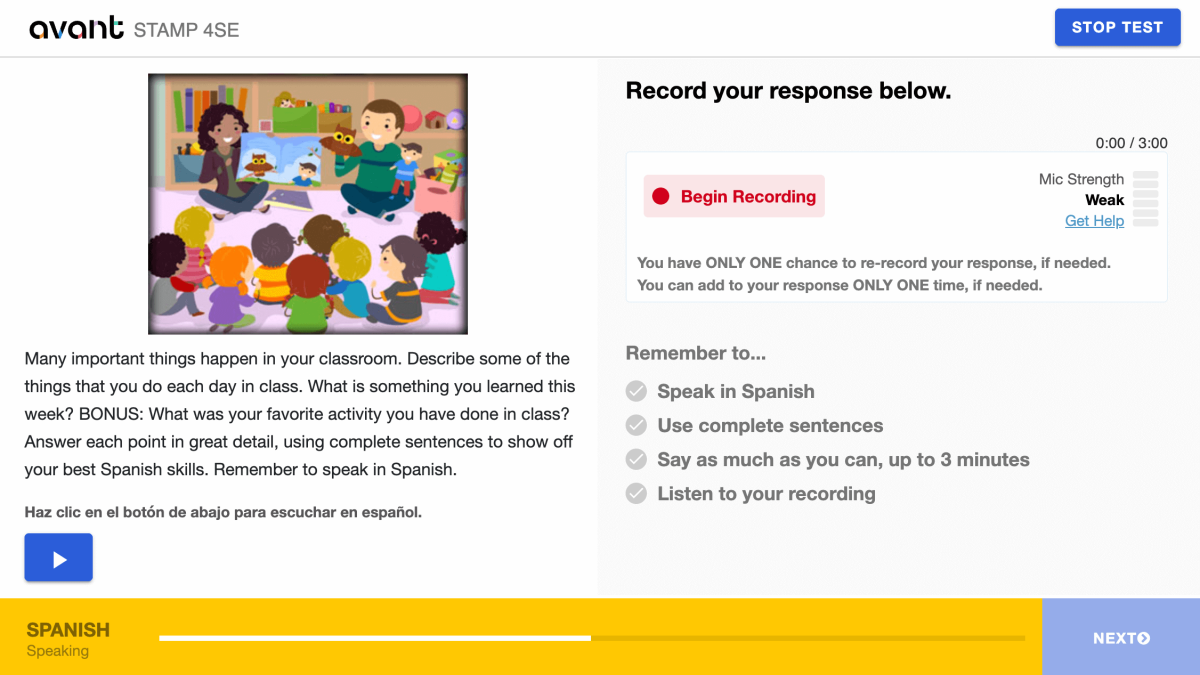
- 완료되면 “녹음 중지”를 클릭하세요.

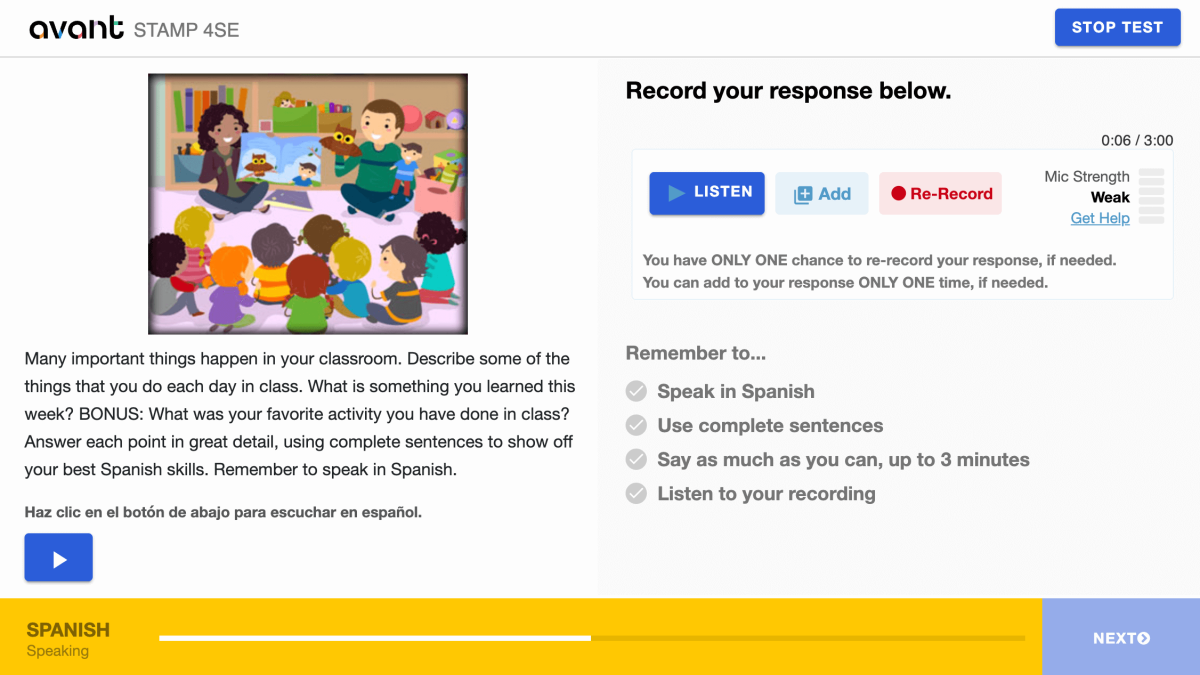
- “Listen”을 클릭하여 녹음을 재생하세요.

- 녹음에 추가하려면 + 추가를 클릭하세요. 필요한 경우 응답에 단 한 번만 추가할 수 있습니다.
- 응답을 삭제하고 다시 녹음하려면 다시 녹음을 클릭하세요. 필요한 경우 응답을 단 한 번만 다시 녹음할 수 있습니다.
- NEXT 버튼을 클릭하여 응답을 제출하세요. NEXT를 클릭하면 다시 돌아갈 수 없습니다.
스피킹 섹션 팁:
- 먼저 전체 프롬프트를 읽으십시오.
- 테스트 중인 언어로 말하십시오. ...
- 완전한 문장을 사용하십시오.
- 당신이 할 수 있는 만큼 많이 말하세요. 가능한 한 많은 세부 사항을 포함시키세요.
- 당신의 생각을 정리하세요.
평가 재개
로그아웃되면 동일한 테스트 코드, 비밀번호, 로그인 이름으로 다시 로그인하십시오. 테스트는 당신이 중단한 부분으로 돌아갑니다. 도움이 필요하면 감독관이나 선생님에게 문의하십시오:
- 테스트 코드와 비밀번호를 입력한 후 테스트 계속을 클릭하세요.
- 처음 입력했던 것과 똑같이 로그인 이름을 다시 입력하세요.
테스트가 완료될 때까지 모든 섹션을 완료하십시오 (특별한 지시가 없는 한).
평가 완료하기
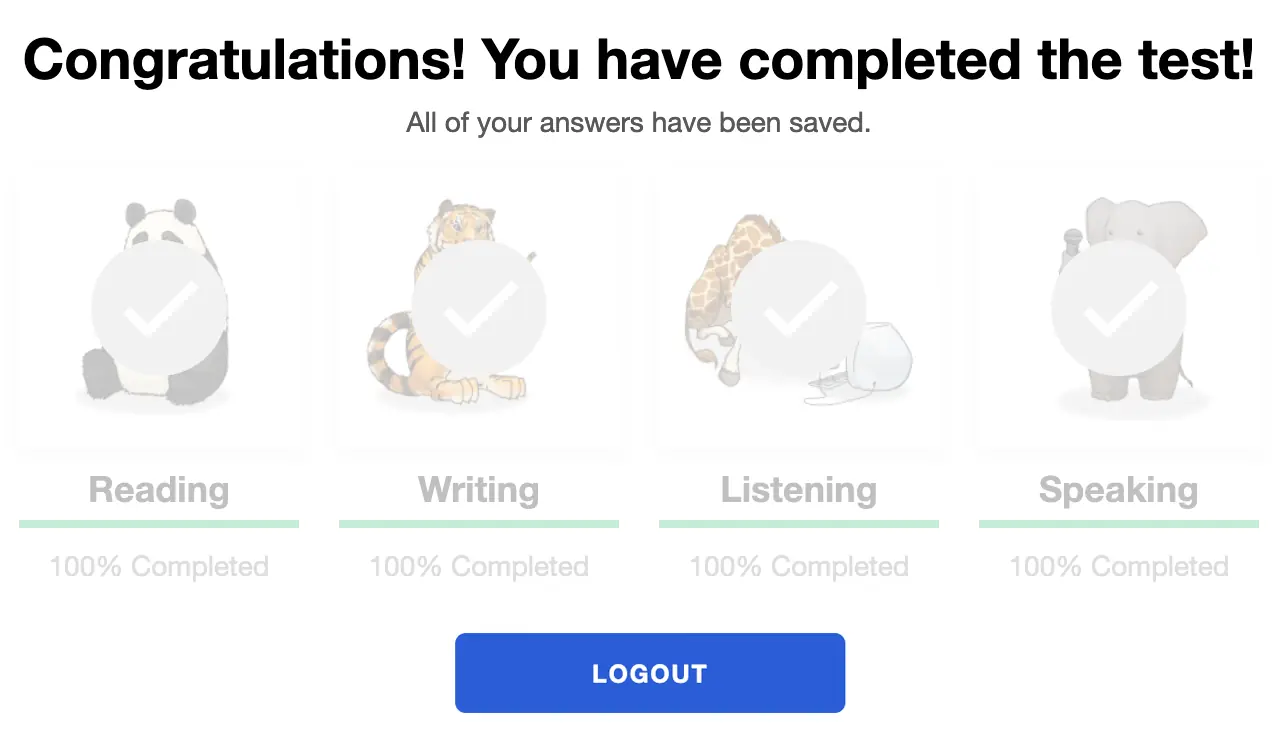
테스트를 완료하면 “축하합니다! 테스트를 완료하셨습니다!”라는 메시지가 표시됩니다. 테스트를 시작한 날로부터 90일 이내에 완료해야 합니다.
평가 결과 얻기
테스트 완료 후 테스트 코디네이터에게 테스트 결과가 전달됩니다. 테스트 응시자는 테스트 결과를 받기 위해 테스트 코디네이터에게 연락해야 합니다.
STAMP 벤치마크 및 루브릭 가이드를 확인하고, 특정 테스트 레벨을 달성하기 위해 필요한 것이 무엇인지 알아보기 위해 테스트 응시자 파워 업 가이드를 확인하세요.
테스트 준비하기
Avant STAMP는 시험 응시자가 현재 시점에서 언어로 어떤 일을 할 수 있는지를 측정하는 능력 테스트입니다. "정답"이나 "오답"이 없으며, 단지 그들의 기술을 보여주는 것뿐입니다.
각 시험 응시자가 준비할 수 있도록 도와주기 위해, 우리는 다음과 같은 여러 자료를 제공하고 있습니다:
샘플 테스트
테스트가 어떻게 보일지를 보여주고 초급, 중급, 고급 질문 및 프롬프트의 예를 제공합니다. 이는 테스트의 컴퓨터 적응성을 보여주지 않으며, 마지막에 점수를 주지 않습니다.
비디오 튜토리얼
테스트 응시자가 어떻게 최선을 다하고 테스트 중에 무엇을 기대해야 하는지 이해하는 데 도움을 줍니다.
글쓰기 예시
많은 언어들에 대해, 우리는 각 레벨별로 작문 응답의 실제 예시를 제공합니다. 시험 응시자들은 자신이 알고 있는 것과 비교하여 각 레벨에서 기대되는 언어 유형을 이해할 수 있습니다.
벤치마크와 루브릭
이 가이드는 시험이 어떻게 채점되는지 이해하는 데 도움을 주며, 각 레벨에서 읽기와 듣기 섹션에서 사용될 수 있는 질문 주제를 제공합니다.
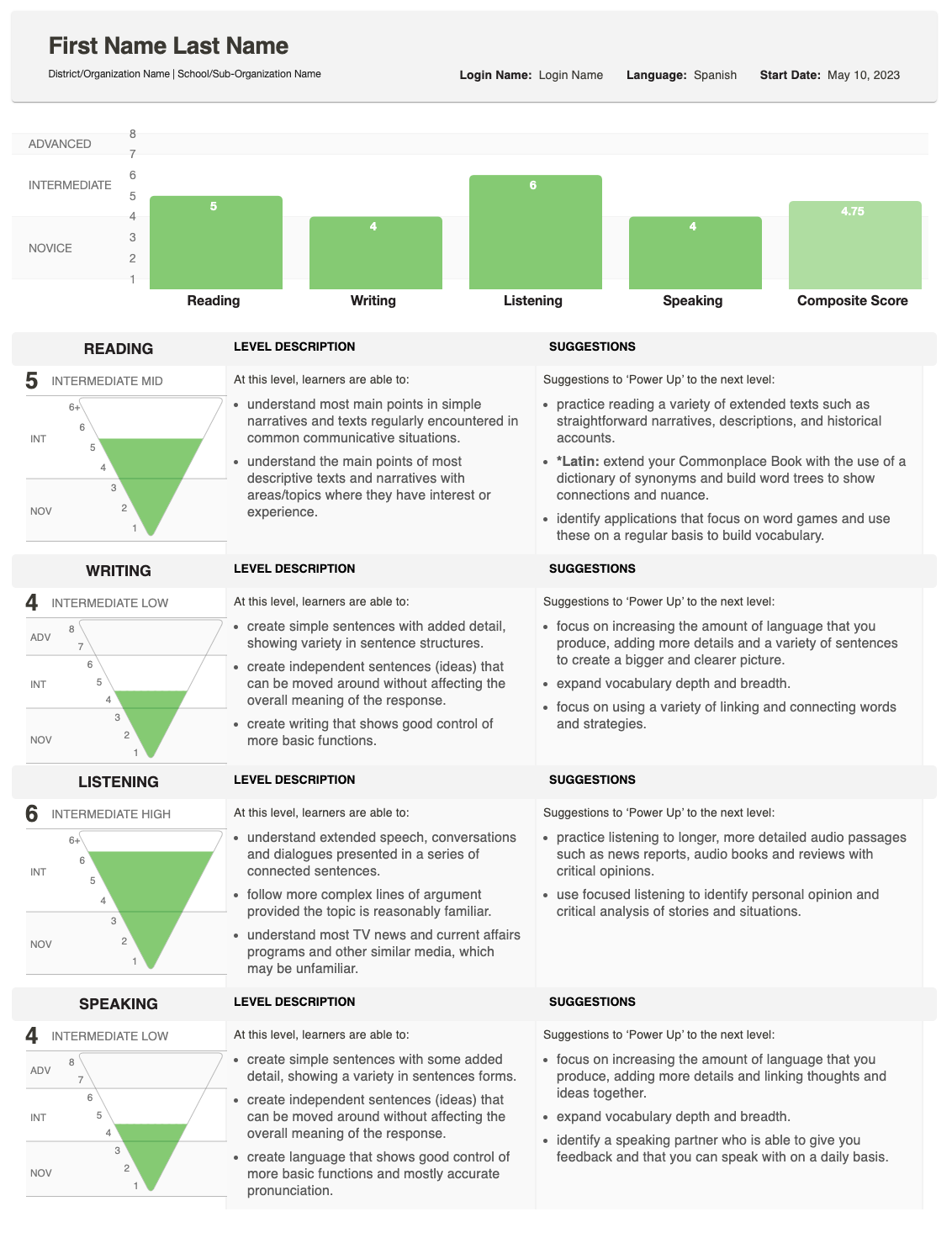
평가 결과
점수 산정이 완료된 후, 결과는 시험을 관리하는 학교 또는 조직에 제공될 것입니다.
이 보고서는 학생이 쓰기와 말하기에서 어떻게 수행했는지 보여주며 전체 (종합) 점수를 제공합니다.
점수가 어떻게 결정되는지에 대한 자세한 설명은 벤치마크 및 루브릭 가이드를 참조하십시오. 이 가이드에서는 각 레벨에서 기대하는 것이 무엇인지 설명하고 있습니다. 개별 학생의 점수에 대해 질문이 있으시면, 시험을 실시한 학교 또는 조직에 문의하십시오.
점수 이해하기
개별 보고서는 각 스킬에 대해 획득한 점수와 함께 복합 점수를 보여줍니다.

스코어 피라미드
역피라미드 그래픽은 각 점수를 표시합니다. 채워진 부분은 도달한 레벨을 보여줍니다.
- 글쓰기와 말하기에 대해, 한 응답이 더 높은 수준에서 점수를 받았다면 추가적인 음영 처리된 영역이 나타날 수 있습니다.
- 이것은 학생이 해당 기술에 대해 다양한 능력 수준에서 수행하고 있을 수 있음을 나타냅니다.
기술 설명
피라미드 옆에는 스킬(읽기, 쓰기, 듣기, 말하기)과 레벨 카테고리(초급, 중급, 고급)에 대한 설명이 있습니다.
- 테스트 섹션이 완료되지 않았다면, 이 영역에는 대신 다음 상태가 표시됩니다: 시작되지 않음 또는 진행 중.

파워 업 제안
가장 오른쪽에, 보고서는 파워 업 제안을 나열합니다—학생이 해당 기술에서 더 향상시키고 더 높은 점수를 얻기 위해 사용할 수 있는 실질적인 팁입니다.