
Resumen de Avant STAMPe
Avant STAMPe es una prueba basada en la web que evalúa la competencia lingüística. Tiene 4 secciones: Lectura, Escritura, Escucha y Habla.

~30 preguntas de opción múltiple

2 indicaciones

~30 preguntas de opción múltiple

2 indicaciones
Iniciando la Evaluación
- Su profesor o supervisor le ayudará a iniciar sesión.
- Después de eso, deberás completar un perfil.
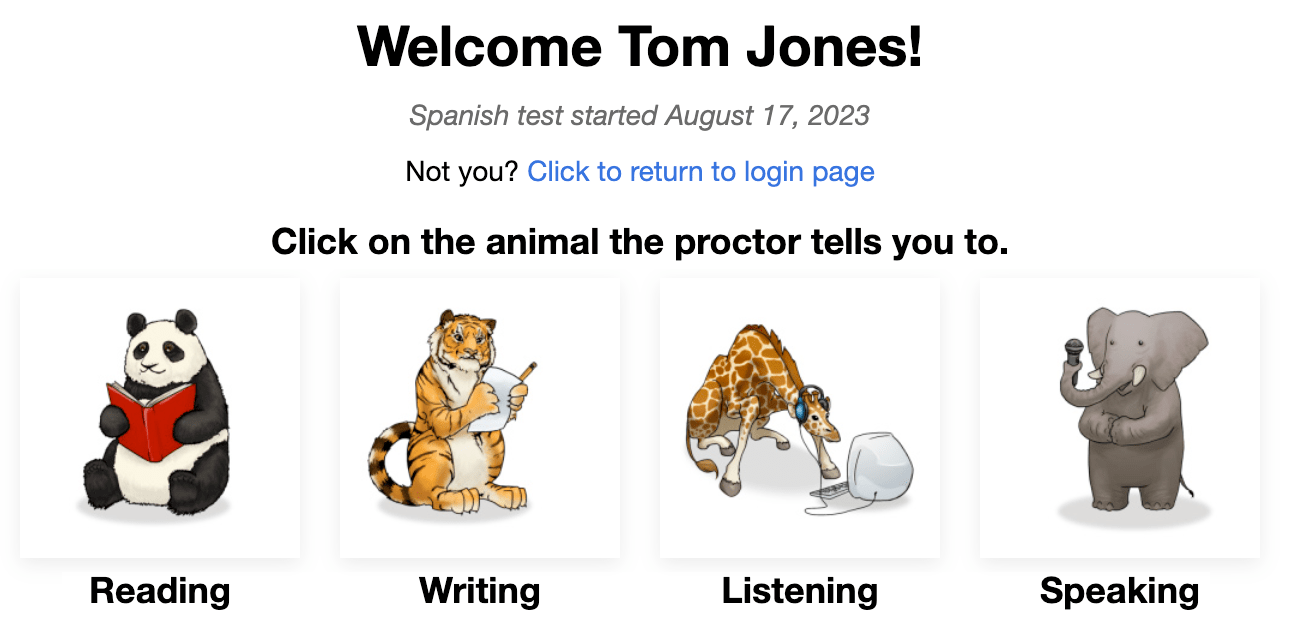
Luego verás una pantalla con una imagen de cuatro animales, uno para cada sección de la prueba. Tu profesor te dirá en qué animal hacer clic.
Al comienzo de cada sección, verás:
- Instrucciones. Por favor, léelas con atención. También puedes escucharlas en el idioma de prueba.
- Pregunta/ejercicio de práctica. No dediques demasiado tiempo a esta pregunta. Recuerda que esto es solo una PREGUNTA/EJERCICIO DE PRÁCTICA, no cuenta en la puntuación final.
Después de responder cada pregunta, haga clic en el botón SIGUIENTE en la parte inferior derecha de la pantalla. Desplácese hacia abajo, si es necesario. Después de hacer clic en el botón SIGUIENTE, no podrá volver atrás.
Después de la última pregunta en cada sección de la prueba, un mensaje te indica que has terminado con la sección. Haz clic en el botón para seleccionar otra sección, luego haz clic en el animal que el profesor te indique.

Lectura y Escucha las preguntas son de opción múltiple y se califican automáticamente. La prueba es adaptativa por computadora lo que significa que se volverá más fácil o más difícil según las respuestas del examinado.
Escritura y Habla las indicaciones se harán más o menos difíciles según lo bien que el examinado haga en las secciones de Lectura y Escucha. Las respuestas son calificadas por Evaluadores Certificados de Avant que utilizan una Rúbrica de Puntuación que lista los criterios para cumplir con los Niveles de Referencia.
Reglas de Prueba
Las pruebas se realizan en un entorno supervisado sin permitir recursos externos.

- No haga clic fuera de la ventana de prueba. Esto se rastrea y te cerrará la sesión de la prueba.

- No utilice ningún material de apoyo (por ejemplo, diccionarios, libros de texto, teléfonos móviles, aplicaciones, herramientas de mensajería o ayudas de traducción como Google Translate).

- No tome notas (en papel o electrónicas). No se permiten papel, bolígrafos, lápices, estiletes, etc.

- No lea/utilice ninguna nota o material de apoyo para sus respuestas orales/expresivas.

- No te comuniques con nadie excepto con el supervisor durante el examen.

- No compartas preguntas o indicaciones de prueba. No copies, imprimas, ni tomes capturas de pantalla de la prueba.

- No utilice lenguaje violento, profano o inapropiado en sus respuestas.
Sección de Lectura
Número de Preguntas: aproximadamente 24 preguntas de opción múltiple
Tiempo Promedio: 25-35 minutos 
Por favor, lea las instrucciones detenidamente. Haga clic en el botón de reproducción azul para escucharlas en el idioma de prueba. Haga clic en el botón SIGUIENTE para pasar a las preguntas.

- Responde a la pregunta.
- Haz clic en el botón SIGUIENTE, en la parte inferior derecha de la pantalla. Desplázate hacia abajo, si es necesario. Después de hacer clic en el botón SIGUIENTE, no podrás volver a la pregunta.

Sección de Escritura
Número de Prompts: 1 prompt de práctica y 2 prompts de prueba
Límite de caracteres: Hasta 2500 caracteres (400-600 palabras) para cada respuesta
Tiempo Promedio: 15 minutos
- Por favor, lea las instrucciones con atención. Haga clic en el botón azul de reproducción para escuchar el mensaje en el idioma de prueba. Puede escuchar la grabación dos (2) veces. Después de dos intentos, el botón se desactivará.
- Haz clic en el botón SIGUIENTE para pasar a la siguiente pantalla. ...

- Lea el enunciado completo primero. Haga clic en el botón azul de reproducción para escuchar el enunciado en el idioma de prueba.
- Escribe tu respuesta en el cuadro de texto. La prueba guardará automáticamente cada 10 segundos.
- Haz clic en NEXT para enviar la respuesta y pasar a la siguiente indicación. Después de hacer clic en NEXT, no podrás volver atrás.

Consejos para la Sección de Escritura:
- Lea todo el mensaje primero.
- Escribe en el idioma que estás probando.
- Utiliza frases completas.
- Escribe tanto como puedas. Incluye tantos detalles como sea posible.
- Organiza tus pensamientos.
Sección de Escucha
Número de Preguntas: aproximadamente 24 preguntas de opción múltiple
Average Time: 25-35 minutes
Por favor, lea las instrucciones detenidamente. Haga clic en el botón de reproducción azul para escucharlas en el idioma de prueba. Haga clic en el botón SIGUIENTE para pasar a las preguntas.

- Haga clic en el botón azul de reproducción para escuchar la grabación y la pregunta, que se reproducirán dos veces. Puede hacer clic en el botón azul de reproducción solo dos (2) veces.
- Responde a la pregunta.
- Haz clic en el botón SIGUIENTE, en la parte inferior derecha de la pantalla. Desplázate hacia abajo, si es necesario. Después de hacer clic en el botón SIGUIENTE, no podrás volver a la pregunta.

Sección de Habla
Número de Prompts: 1 prompt de práctica y 2 prompts de prueba
Límite de Tiempo de Grabación: Tendrás tres (3) minutos de tiempo de grabación para cada respuesta hablada
Tiempo Promedio: 15 minutos
Por favor, lea las instrucciones cuidadosamente. Haga clic en el botón azul de reproducción para escucharlas en el idioma de prueba. Haga clic en el botón SIGUIENTE para pasar a la siguiente pantalla.

- Por favor, lea las instrucciones con atención. Haga clic en el botón azul de reproducción para escuchar el mensaje en el idioma de prueba. Puede escuchar la grabación dos (2) veces. Después de dos intentos, el botón se desactivará.
- Haz clic en "Comenzar Grabación" para grabar tu respuesta.
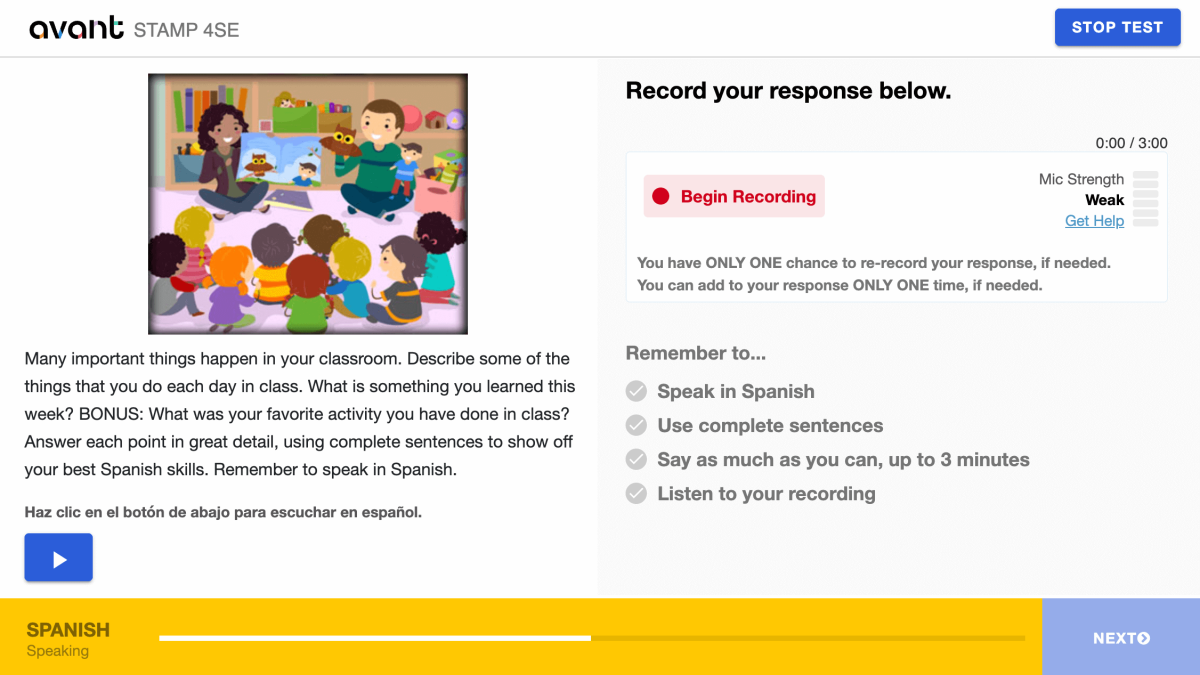
- Haz clic en “Detener Grabación” cuando hayas terminado.

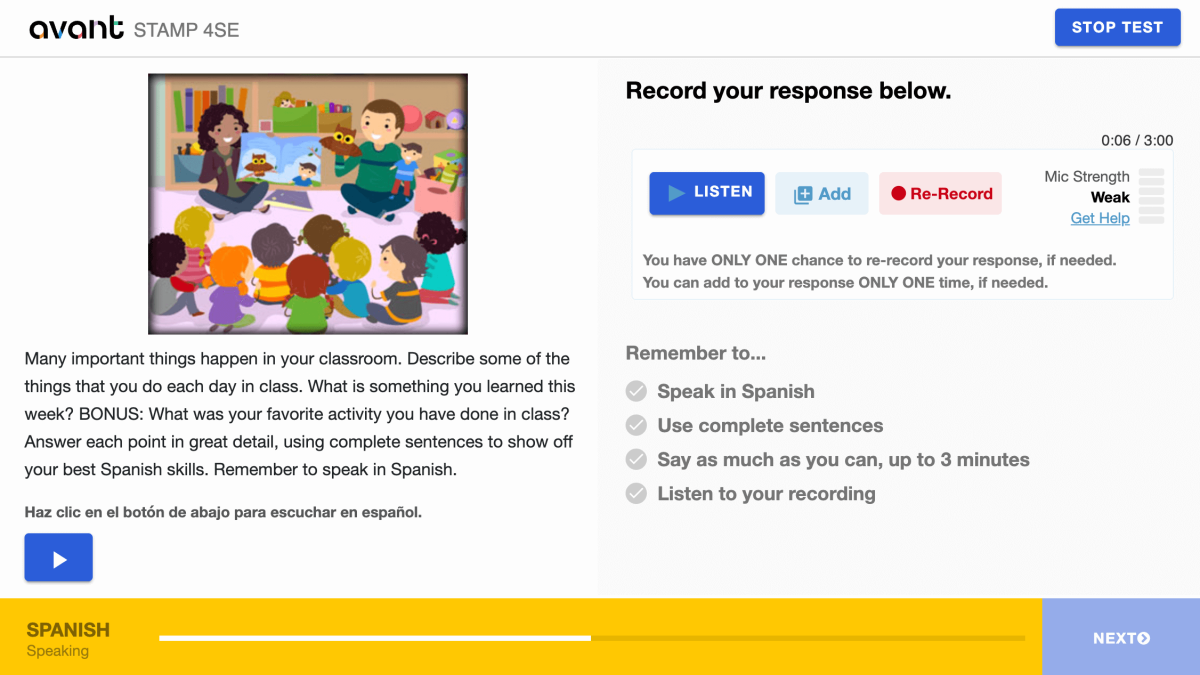
- Haz clic en "Escuchar" para reproducir tu grabación.

- Haz clic en + Añadir si quieres agregar a tu grabación. Puedes añadir a tu respuesta SÓLO UNA vez, si es necesario.
- Haz clic en Regrabar si quieres eliminar tu respuesta y volver a grabarla. Tienes SÓLO UNA oportunidad para volver a grabar tu respuesta, si es necesario.
- Haz clic en el botón SIGUIENTE para enviar tu respuesta. Después de hacer clic en SIGUIENTE, no podrás volver atrás.
Consejos para la Sección de Habla:
- Lea todo el mensaje primero.
- Habla en el idioma que estás probando. Preserve ... exactamente.
- Utiliza frases completas.
- Diga todo lo que pueda. Incluya tantos detalles como sea posible. Preserve ... exactamente.
- Organiza tus pensamientos.
Reanudando la Evaluación
Si se desconecta, vuelva a iniciar sesión con el mismo Código de Prueba, Contraseña y Nombre de Usuario. La prueba le llevará a la sección donde lo dejó. Contacte a su supervisor o profesor para obtener ayuda:
- Haz clic en Continuar Prueba después de ingresar el Código de Prueba y la Contraseña.
- Vuelva a ingresar su Nombre de Usuario exactamente como lo hizo la primera vez.
Finaliza todas las secciones de la prueba hasta que la prueba esté completada (a menos que se indique lo contrario).
Completando la Evaluación
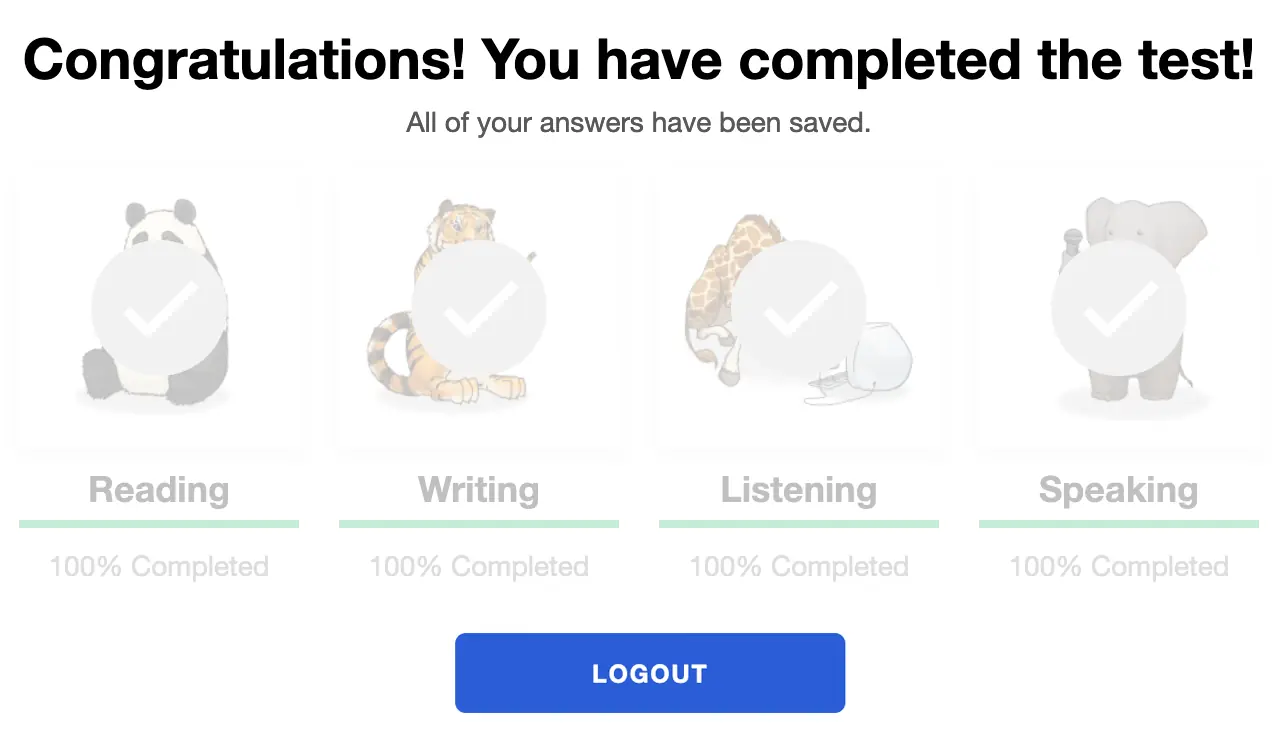
Cuando hayas completado la prueba, verás el mensaje “¡Felicidades! ¡Has completado la prueba!”. Debes terminar la prueba dentro de los 90 días después de comenzarla.
Obteniendo Resultados de Evaluación
Los resultados de las pruebas se entregan al coordinador de pruebas después de completar la prueba. Los examinados deben contactar a su coordinador de pruebas para recibir los resultados de las pruebas.
Echa un vistazo a la STAMP Guía de Referencias y Rúbrica, y a la Guía para Potenciar al Examinado para saber qué se requiere para alcanzar un nivel de prueba específico.
Preparándose para el Examen
Avant STAMP es una prueba de competencia de lo que el examinado puede hacer con el idioma en este punto en el tiempo. No hay respuestas "correctas" o "incorrectas", simplemente una demostración de sus habilidades.
Para ayudar a cada persona que realiza el examen a prepararse, tenemos varios recursos disponibles para ayudar:
Pruebas de Muestra
Muestra cómo se verá la prueba y da ejemplos de preguntas y sugerencias de Principiante, Intermedio y Avanzado. No muestra la naturaleza adaptativa al ordenador de la prueba y no dará una puntuación al final.
Tutoriales en Video
Ayuda al examinado a entender cómo dar lo mejor de sí mismo y qué esperar durante el examen.
Ejemplos de Escritura
Para muchos idiomas, proporcionamos ejemplos reales de respuestas escritas para cada nivel. Los examinados pueden comparar lo que saben para entender qué tipo de lenguaje se espera en cada nivel.
Benchmarks y Rúbricas
Esta guía ayuda a entender cómo se califica el examen y proporciona temas de preguntas que podrían usarse en cada nivel en las secciones de Lectura y Escucha.
Resultados de la Evaluación
Después de completar la puntuación, los resultados se proporcionarán a la escuela o la organización que administra la prueba.
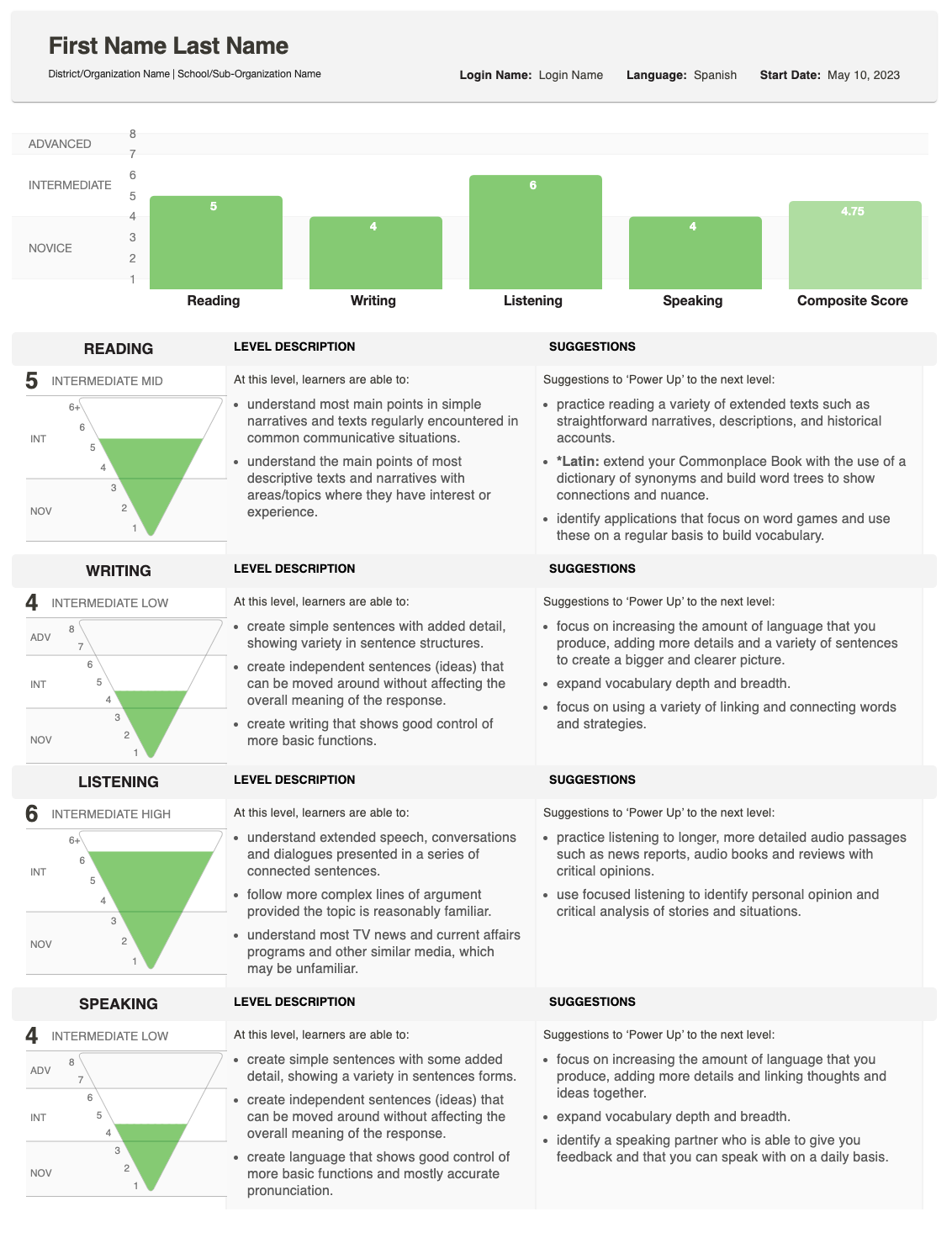
El informe muestra cómo se desempeñó su estudiante en Escritura y Expresión oral y proporciona una puntuación total (compuesta).
Para una explicación detallada de cómo se determinan las puntuaciones, consulte la Guía de Referencia y Rúbrica, que describe lo que se espera en cada nivel. Si tiene preguntas sobre las puntuaciones de un estudiante individual, por favor contacte a la escuela o organización que administró la prueba.
Entendiendo las Puntuaciones
El Informe Individual muestra la puntuación obtenida para cada habilidad, junto con una Puntuación Compuesta.

Pirámide de Puntuación
Un gráfico de pirámide invertida muestra cada puntuación. La sección rellena muestra el nivel alcanzado.
- Para la escritura y el habla, puede aparecer un área sombreada adicional si una respuesta fue calificada a un nivel superior.
- Esto indica que el estudiante puede estar desempeñándose en un rango de niveles de competencia para esa habilidad.
Descripciones de Habilidades
Junto a la pirámide, verás descripciones de la habilidad (Lectura, Escritura, Escucha, Habla) y la categoría de nivel (Principiante, Intermedio, Avanzado).
- Si una sección de prueba no se terminó, esta área mostrará en su lugar el estado: No Iniciado o En Progreso.

Sugerencias para Potenciar
En el extremo derecho, el informe enumera Sugerencias para Potenciar—consejos prácticos que el estudiante puede utilizar para mejorar y alcanzar puntuaciones más altas en esa habilidad.