
If an Avant test includes a writing section, a virtual keyboard may be needed for typing appropriate characters. Please read below to determine which steps, if any, must be completed prior to testing.
Do Not Use an On-Screen Keyboard for These Languages
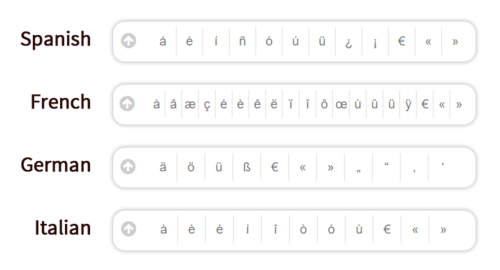
On-screen keyboards are not permitted for the following languages. These tests provide a character box for entering accented letters and special characters.
Use your regular keyboard and the character box provided in the test to enter any necessary special characters.
Languages That Need A Keyboard Activated
The languages listed below all require a virtual keyboard to be loaded:
Abkhazian, Amharic, Arabic – Algerian, Arabic – Arab Gulf, Arabic – Egyptian, Arabic – Iraqi, Arabic – Jordanian, Arabic – Lebanese, Arabic – Libyan, Arabic – Moroccan, Arabic – Palestinian, Arabic – Sudanese, Arabic – Syrian, Arabic – Tunisian, Arabic – Yemeni, Arabic (Modern Standard), Armenian, Bengali, Burmese, Cantonese, Chăm, Chinese (Simplified), Chinese (Traditional), Dari, Georgian, Greek, Gujarati, Hebrew, Hindi, Japanese, Kannada, Karen, Khmer, Korean, Lao, Lisan ud-Dawat, Malayalam, Marathi, Mongolian, Nepali, Odia (Oriya), Pashto, Persian-Farsi, Punjabi, Russian, Sanskrit, Sinhala (Sinhalese), Sylheti, Tamil, Tatar, Telugu, Thai, Tibetan (Bod-skad), Tigrinya, Twi, Ukrainian, Urdu, Vietnamese
- Abkhazian
- Amharic
- Arabic – Algerian
- Arabic – Arab Gulf
- Arabic – Egyptian
- Arabic – Iraqi
- Arabic – Jordanian
- Arabic – Lebanese
- Arabic – Libyan
- Arabic – Moroccan
- Arabic – Palestinian
- Arabic – Sudanese
- Arabic – Syrian
- Arabic – Tunisian
- Arabic – Yemeni
- Arabic (Modern Standard)
- Armenian
- Bengali
- Burmese
- Cantonese
- Chăm
- Chinese (Simplified)
- Chinese (Traditional)
- Dari
- Georgian
- Greek
- Gujarati
- Hebrew
- Hindi
- Japanese
- Kannada
- Karen
- Khmer
- Korean
- Lao
- Lisan ud-Dawat
- Malayalam
- Marathi
- Mongolian
- Nepali
- Odia (Oriya)
- Pashto
- Persian-Farsi
- Punjabi
- Russian
- Sanskrit
- Sinhala (Sinhalese)
- Sylheti
- Tamil
- Tatar
- Telugu
- Thai
- Tibetan (Bod-skad)
- Tigrinya
- Twi
- Ukrainian
- Urdu
- Vietnamese
Important: If test takers use Romanized writing for a character-based language, they will receive a NR (Not Ratable). Test takers MUST show the ability to use characters.
Keyboard Instructions
A standard keyboard will be used to type characters corresponding with the virtual keyboard. There are a couple of options for activating these virtual keyboards.
Option 1. Google Input Tools (Extension)
A quick and easy solution for loading a web-based virtual keyboard if you are using the Google Chrome browser. Please follow the steps on this page.
Google Input Tools Unavailable with Remote Proctoring
Google Input Tools does not currently work with remotely proctored tests. If you are using online proctoring please use your computer’s built-in language keyboard instead.
Option 2. Computer’s Built-In Virtual Keyboard
Most computer operating systems include virtual language keyboards found in the control panel or computer settings. Click on the links below to see detailed instructions for your operating system:


Printed Keyboard Layouts & On-Screen Keyboards
Test takers are allowed to have a printed copy of their keyboard layout or use an on-screen keyboard during the test. We allow this exception to the “no paper” rule as long as test takers do not have access to a pen or pencil to write anything on it. Keyboard layouts and steps to use on-screen keyboards are provided in the operating system specific guides above.

Handwritten Writing Section?
If your organization is administering a special handwritten option for the writing section of the test, please refer to the Handwritten Writing Section Guide.