
Обзор Avant STAMPe
Avant STAMPe - это веб-основанный тест, который оценивает уровень владения языком. Он состоит из 4 разделов: Чтение, Письмо, Аудирование и Говорение.

~30 вопросов с множественным выбором

2 подсказки

~30 вопросов с множественным выбором

2 подсказки
Начало теста
- Ваш учитель или экзаменатор помогут вам войти в систему.
- После этого вы завершите создание профиля.
Затем вы увидите экран с изображением четырех животных - по одному для каждого раздела теста. Ваш учитель скажет вам, на какое животное нажать.
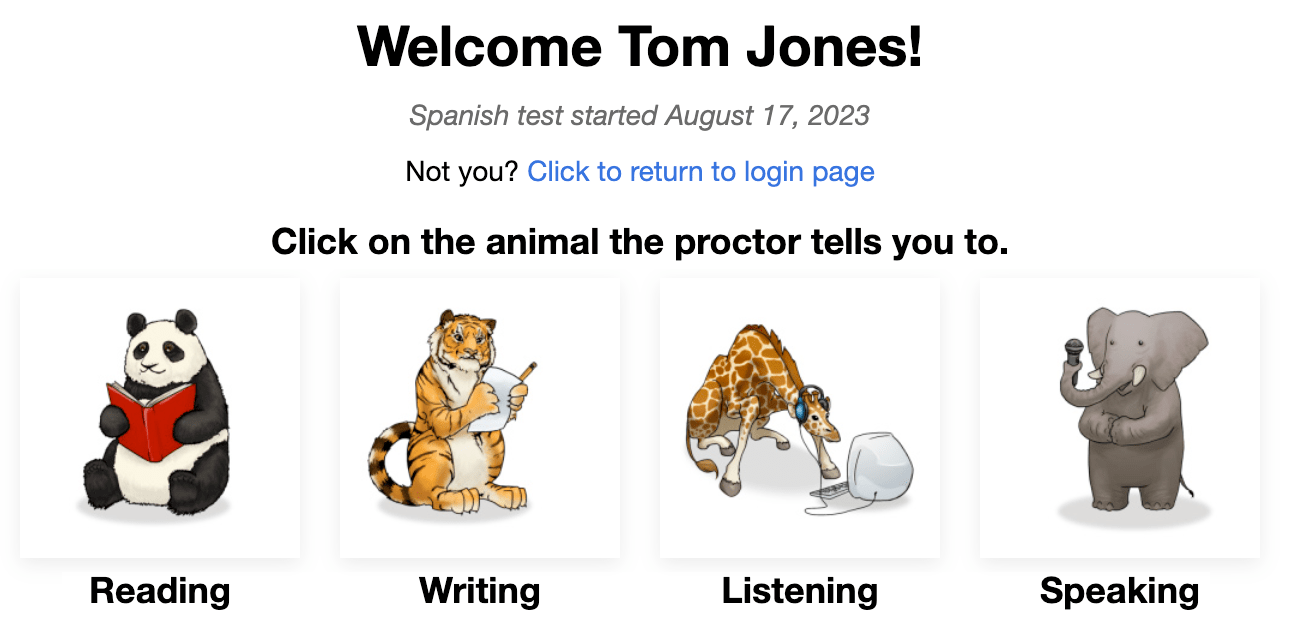
В начале каждого раздела вы увидите:
- Инструкции. Пожалуйста, внимательно их прочитайте. Вы также можете прослушать их на тестовом языке.
- Тренировочный вопрос/задание. Не тратите слишком много времени на этот вопрос. Помните, что это лишь ТРЕНИРОВОЧНЫЙ вопрос/задание, он не учитывается в итоговом балле.
После ответа на каждый вопрос нажмите кнопку NEXT в нижнем правом углу экрана. Прокрутите вниз, если это необходимо. После нажатия кнопки NEXT, вы не сможете вернуться назад.
После последнего вопроса в каждом разделе теста, сообщение сообщает вам, что вы закончили этот раздел. Нажмите на кнопку, чтобы выбрать другой раздел, затем нажмите на животное, которое учитель вам скажет.

Чтение и Прослушивание вопросы представлены в формате выбора из нескольких вариантов и оцениваются автоматически. Тест является адаптивным для компьютера, что означает, что он становится легче или сложнее в зависимости от ответов участника тестирования.
Письменные и устные задания будут усложняться или упрощаться в зависимости от того, насколько хорошо экзаменуемый справился с разделами Чтение и Прослушивание. Ответы оцениваются сертифицированными оценщиками Avant, которые используют рубрику оценки, перечисляющую критерии для достижения контрольных уровней.
Правила Тестирования
Тесты проводятся в контролируемой среде без использования внешних ресурсов.

- Не кликайте за пределами окна теста. Это отслеживается и приведет к вашему выходу из теста.

- Не используйте никаких вспомогательных материалов (например, словари, учебники, мобильные телефоны, приложения, средства обмена сообщениями или переводчики, такие как Google Translate).

- Не делайте заметок (на бумаге или электронные). Бумага, ручки, карандаши, стилусы и т.д. не разрешены.

- Не читайте/не используйте никаких заметок или вспомогательных материалов для ваших устных/экспрессивных ответов.

- Не общайтесь с кем-либо, кроме экзаменатора во время теста.

- Не распространяйте вопросы или задания теста. Не копируйте, не печатайте и не делайте снимки экрана с тестом.

- Не используйте грубый, непристойный или неуместный язык в своих ответах.
Секция Чтения
Количество вопросов: примерно 24 вопроса с множественным выбором
Среднее время: 25-35 минут 
Пожалуйста, внимательно прочитайте инструкции. Нажмите на синюю кнопку воспроизведения, чтобы прослушать их на тестируемом языке. Нажмите кнопку ДАЛЕЕ, чтобы перейти к вопросам.

- Ответьте на вопрос.
- Нажмите кнопку ДАЛЕЕ, которая находится в нижнем правом углу экрана. Прокрутите вниз, если это необходимо. После нажатия на кнопку ДАЛЕЕ, вы не сможете вернуться к вопросу.

Раздел Письма
Количество заданий: 1 тренировочное задание и 2 тестовых задания
Лимит символов: До 2500 символов (400-600 слов) для каждого ответа
Среднее время: 15 минут
- Пожалуйста, внимательно прочитайте инструкции. Нажмите на синюю кнопку воспроизведения, чтобы прослушать подсказку на тестируемом языке. Вы можете прослушать запись два (2) раза. После двух попыток кнопка станет неактивной.
- Нажмите на кнопку ВПЕРЕД чтобы перейти к следующему экрану. ...

- Прочитайте весь текст задания сначала. Нажмите на синюю кнопку воспроизведения, чтобы послушать задание на тестируемом языке.
- Введите свой ответ в текстовое поле. Тест будет автоматически сохранять его каждые 10 секунд.
- Нажмите NEXT чтобы отправить ответ и перейти к следующему заданию. После нажатия NEXT, вы не сможете вернуться назад.

Советы для раздела "Письмо":
- Прочтите весь запрос сначала.
- Write in the language you are testing.
- Используйте полные предложения.
- Пишите как можно больше. Включите как можно больше деталей.
- Организуйте свои мысли.
Раздел Слушания
Количество вопросов: примерно 24 вопроса с множественным выбором
Average Time: 25-35 minutes
Пожалуйста, внимательно прочитайте инструкции. Нажмите на синюю кнопку воспроизведения, чтобы прослушать их на тестируемом языке. Нажмите кнопку ДАЛЕЕ, чтобы перейти к вопросам.

- Нажмите на синюю кнопку воспроизведения, чтобы прослушать запись и вопрос, которые будут воспроизведены дважды. Вы можете нажать на синюю кнопку воспроизведения только два (2) раза.
- Ответьте на вопрос.
- Нажмите на кнопку ДАЛЕЕ, расположенную в нижнем правом углу экрана. Прокрутите вниз, если это необходимо. После нажатия на кнопку ДАЛЕЕ, вы не сможете вернуться к вопросу.

Раздел Говорения
Количество заданий: 1 тренировочное задание и 2 тестовых задания
Ограничение времени записи: У вас будет три (3) минуты на запись каждого ответа в разделе Устная речь
Среднее время: 15 минут
Пожалуйста, внимательно прочитайте инструкции. Нажмите на синюю кнопку воспроизведения, чтобы прослушать их на тестируемом языке. Нажмите кнопку ВПЕРЕД, чтобы перейти к следующему экрану.

- Пожалуйста, внимательно прочитайте инструкции. Нажмите на синюю кнопку воспроизведения, чтобы прослушать подсказку на тестируемом языке. Вы можете прослушать запись два (2) раза. После двух попыток кнопка станет неактивной.
- Нажмите "Начать запись" для записи вашего ответа.
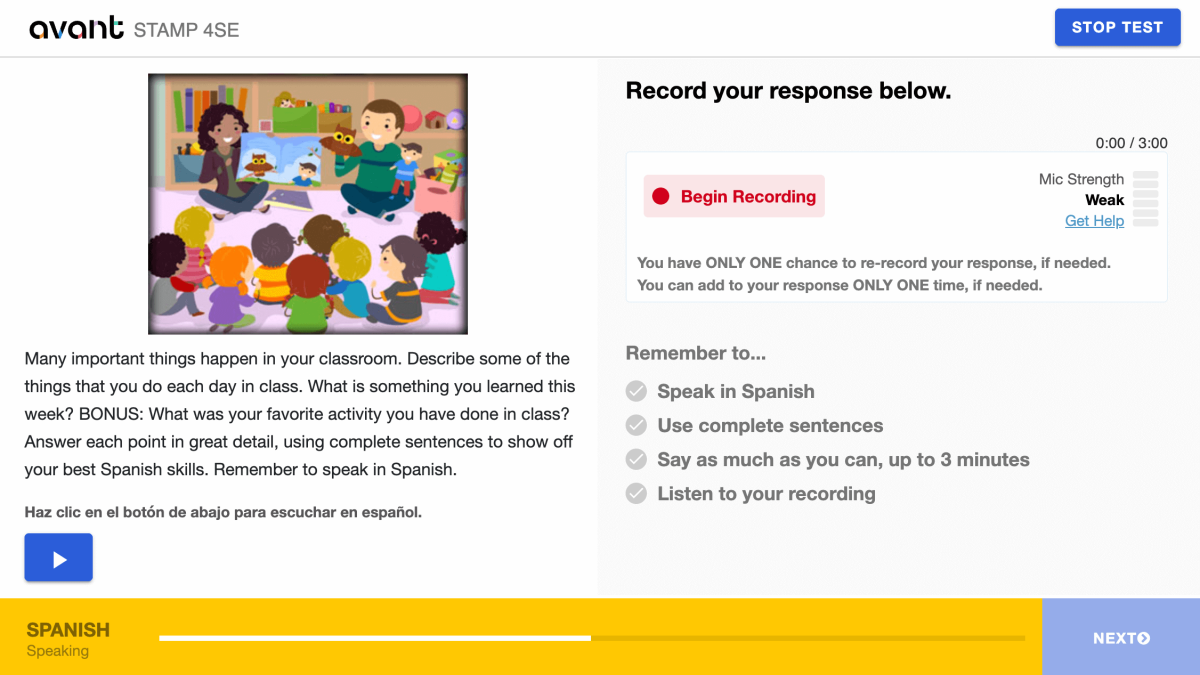
- Нажмите “Stop Recording” когда закончите.

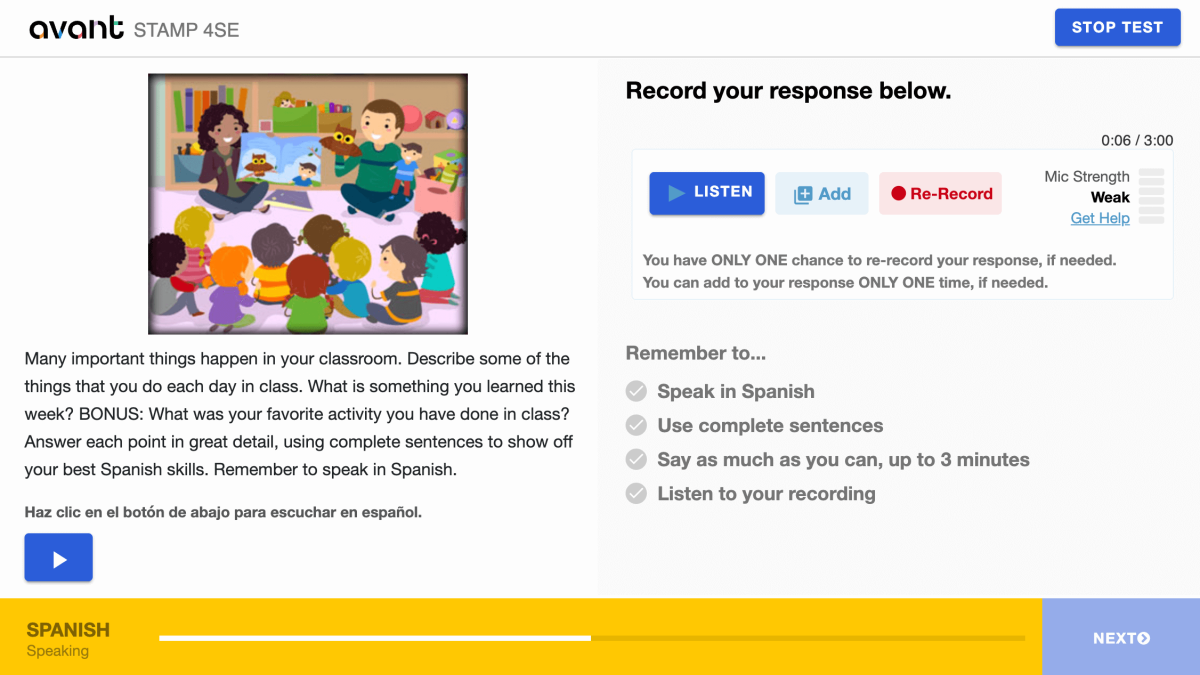
- Нажмите “Слушать”, чтобы воспроизвести вашу запись.

- Нажмите на + Добавить , если вы хотите добавить что-то к вашей записи. Вы можете добавить к своему ответу ТОЛЬКО ОДИН раз, если это необходимо.
- Нажмите на Перезаписать, если вы хотите удалить свой ответ и перезаписать его. У вас есть ТОЛЬКО ОДНА возможность перезаписать свой ответ, если это необходимо.
- Нажмите на кнопку ДАЛЕЕ для отправки вашего ответа. После нажатия на ДАЛЕЕ, вы не сможете вернуться назад.
Советы для раздела "Устная речь":
- Прочтите весь запрос сначала.
- Говорите на языке, который вы тестируете.
- Используйте полные предложения.
- Скажите как можно больше. Включите как можно больше деталей. Сохраните ... в точности.
- Организуйте свои мысли.
Возобновление теста
Если вы вышли из системы, войдите снова с тем же Тестовым Кодом, Паролем и Именем пользователя. Тест перенаправит вас в раздел, на котором вы остановились. Обратитесь за помощью к своему проктору или учителю:
- Нажмите Продолжить тест после ввода Кода теста и Пароля.
- Введите заново ваше Имя пользователя точно так же, как вы делали это в первый раз.
Завершите все разделы теста до его окончания (если не указано иначе).
Завершение теста
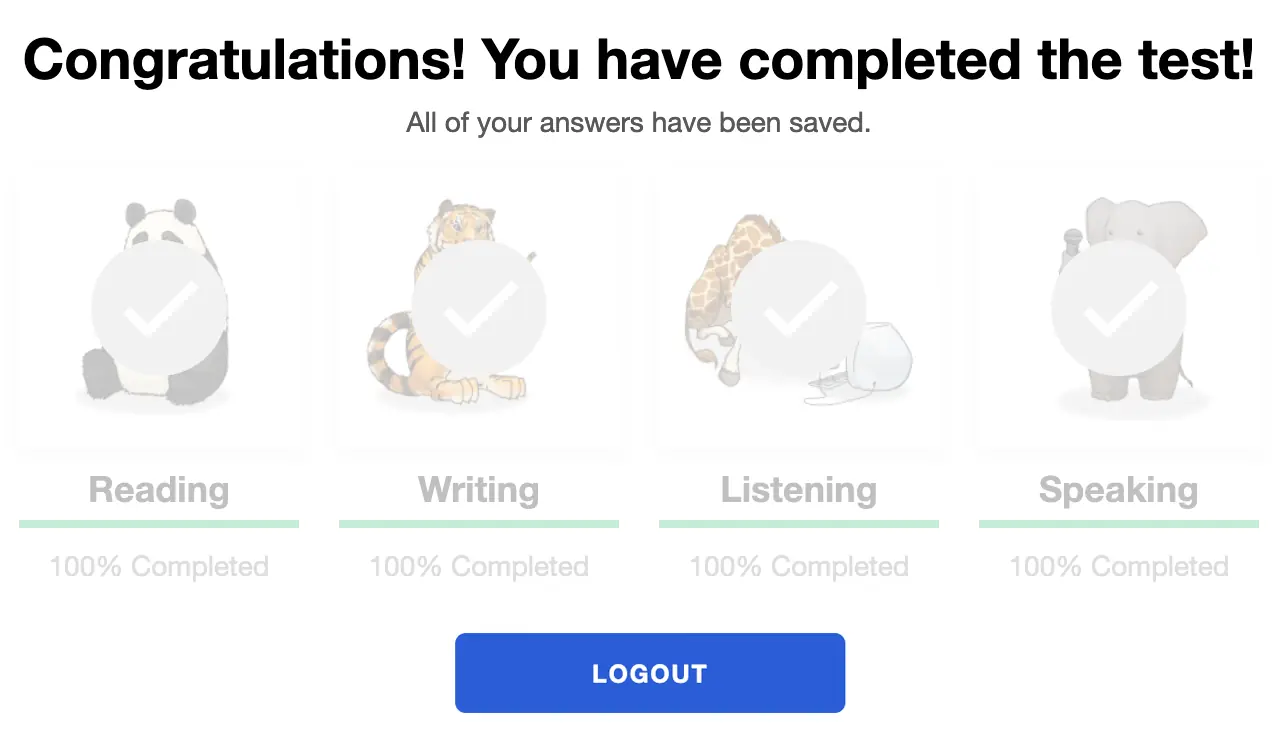
Когда вы завершите тест, вы увидите сообщение «Поздравляем! Вы завершили тест!». Вы должны завершить тест в течение 90 дней с момента его начала.
Получение результатов
Результаты тестирования передаются координатору тестирования после завершения теста. Участникам тестирования следует связаться со своим координатором тестирования для получения результатов теста.
Ознакомьтесь с STAMP Руководством по оценочным критериям и рубрике, и Руководством по усилению для сдающего тест чтобы знать, что требуется для достижения определенного уровня теста.
Подготовка к Тесту
Avant STAMP - это тест на знание языка, который показывает, что именно участник теста может сделать с языком на данный момент. Нет "правильных" или "неправильных" ответов, просто демонстрация их навыков.
Чтобы помочь каждому участнику тестирования подготовиться, у нас есть несколько ресурсов для помощи:
Примеры Тестов
Показывает, как будет выглядеть тест и дает примеры вопросов и заданий для новичков, среднего и продвинутого уровня. Он не демонстрирует адаптивную природу теста на компьютере и не дает оценки в конце.
Видеоуроки
Помогает тому, кто сдаёт тест, понять, как показать свои лучшие результаты и чего ожидать во время тестирования.
Примеры Письма
Для многих языков мы предоставляем реальные примеры написания ответов для каждого уровня. Сдающие тест могут сравнить то, что они знают, чтобы понять, какой тип языка ожидается на каждом уровне.
Бенчмаркинг и рубрики
Это руководство помогает понять, как оценивается тест, и предоставляет темы вопросов, которые могут быть использованы на каждом уровне в разделах чтения и прослушивания.
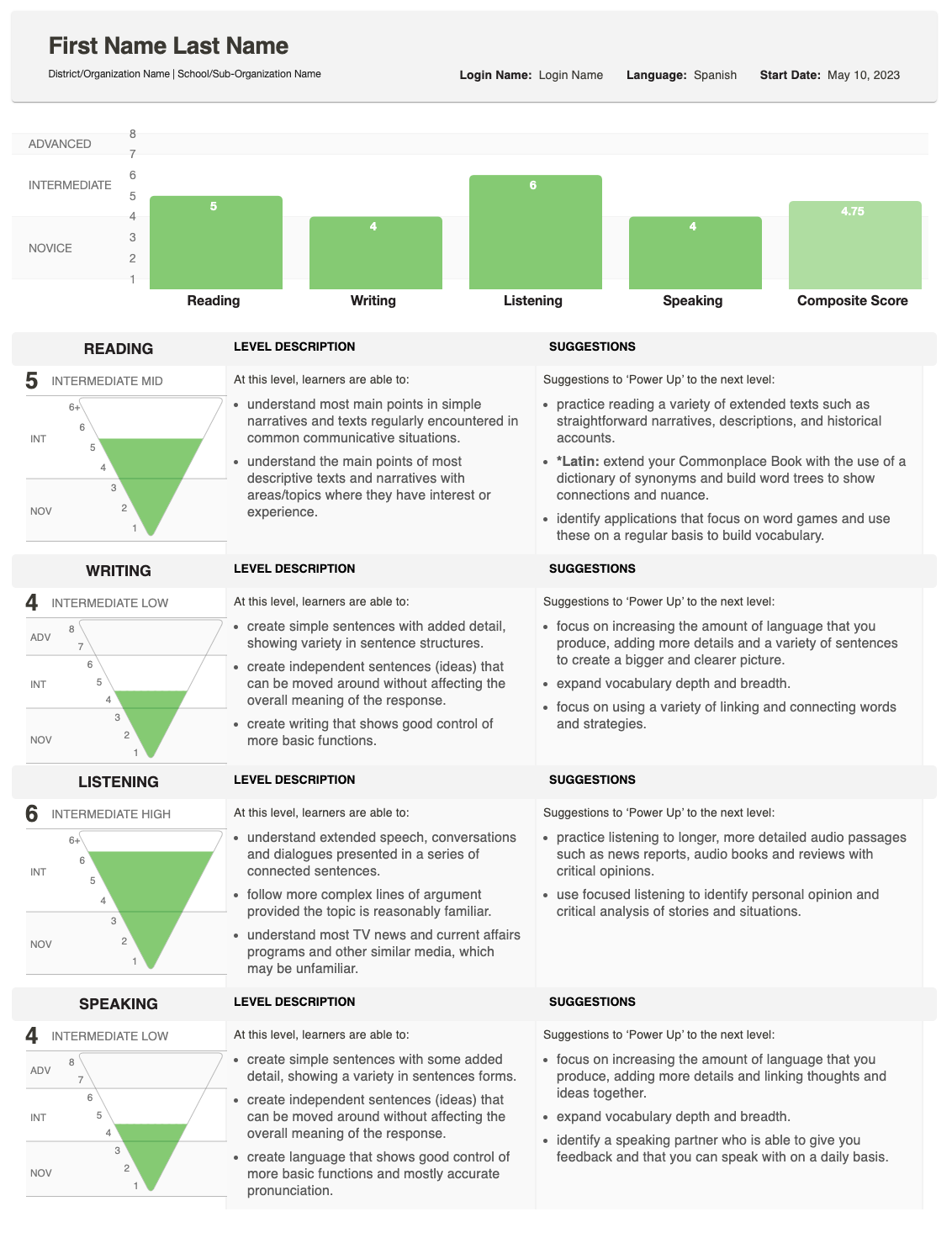
Результаты Оценки
После завершения оценивания, результаты будут предоставлены школе или организации, проводящей тест.
Отчет показывает, как ваш студент справился с Письмом и Говорением и дает общий (композитный) балл.
Для подробного объяснения того, как определяются оценки, смотрите Руководство по бенчмаркингу и рубрикам, которое описывает, что ожидается на каждом уровне. Если у вас есть вопросы о оценках отдельного ученика, пожалуйста, свяжитесь со школой или организацией, которая проводила тест.
Понимание Оценок
Индивидуальный отчет показывает оценку, полученную за каждый навык, а также общую оценку.

Пирамида Оценок
График в виде перевернутой пирамиды отображает каждый результат. Закрашенная секция показывает достигнутый уровень.
- Для письма и разговора дополнительная затемненная область может появиться, если один ответ был оценен на более высоком уровне.
- Это указывает на то, что студент может работать на разных уровнях владения этим навыком.
Описания Навыков
Рядом с пирамидой вы увидите описания навыка (Чтение, Письмо, Аудирование, Говорение) и категорию уровня (Начинающий, Средний, Продвинутый).
- Если раздел теста не был завершен, в этой области вместо этого будет отображаться статус: Не начато или В процессе.

Предложения по Увеличению Мощности
На крайней правой стороне отчет содержит Рекомендации по Усилению—практические советы, которые ученик может использовать для улучшения и достижения более высоких результатов в этом навыке.