
Visão Geral do Avant STAMPe
Avant STAMPe é um teste baseado na web que avalia a proficiência em idiomas. Ele possui 4 seções: Leitura, Escrita, Audição e Fala.

~30 perguntas de múltipla escolha

2 prompts

~30 perguntas de múltipla escolha

2 prompts
Iniciando a Avaliação
- Seu professor ou supervisor ajudará você a fazer login.
- Após isso, você irá completar um perfil.
Você verá então uma tela com uma imagem de quatro animais - um para cada seção do teste. Seu professor lhe dirá em qual animal clicar.
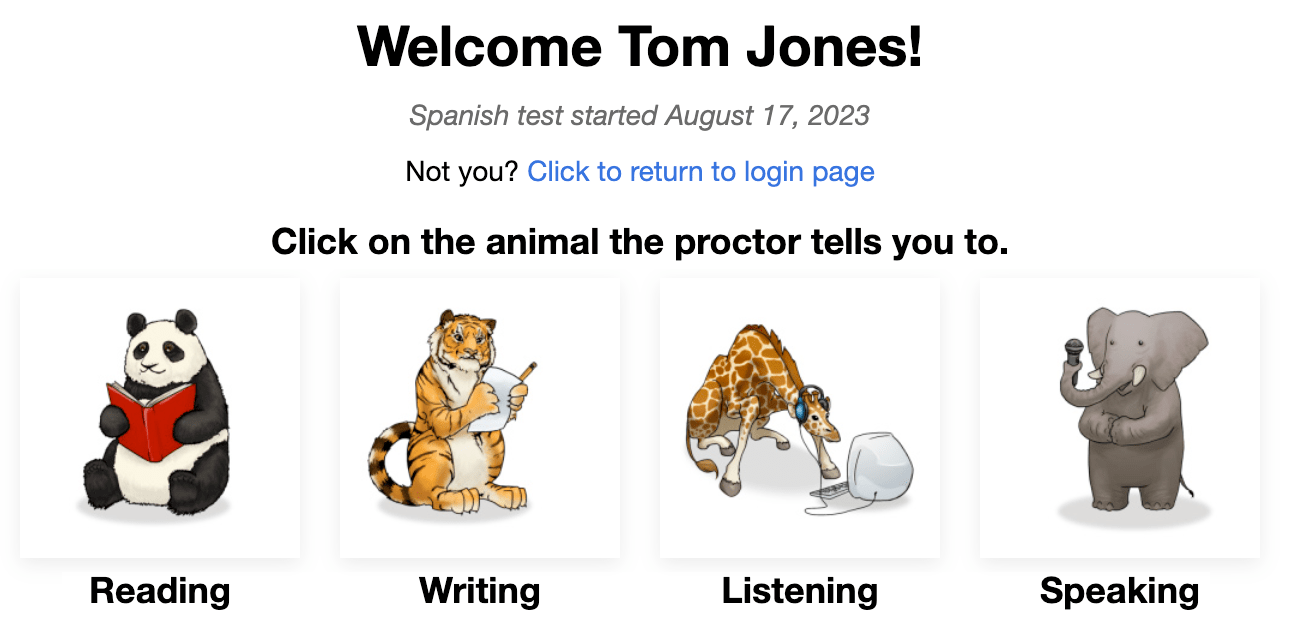
No início de cada seção, você verá:
- Instruções. Por favor, leia-as com atenção. Você também pode ouvi-las no idioma de teste.
- Questão/exercício de prática. Não gaste muito tempo nesta questão. Lembre-se de que esta é apenas uma questão/exercício de PRÁTICA, ela não conta na pontuação final.
Após responder a cada pergunta, clique no botão PRÓXIMO no canto inferior direito da tela. Role para baixo, se necessário. Depois de clicar no botão PRÓXIMO, você não poderá voltar.
Após a última pergunta em cada seção do teste, uma mensagem informa que você terminou a seção. Clique no botão para selecionar outra seção, em seguida clique no animal que o professor indicar.

Leitura e Audição as questões são de múltipla escolha e são corrigidas automaticamente. O teste é adaptativo ao computador, o que significa que ficará mais fácil ou mais difícil com base nas respostas do candidato.
Escrita e Fala as solicitações serão feitas mais ou menos difíceis com base no desempenho do candidato nas seções de Leitura e Audição. As respostas são avaliadas por Avaliadores Certificados Avant que usam uma Rubrica de Pontuação que lista os critérios para atingir os Níveis de Referência.
Regras do Teste
Os testes são realizados em um ambiente supervisionado sem permissão para o uso de recursos externos.

- Não clique fora da janela do teste. Isso é rastreado e fará com que você saia do teste.

- Não use nenhum material de apoio (por exemplo, dicionários, livros didáticos, celulares, aplicativos, ferramentas de mensagens ou auxílios de tradução como o Google Tradutor).

- Não faça anotações (em papel ou eletrônicas). Papel, canetas, lápis, estiletes, etc. não são permitidos.

- Não leia/use quaisquer notas ou materiais de apoio para suas respostas faladas/expressivas.

- Não se comunique com ninguém exceto o fiscal durante o teste.

- Não compartilhe questões ou instruções do teste. Não copie, imprima ou tire capturas de tela do teste.

- Não use linguagem violenta, profana ou inadequada em suas respostas.
Seção de Leitura
Número de Perguntas: aproximadamente 24 perguntas de múltipla escolha
Tempo Médio: 25-35 minutos 
Por favor, leia as instruções com atenção. Clique no botão azul de reprodução para ouvi-las no idioma de teste. Clique no botão PRÓXIMO para ir para as perguntas.

- Responda a pergunta.
- Clique no botão PRÓXIMO, no canto inferior direito da tela. Role para baixo, se necessário. Após clicar no botão PRÓXIMO, você não poderá retornar à pergunta.

Seção de Escrita
Número de Prompts: 1 prompt de prática e 2 prompts de teste
Limite de Caracteres: Até 2500 caracteres (400-600 palavras) para cada resposta
Tempo Médio: 15 minutos
- Por favor, leia as instruções com atenção. Clique no botão azul de reprodução para ouvir o prompt no idioma de teste. Você pode ouvir a gravação duas (2) vezes. Após duas tentativas, o botão se tornará inativo.
- Click the NEXT button to move to the next screen.

- Leia todo o prompt primeiro. Clique no botão azul de reprodução para ouvir o prompt no idioma de teste.
- Digite sua resposta na caixa de texto. O teste irá salvar automaticamente a cada 10 segundos.
- Clique em NEXT para enviar a resposta e avançar para a próxima instrução. Após clicar em NEXT, você não poderá voltar atrás.

Dicas para a Seção de Escrita:
- Leia todo o prompt primeiro.
- Escreva no idioma que você está testando. Preserve ... exatamente.
- Use frases completas.
- Escreva o máximo que puder. Inclua o maior número possível de detalhes.
- Organize seus pensamentos.
Seção de Audição
Número de Perguntas: aproximadamente 24 perguntas de múltipla escolha
Average Time: 25-35 minutes
Por favor, leia as instruções com atenção. Clique no botão azul de reprodução para ouvi-las no idioma de teste. Clique no botão PRÓXIMO para ir para as perguntas.

- Clique no botão azul de reprodução para ouvir a gravação e a pergunta, que serão reproduzidas duas vezes. Você pode clicar no botão azul de reprodução apenas duas (2) vezes.
- Responda a pergunta.
- Clique no botão PRÓXIMO, no canto inferior direito da tela. Role para baixo, se necessário. Após clicar no botão PRÓXIMO, você não poderá retornar à pergunta.

Seção de Fala
Número de Prompts: 1 prompt de prática e 2 prompts de teste
Limite de Tempo de Gravação: Você terá três (3) minutos de tempo de gravação para cada resposta falada
Tempo Médio: 15 minutos
Por favor, leia as instruções com atenção. Clique no botão azul de reprodução para ouvi-las no idioma de teste. Clique no botão PRÓXIMO para ir para a próxima tela.

- Por favor, leia as instruções com atenção. Clique no botão azul de reprodução para ouvir o prompt no idioma de teste. Você pode ouvir a gravação duas (2) vezes. Após duas tentativas, o botão se tornará inativo.
- Clique em “Iniciar Gravação” para registrar sua resposta.
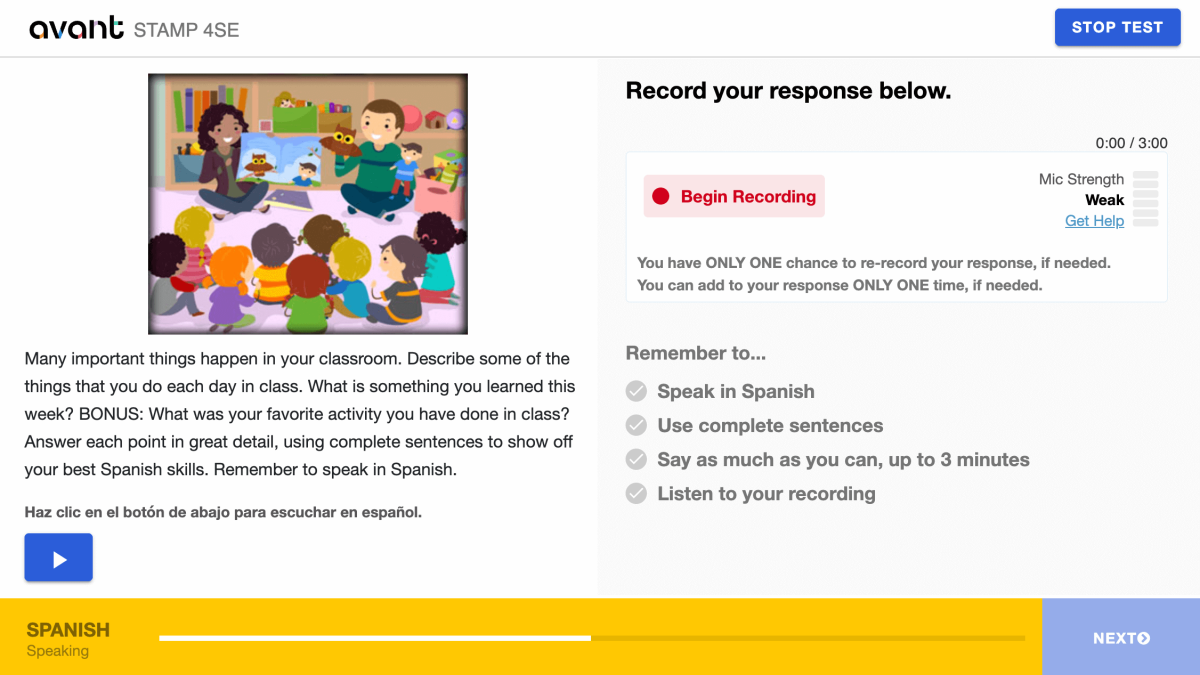
- Clique em “Parar Gravação” quando terminar.

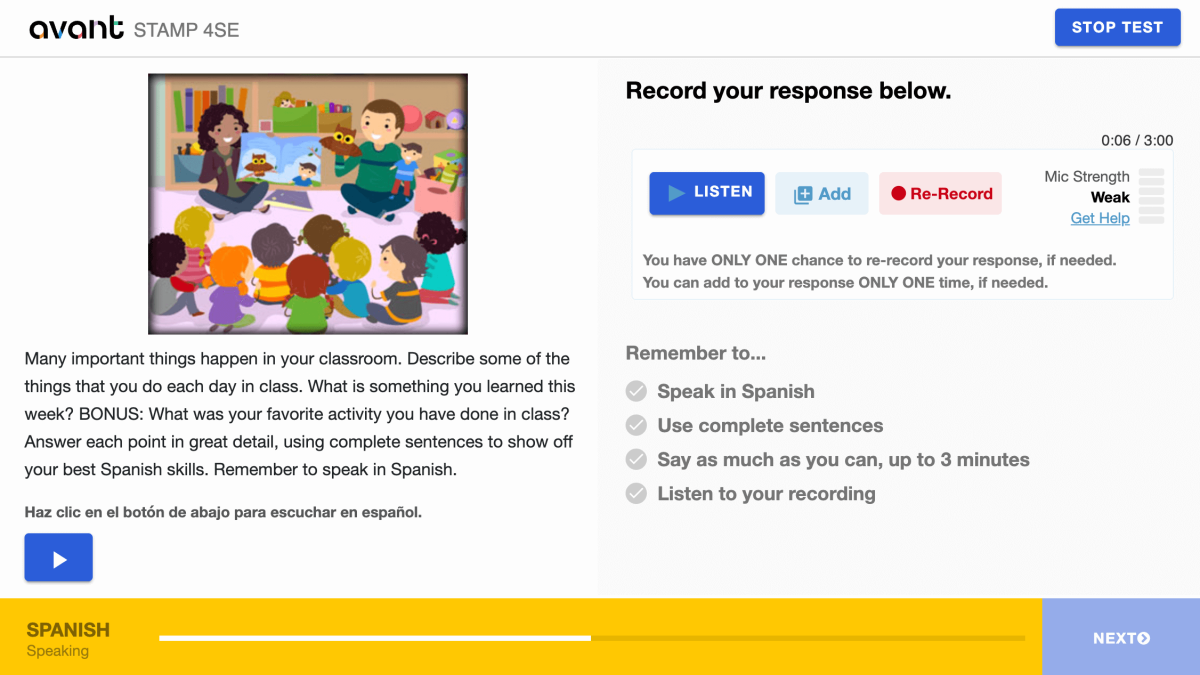
- Clique em "Ouvir" para reproduzir sua gravação.

- Clique em + Adicionar se quiser adicionar à sua gravação. Você pode adicionar à sua resposta SOMENTE UMA vez, se necessário.
- Clique em Regravar se quiser apagar sua resposta e regravá-la. Você tem SOMENTE UMA chance de regravar sua resposta, se necessário.
- Clique no botão PRÓXIMO para enviar sua resposta. Após clicar em PRÓXIMO, você não poderá voltar.
Dicas para a Seção de Conversação:
- Leia todo o prompt primeiro.
- Fale na língua que você está testando. Preserve ... exatamente.
- Use frases completas.
- Diga o máximo que puder. Inclua o maior número possível de detalhes.
- Organize seus pensamentos.
Retomando a Avaliação
Se você for desconectado, faça login novamente com o mesmo Código de Teste, Senha e Nome de Usuário. O teste o levará para a seção onde você parou. Entre em contato com seu supervisor ou professor para obter ajuda:
- Clique em Continuar Teste após inserir o Código do Teste e a Senha.
- Digite novamente o seu Nome de Usuário exatamente como fez da primeira vez.
Conclua todas as seções do teste até que o teste esteja completo (a menos que instruído de outra forma).
Concluindo a Avaliação
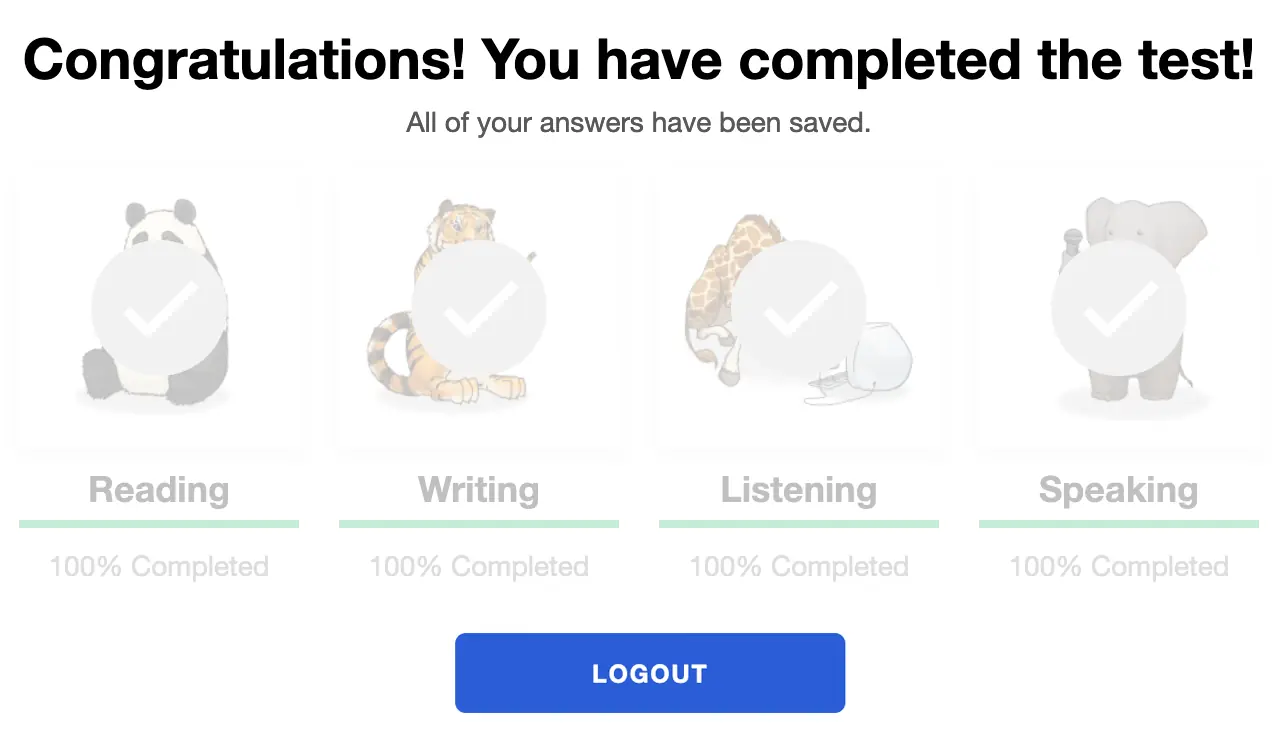
Quando você terminar o teste, verá a mensagem “Parabéns! Você completou o teste!”. Você deve terminar o teste dentro de 90 dias após iniciá-lo.
Obtendo Resultados de Avaliação
Os resultados dos testes são entregues ao coordenador de testes após a conclusão do teste. Os candidatos devem entrar em contato com seu coordenador de testes para receber os resultados dos testes.
Confira o STAMP Guia de Benchmarks e Rubrica, e o Guia Power Up para Candidatos a Testes para saber o que é necessário para alcançar um nível específico de teste.
Preparando-se para o Teste
Avant STAMP é um teste de proficiência do que o candidato pode fazer com o idioma neste momento. Não há respostas "certas" ou "erradas", apenas uma demonstração de suas habilidades.
Para ajudar cada candidato a se preparar, nós temos vários recursos disponíveis:
Testes de Amostra
Mostra como o teste será e dá exemplos de perguntas e prompts para Novatos, Intermediários e Avançados. Ele não mostra a natureza adaptativa ao computador do teste e não fornecerá uma pontuação no final.
Tutoriais em Vídeo
Ajuda o candidato a entender como dar o seu melhor e o que esperar durante o teste.
Exemplos de Escrita
Para muitos idiomas, fornecemos exemplos reais de respostas escritas para cada nível. Os candidatos podem comparar o que sabem para entender que tipo de linguagem é esperado em cada nível.
Benchmarks e Rubricas
Este guia ajuda a entender como o teste é avaliado e fornece tópicos de perguntas que podem ser usados em cada nível nas seções de Leitura e Audição.
Resultados da Avaliação
Após a pontuação ser concluída, os resultados serão fornecidos à escola ou organização que administra o teste.
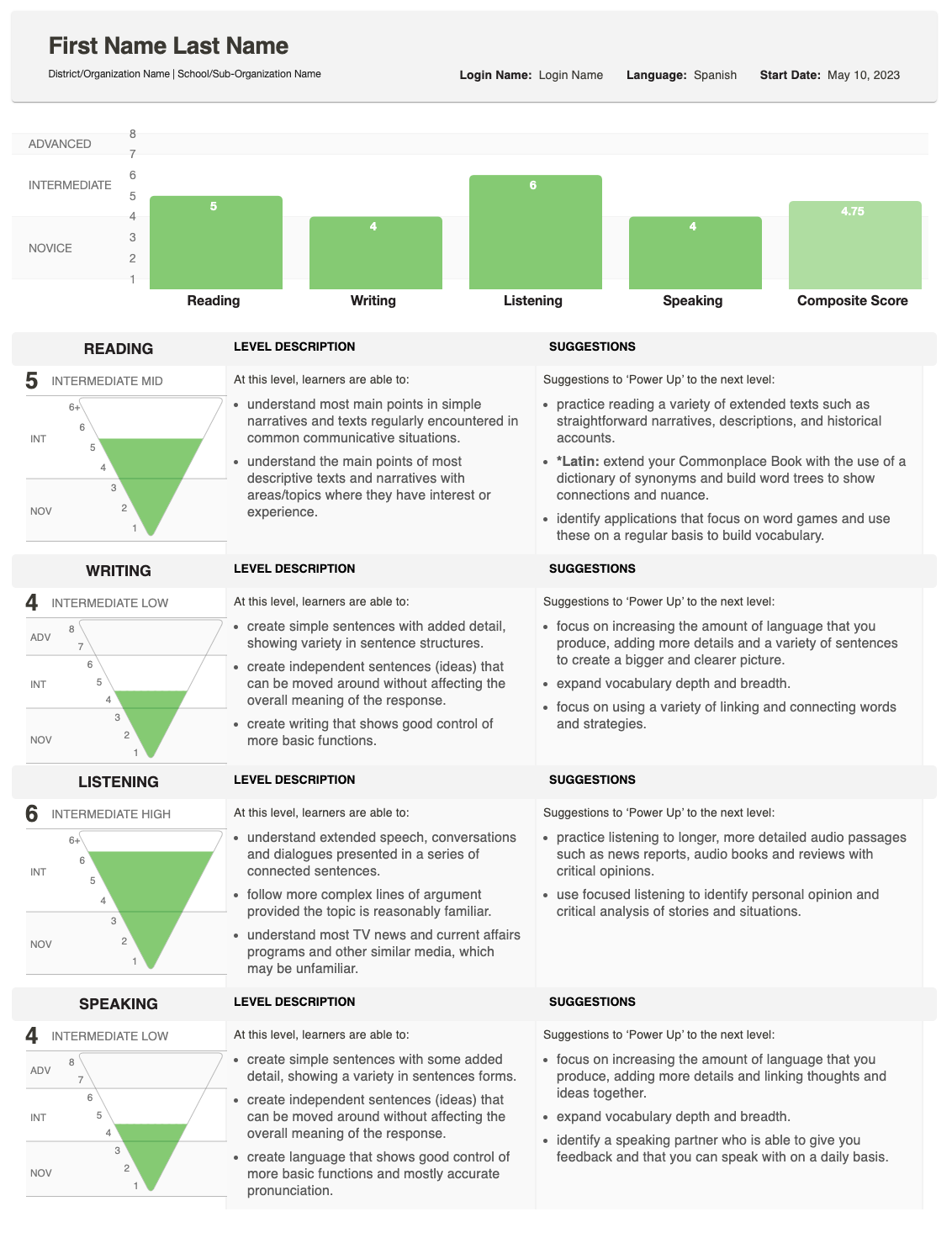
O relatório mostra como seu aluno se saiu em Redação e Oralidade e fornece uma pontuação geral (composta).
Para uma explicação detalhada de como as pontuações são determinadas, veja o Guia de Benchmark e Rubrica, que descreve o que é esperado em cada nível. Se você tem perguntas sobre as pontuações de um aluno individual, por favor, entre em contato com a escola ou organização que aplicou o teste.
Entendendo as Pontuações
O Relatório Individual mostra a pontuação obtida para cada habilidade, juntamente com uma Pontuação Composta.

Pirâmide de Pontuação
Um gráfico de pirâmide invertida exibe cada pontuação. A seção preenchida mostra o nível alcançado.
- Para Escrita e Fala, uma área sombreada extra pode aparecer se uma resposta foi avaliada em um nível superior.
- Isso indica que o aluno pode estar atuando em uma variedade de níveis de proficiência para essa habilidade.
Descrições de Habilidades
Ao lado da pirâmide, você verá descrições da habilidade (Leitura, Escrita, Audição, Fala) e da categoria de nível (Iniciante, Intermediário, Avançado).
- Se uma seção de teste não foi concluída, esta área mostrará o status: Não Iniciado ou Em Andamento.

Sugestões para Potencializar
No extremo direito, o relatório lista Sugestões de Aprimoramento — dicas práticas que o aluno pode usar para melhorar e alcançar pontuações mais altas naquela habilidade.