
Aperçu avant STAMPe
Avant STAMPe est un test en ligne qui évalue la compétence linguistique. Il comporte 4 sections : Lecture, Écriture, Écoute et Expression orale.

~30 questions à choix multiples

2 invites

~30 questions à choix multiples

2 invites
Commencer l'épreuve
- Votre enseignant ou surveillant d'examen vous aidera à vous connecter.
- Après cela, vous allez compléter un profil.
Vous verrez ensuite un écran avec une image de quatre animaux - un pour chaque section du test. Votre professeur vous dira sur quel animal cliquer.
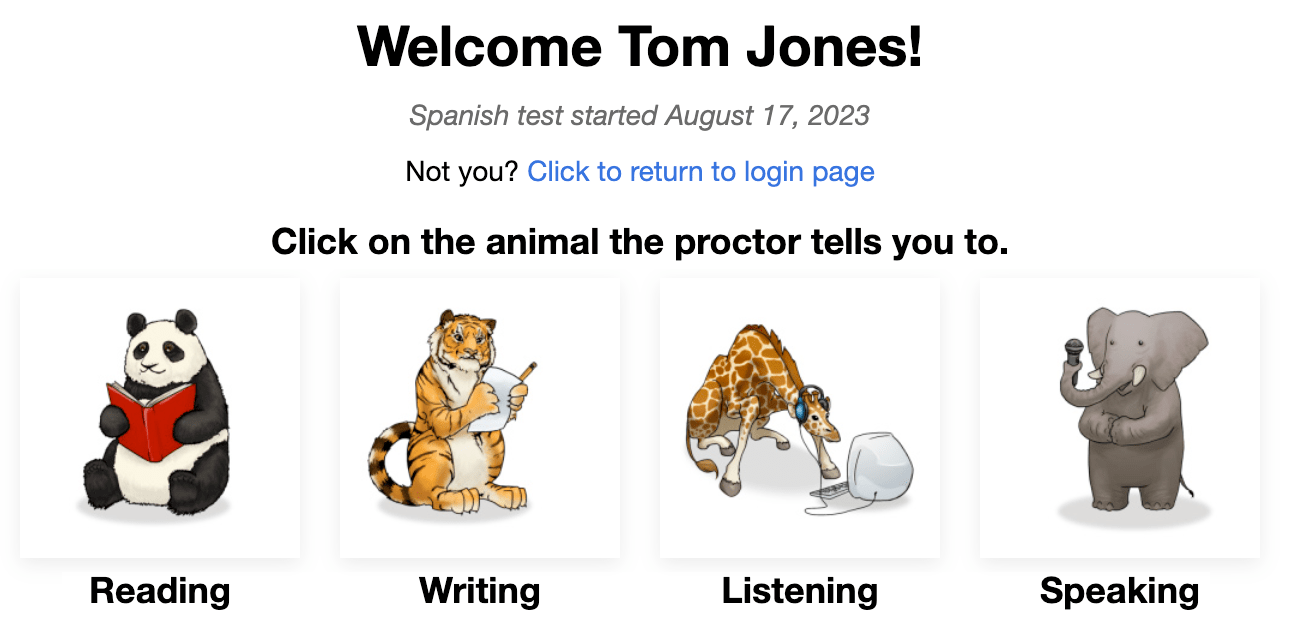
Au début de chaque section, vous verrez :
- Instructions. Veuillez les lire attentivement. Vous pouvez également les écouter dans la langue de test.
- Les questions/exercices d'entraînement. Ne passez pas trop de temps dessus. N'oubliez pas qu'il ne s'agit que d'une question/d'un exercice d'ENTRAÎNEMENT, ce qui ne comptera pas dans le score final.
Après avoir répondu à chaque question, cliquez sur le bouton SUIVANT en bas à droite de l'écran. Faites défiler vers le bas, si nécessaire. Après avoir cliqué sur le bouton SUIVANT, vous ne pourrez pas revenir en arrière.
Après la dernière question de chaque section du test, un message vous informe que vous avez terminé la section. Cliquez sur le bouton pour sélectionner une autre section, puis cliquez sur l'animal que l'enseignant vous indique.

Lecture et Écoute les questions sont à choix multiples et sont automatiquement notées. Le test est adaptatif sur ordinateur ce qui signifie qu'il deviendra plus facile ou plus difficile en fonction des réponses du candidat.
Écriture et Expression Orale les invites seront rendues plus ou moins difficiles en fonction de la performance du candidat dans les sections Lecture et Écoute. Les réponses sont évaluées par des Évaluateurs Certifiés Avant qui utilisent une Grille d'Évaluation qui liste les critères pour atteindre les Niveaux de Référence.
Règles de Test
Les tests sont effectués dans un environnement surveillé sans aucune ressource extérieure autorisée.

- Ne cliquez pas en dehors de la fenêtre de test. Ceci est suivi et vous déconnectera du test.

- N'utilisez aucun matériel de soutien (par exemple, dictionnaires, manuels, téléphones portables, applications, outils de messagerie ou aides à la traduction comme Google Translate).

- Ne prenez pas de notes (sur papier ou électroniques). Le papier, les stylos, les crayons, les stylets, etc. ne sont pas autorisés.

- Ne lisez/utilisez pas de notes ou de matériaux de soutien pour vos réponses orales/expressives.

- Ne communiquez avec personne sauf le surveillant pendant le test.

- Ne partagez pas les questions ou les consignes du test. Ne copiez pas, n'imprimez pas, ne prenez pas de captures d'écran du test.

- N'utilisez pas de langage violent, profane ou inapproprié dans vos réponses.
Partie Compréhension écrite
Nombre de Questions : environ 24 questions à choix multiples
Temps Moyen : 25-35 minutes 
Veuillez lire attentivement les instructions. Cliquez sur le bouton de lecture bleu pour les écouter dans la langue de test. Cliquez sur le bouton SUIVANT pour passer aux questions.

- Répondez à la question.
- Cliquez sur le bouton SUIVANT, en bas à droite de l'écran. Faites défiler vers le bas, si nécessaire. Après avoir cliqué sur le bouton SUIVANT, vous ne pourrez pas revenir à la question.

Partie Production écrite
Nombre de Prompts : 1 prompt d'entraînement et 2 prompts de test
Limite de caractères : Jusqu'à 2500 caractères (400-600 mots) pour chaque réponse
Temps Moyen : 15 minutes
- Veuillez lire attentivement les instructions. Cliquez sur le bouton de lecture bleu pour écouter l'invite dans la langue de test. Vous pouvez écouter l'enregistrement deux (2) fois. Après deux tentatives, le bouton deviendra inactif.
- Cliquez sur le bouton SUIVANT pour passer à l'écran suivant.

- Lisez l'intégralité de l'invite en premier. Cliquez sur le bouton de lecture bleu pour écouter l'invite dans la langue de test. ...
- Tapez votre réponse dans la boîte de texte. Le test va la auto-save toutes les 10 secondes.
- Cliquez sur NEXT pour soumettre la réponse et passer à la prochaine instruction. Après avoir cliqué sur NEXT, vous ne pourrez pas revenir en arrière.

Conseils pour la section Rédaction :
- Lisez d'abord l'intégralité de l'invite.
- Écrivez dans la langue que vous testez. Préservez ... exactement.
- Utilisez des phrases complètes.
- Écrivez autant que vous le pouvez. Incluez autant de détails que possible.
- Organisez vos pensées.
Partie Compréhension orale
Nombre de Questions : environ 24 questions à choix multiples
Average Time: 25-35 minutes
Veuillez lire attentivement les instructions. Cliquez sur le bouton de lecture bleu pour les écouter dans la langue de test. Cliquez sur le bouton SUIVANT pour passer aux questions.

- Cliquez sur le bouton de lecture bleu pour écouter l'enregistrement et la question, qui seront joués deux fois. Vous pouvez cliquer sur le bouton de lecture bleu seulement deux (2) fois.
- Répondez à la question.
- Cliquez sur le bouton SUIVANT, en bas à droite de l'écran. Faites défiler vers le bas, si nécessaire. Après avoir cliqué sur le bouton SUIVANT, vous ne pourrez pas revenir à la question.

Partie Production orale
Nombre de Prompts : 1 prompt d'entraînement et 2 prompts de test
Limite de temps d'enregistrement : Vous aurez trois (3) minutes d'enregistrement pour chaque réponse orale
Temps Moyen : 15 minutes
Veuillez lire attentivement les instructions. Cliquez sur le bouton de lecture bleu pour les écouter dans la langue de test. Cliquez sur le bouton SUIVANT pour passer à l'écran suivant.

- Veuillez lire attentivement les instructions. Cliquez sur le bouton de lecture bleu pour écouter l'invite dans la langue de test. Vous pouvez écouter l'enregistrement deux (2) fois. Après deux tentatives, le bouton deviendra inactif.
- Cliquez sur "Commencer l'enregistrement" pour enregistrer votre réponse.
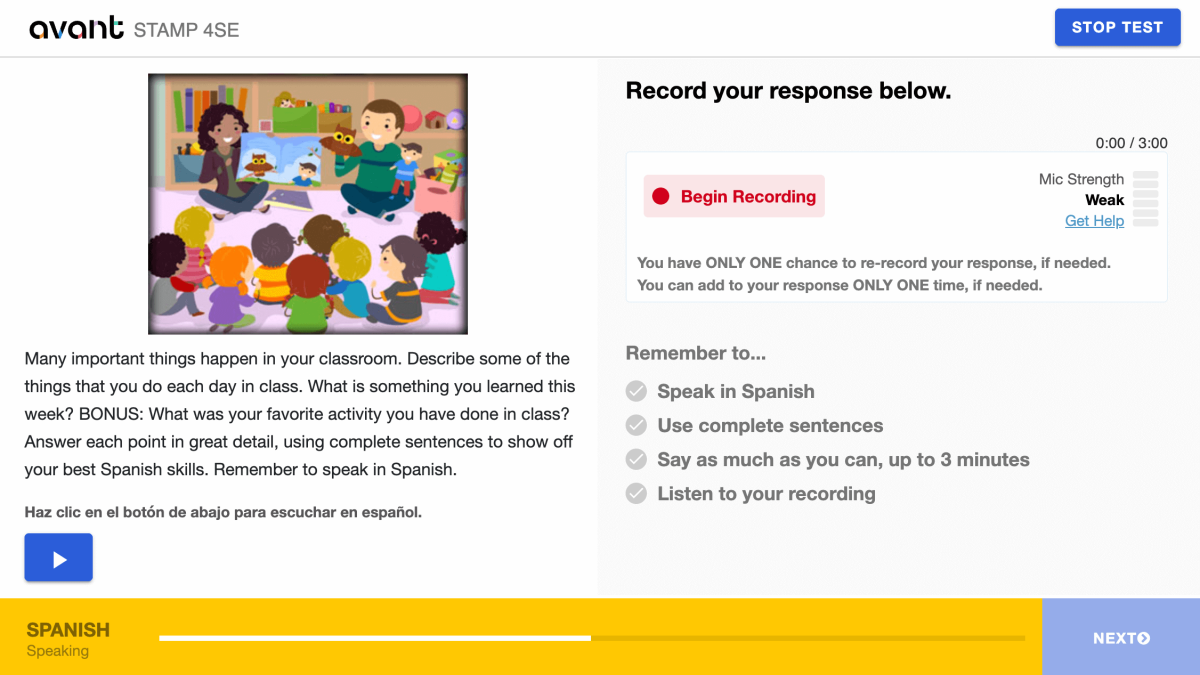
- Cliquez sur "Arrêter l'enregistrement" lorsque vous avez terminé.

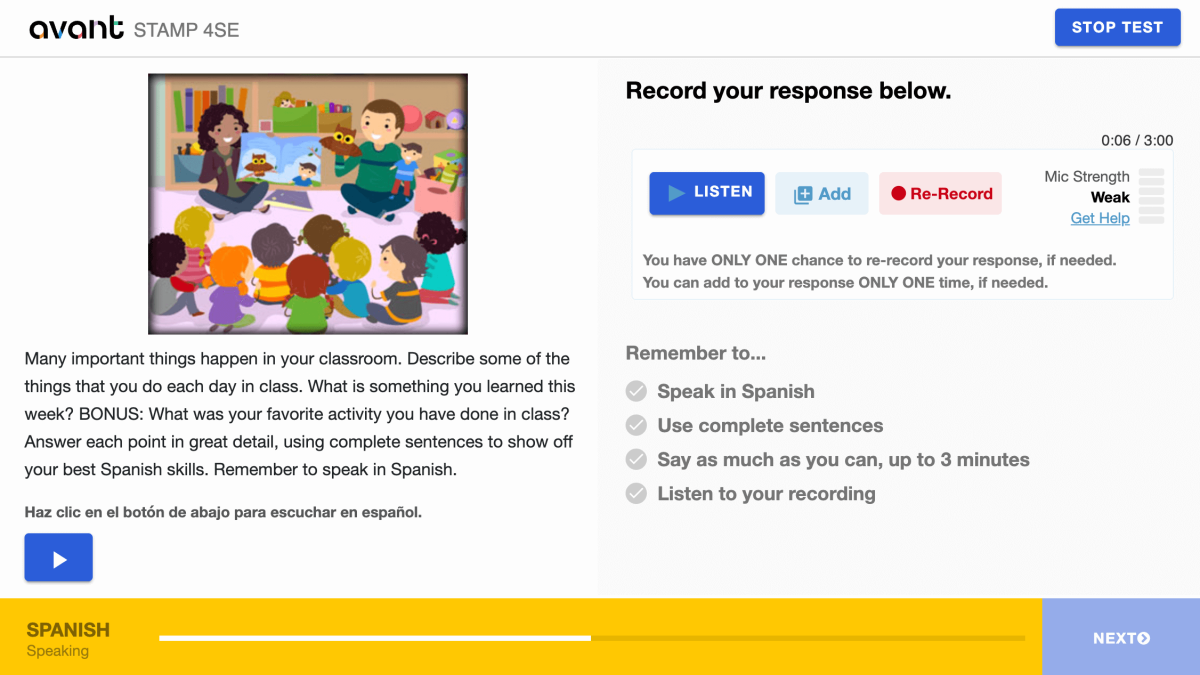
- Cliquez sur “Écouter” pour lire votre enregistrement.

- Cliquez sur le + Ajouter si vous voulez ajouter à votre enregistrement. Vous pouvez ajouter à votre réponse UNE SEULE fois, si nécessaire.
- Cliquez sur le Re-Enregistrer si vous voulez supprimer votre réponse et la réenregistrer. Vous avez UNE SEULE chance de réenregistrer votre réponse, si nécessaire.
- Cliquez sur le bouton SUIVANT pour soumettre votre réponse. Après avoir cliqué sur SUIVANT, vous ne pourrez pas revenir en arrière.
Conseils pour la section orale :
- Lisez d'abord l'intégralité de l'invite.
- Parlez dans la langue que vous testez. Préservez ... exactement.
- Utilisez des phrases complètes.
- Dites autant que vous pouvez. Incluez autant de détails que possible. Préservez ... exactement.
- Organisez vos pensées.
Reprise de l'épreuve
Si vous êtes déconnecté, reconnectez-vous avec le même Code de Test, Mot de Passe et Nom d'Utilisateur. Le test vous ramènera à la section où vous avez arrêté. Contactez votre surveillant ou votre professeur pour obtenir de l'aide :
- Cliquez sur continuer l'épreuve après avoir entré le code de l'épreuve et le mot de passe.
- Saisissez à nouveau votre nom d'utilisateur exactement comme vous l'avez fait la première fois.
Terminez toutes les parties de l'épreuve jusqu'à ce que l'épreuve soit terminée (sauf indication contraire).
Terminer l'épreuve
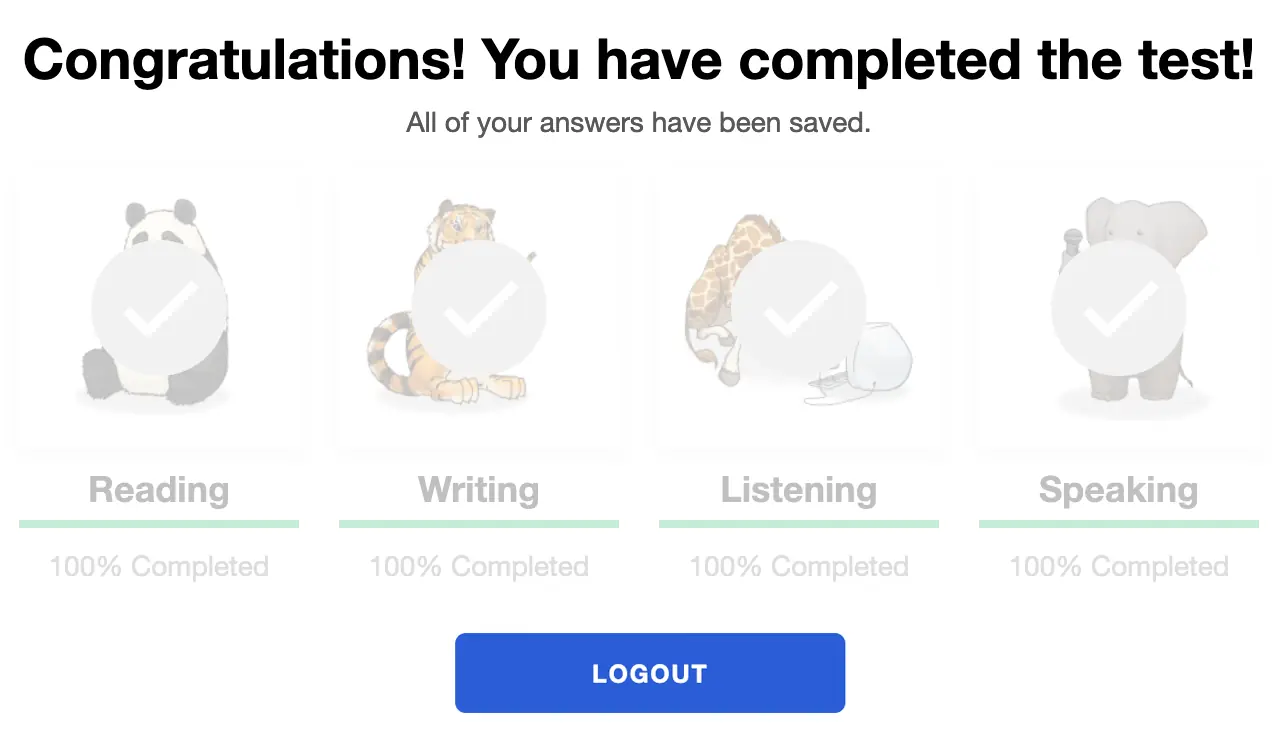
Lorsque vous aurez terminé le test, vous verrez le message « Félicitations ! Vous avez terminé le test ! ». Vous devez terminer le test dans les 90 jours suivant son commencement.
Obtenir les résultats de l'épreuve
Les résultats du épreuves sont livrés au coordinateur des tests après l'achèvement du test. Les candidats du épreuves doivent contacter leur coordinateur de tests pour recevoir les résultats des tests.
Consultez le STAMP Guide des Benchmarks et Rubric, et le Guide Power Up pour les Candidats aux Tests pour savoir ce qui est requis pour atteindre un niveau de test spécifique.
Préparation pour le Test
Avant STAMP est un test de compétence de ce que le candidat peut faire avec la langue à ce moment précis. Il n'y a pas de réponses "justes" ou "fausses", simplement une démonstration de leurs compétences.
Pour aider chaque candidat à se préparer, nous disposons de plusieurs ressources d'aide :
Epreuves types
Montre à quoi ressemblera le test et donne des exemples de questions et de consignes pour les niveaux Débutant(e), Intermédiaire et Avancé. Il ne montre pas la nature adaptative informatique du test et ne donnera pas de score à la fin.
Tutoriels vidéo
Aide le candidat à comprendre comment donner le meilleur de lui-même et à quoi s'attendre pendant le test.
Modèles pour la rédaction
Pour de nombreuses langues, nous fournissons de véritables exemples de réponses écrites pour chaque niveau. Les candidats peuvent comparer ce qu'ils savent pour comprendre quel type de langage est attendu à chaque niveau.
Benchmarks et Rubriques
Ce guide aide à comprendre comment le test est noté et fournit des sujets de questions qui pourraient être utilisés à chaque niveau dans les sections Lecture et Écoute.
Résultats d'Évaluation
Après la notation, les résultats seront fournis à l'école ou à l'organisation qui administre le test.
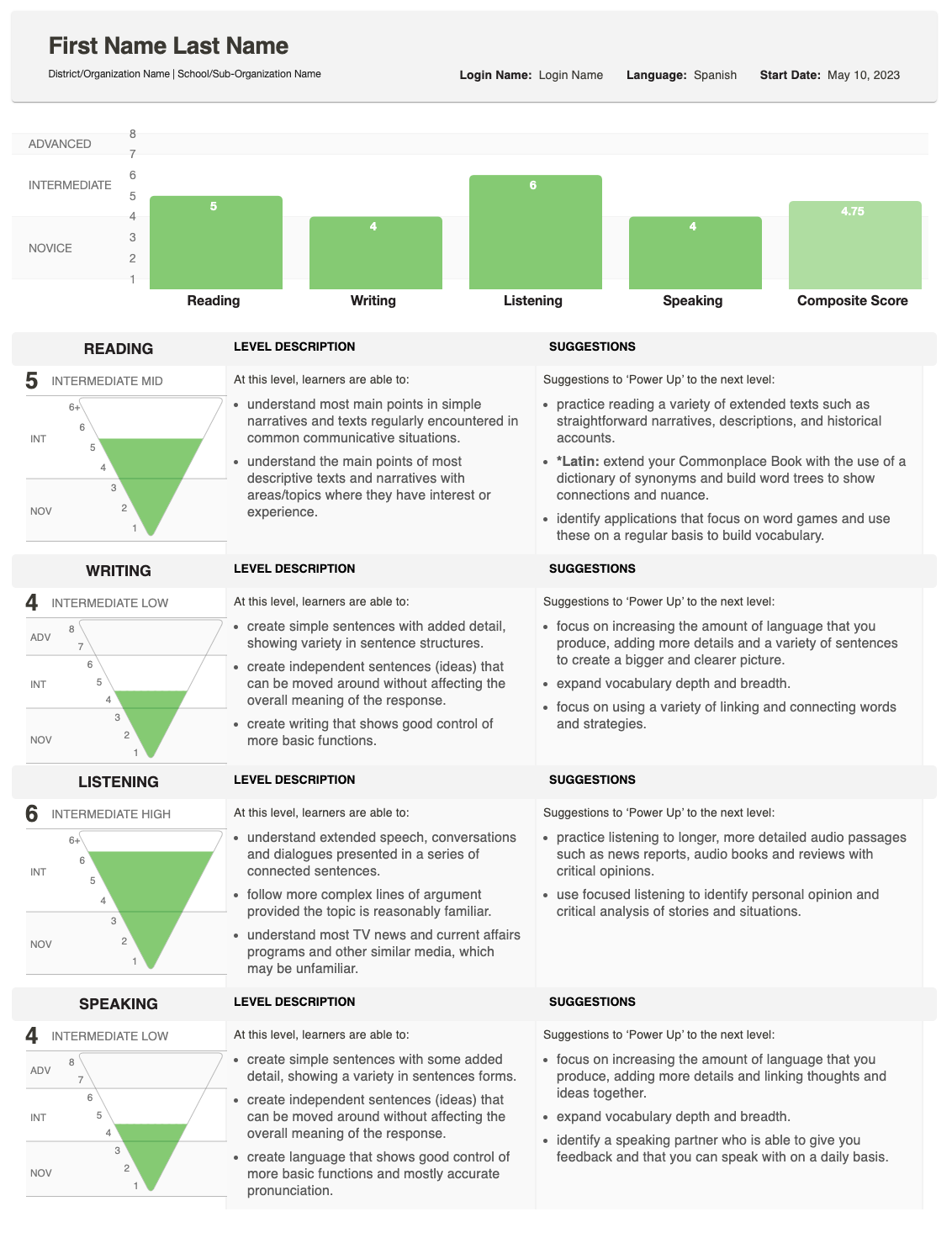
Le rapport montre comment votre élève s'est comporté en Écriture et en Expression orale et donne un score global (composite).
Pour une explication détaillée de la façon dont les scores sont déterminés, consultez le Guide des critères et des échelles, qui décrit ce qui est attendu à chaque niveau. Si vous avez des questions sur les scores d'un élève en particulier, veuillez contacter l'école ou l'organisation qui a administré le test.
Comprendre les Scores
Le Rapport Individuel montre le score obtenu pour chaque compétence, accompagné d'un Score Composite.

Pyramide de Score
Un graphique en pyramide inversée affiche chaque score. La section remplie indique le niveau atteint.
- Pour l'écriture et l'expression orale, une zone ombrée supplémentaire peut apparaître si une réponse a été notée à un niveau supérieur.
- Cela indique que l'élève peut être performant à différents niveaux de compétence pour cette compétence.
Descriptions des Compétences
À côté de la pyramide, vous verrez des descriptions de la compétence (Lecture, Écriture, Écoute, Parole) et de la catégorie de niveau (Débutant(e), Intermédiaire, Avancé).
- Si une section de test n'a pas été terminée, cette zone affichera plutôt le statut : Non commencé ou En cours.

Suggestions pour Augmenter la Puissance
Sur l'extrême droite, le rapport liste les Suggestions de renforcement - des conseils pratiques que l'étudiant peut utiliser pour s'améliorer et atteindre des scores plus élevés dans cette compétence.