
نظرة عامة على Avant STAMPe
أفانت STAMPe هو اختبار عبر الإنترنت يقيم مستوى اللغة. يحتوي على 4 أقسام: القراءة، الكتابة، الاستماع و التحدث.

~30 أسئلة الاختيار من متعدد

2 مواضيع

~30 أسئلة الاختيار من متعدد

2 مواضيع
بدء التقييم
- سيساعدك معلمك أو المراقب في تسجيل الدخول.
- بعد ذلك، ستقوم بإكمال الملف الشخصي.
سترى بعد ذلك شاشة تحتوي على صورة لأربعة حيوانات - واحد لكل قسم من الاختبار. سيخبرك معلمك بالحيوان الذي عليك النقر عليه.
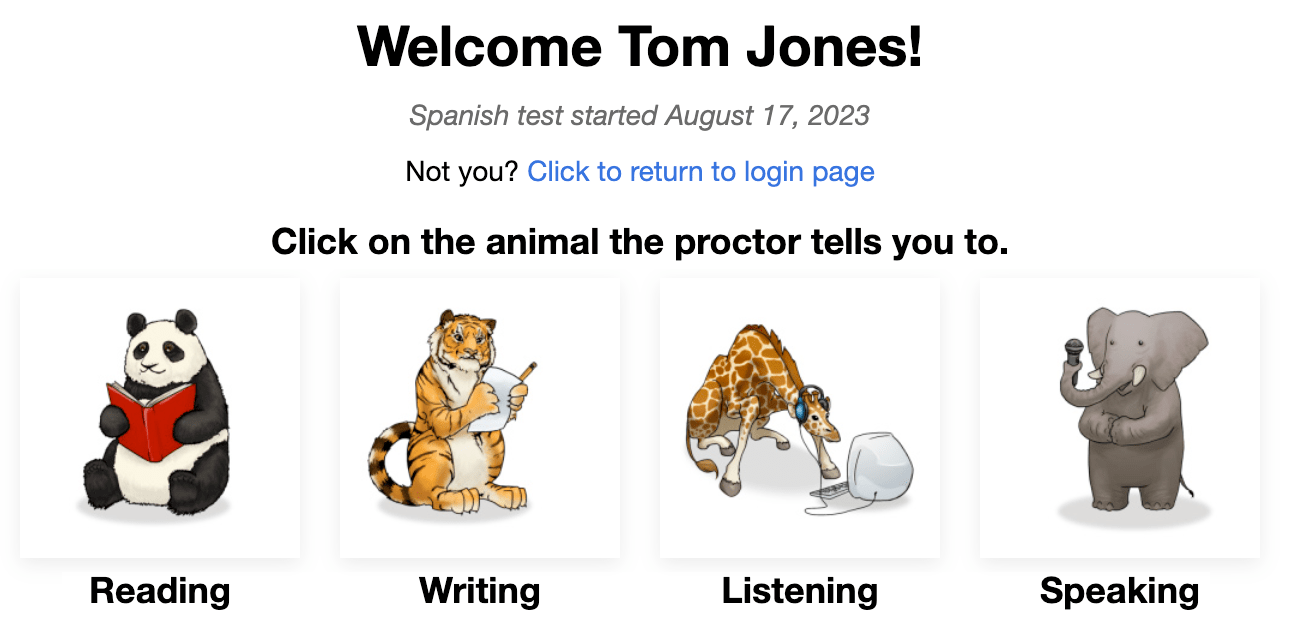
في بداية كل قسم، سترى:
- تعليمات. يرجى قراءتها بعناية. يمكنك أيضًا الاستماع إليها باللغة المستخدمة في الاختبار. ...
- سؤال/موضوع للتدريب. لا تقضي الكثير من الوقت على هذا السؤال. تذكر أن هذا مجرد سؤال/موضوع للتدريب، ولن يحتسب في النتيجة النهائية.
بعد الإجابة على كل سؤال، انقر على زر التالي في الجزء السفلي الأيمن من الشاشة. انزل للأسفل، إذا كان ذلك ضروريًا. بعد النقر على زر التالي، لن تتمكن من العودة إلى الخلف.
بعد السؤال الأخير في كل قسم من أقسام الاختبار، تظهر رسالة تخبرك أنك أنهيت القسم. انقر على الزر لاختيار قسم آخر، ثم انقر على الحيوان الذي يخبرك المعلم بالنقر عليه.

القراءة والاستماع الأسئلة هي متعددة الخيارات ويتم تصحيحها تلقائيًا. الاختبار هو متكيف مع الكمبيوتر مما يعني أنه سيصبح أسهل أو أصعب بناءً على ردود فعل الشخص الذي يؤدي الاختبار.
الكتابة والتحدث ستصبح المهام أكثر أو أقل صعوبة بناءً على مدى جيدة أداء الشخص الذي يؤدي الاختبار في أقسام القراءة والاستماع. تتم تقييم الردود بواسطة مقيمين معتمدين من Avant الذين يستخدمون مقياس تقييم يحدد المعايير المطلوبة لتحقيق مستويات المعايير.
قواعد الاختبار
يتم إجراء الاختبارات في بيئة مراقبة بدون السماح بالموارد الخارجية.

- لا تنقر خارج نافذة الاختبار. يتم تتبع هذا وسيتم تسجيل خروجك من الاختبار.

- لا تستخدم أي مواد دعم (مثل القواميس، الكتب الدراسية، الهواتف المحمولة، التطبيقات، أدوات المراسلة، أو أدوات المساعدة في الترجمة مثل Google Translate).

- لا تقم بأخذ ملاحظات (على الورق أو الكترونيا). الأوراق، الأقلام، الأقلام الرصاص، الأقلام الذكية، الخ. غير مسموح بها.

- لا تقرأ / تستخدم أي ملاحظات أو مواد دعم لردودك الشفوية / التعبيرية.

- لا تتواصل مع أي شخص باستثناء المراقب أثناء الاختبار.

- لا تشارك أسئلة الاختبار أو الأوامر. لا تقم بنسخ، طباعة، أو التقاط لقطات شاشة للاختبار.

- لا تستخدم لغة عنيفة، فاحشة، أو غير مناسبة في ردودك.
قسم القراءة
عدد الأسئلة: تقريبا 24 سؤالاً متعدد الخيارات
متوسط الوقت: 25-35 دقيقة 
يرجى قراءة التعليمات بعناية. انقر على زر التشغيل الأزرق للاستماع إليها باللغة التجريبية. انقر على زر التالي للانتقال إلى الأسئلة.

- أجب عن السؤال.
- انقر على زر التالي، في الجزء السفلي الأيمن من الشاشة. انزل للأسفل، إذا كان ذلك ضروريًا. بعد النقر على زر التالي، لن تتمكن من العودة إلى السؤال.

قسم الكتابة
عدد المواضيع: 1 موضوع للتدريب و2 مواضيع للاختبار
حد الأحرف: يصل إلى 2500 حرف (400-600 كلمة) لكل رد
الوقت المتوسط: 15 دقيقة
- يرجى قراءة التعليمات بعناية. انقر على زر التشغيل الأزرق للاستماع إلى التعليمات باللغة المستخدمة في الاختبار. يمكنك الاستماع إلى التسجيل مرتين (2). بعد محاولتين، سيصبح الزر غير نشط.
- انقر على زر التالي للانتقال إلى الشاشة التالية.

- اقرأ السؤال بالكامل أولاً. انقر على الزر الأزرق للاستماع إلى السؤال باللغة المختبرة. ...
- اكتب ردك في مربع النص. سيتم حفظه تلقائيًا كل 10 ثواني.
- انقر على NEXT لتقديم الرد والانتقال إلى المطالبة التالية. بعد النقر على NEXT، لن تتمكن من العودة إلى الخلف.

نصائح قسم الكتابة:
- اقرأ الأمر بأكمله أولاً.
- اكتب باللغة التي تقوم بإختبارها. حافظ على ... بالضبط.
- استخدم جمل كاملة.
- اكتب قدر ما تستطيع. أدرج أكبر عدد ممكن من التفاصيل. ...
- قم بتنظيم أفكارك.
قسم الاستماع
عدد الأسئلة: تقريبا 24 سؤالاً من اختيار من متعدد
Average Time: 25-35 minutes
يرجى قراءة التعليمات بعناية. انقر على زر التشغيل الأزرق للاستماع إليها باللغة التجريبية. انقر على زر التالي للانتقال إلى الأسئلة.

- انقر على زر التشغيل الأزرق للاستماع إلى التسجيل والسؤال، اللذين سيتم تشغيلهما مرتين. يمكنك النقر على زر التشغيل الأزرق مرتين (2) فقط.
- أجب عن السؤال.
- انقر على زر التالي، في الجزء السفلي الأيمن من الشاشة. انزل للأسفل، إذا كان ذلك ضروريًا. بعد النقر على زر التالي، لن تتمكن من العودة إلى السؤال.

قسم التحدث
عدد المواضيع: 1 موضوع للتدريب و2 مواضيع للاختبار
حد الوقت للتسجيل: ستمتلك ثلاث (3) دقائق من الوقت للتسجيل لكل استجابة تحدث
الوقت المتوسط: 15 دقيقة
يرجى قراءة التعليمات بعناية. انقر على زر التشغيل الأزرق للاستماع إليها باللغة التجريبية. انقر على زر التالي للانتقال إلى الشاشة التالية.

- يرجى قراءة التعليمات بعناية. انقر على زر التشغيل الأزرق للاستماع إلى التعليمات باللغة المستخدمة في الاختبار. يمكنك الاستماع إلى التسجيل مرتين (2). بعد محاولتين، سيصبح الزر غير نشط.
- انقر على "بدء التسجيل" لتسجيل ردك.
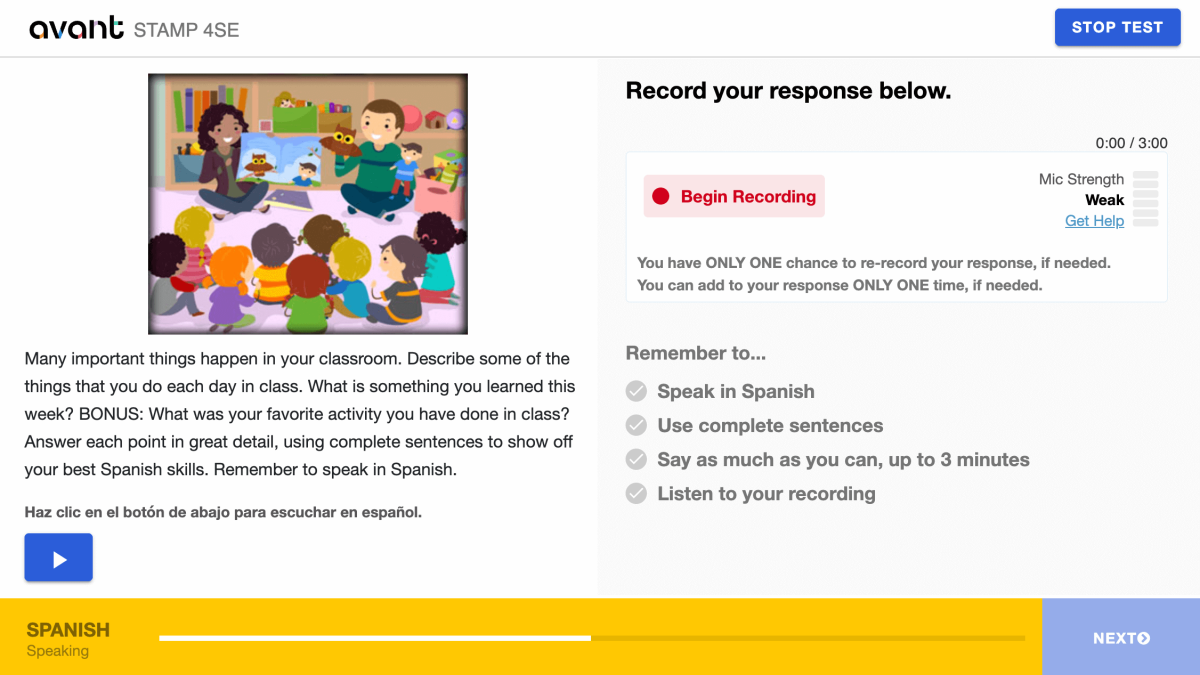
- انقر على "إيقاف التسجيل" عندما تنتهي.

- انقر على "استمع" لتشغيل التسجيل الخاص بك.

- انقر على + إضافة إذا كنت ترغب في الإضافة إلى التسجيل الخاص بك. يمكنك الإضافة إلى ردك مرة واحدة فقط إذا كان ذلك ضروريًا.
- انقر على إعادة التسجيل إذا كنت ترغب في حذف ردك وإعادة تسجيله. لديك فرصة واحدة فقط لإعادة تسجيل ردك، إذا كان ذلك ضروريًا.
- انقر على زر التالي لتقديم ردك. بعد النقر على NEXT، لن تتمكن من العودة للخلف.
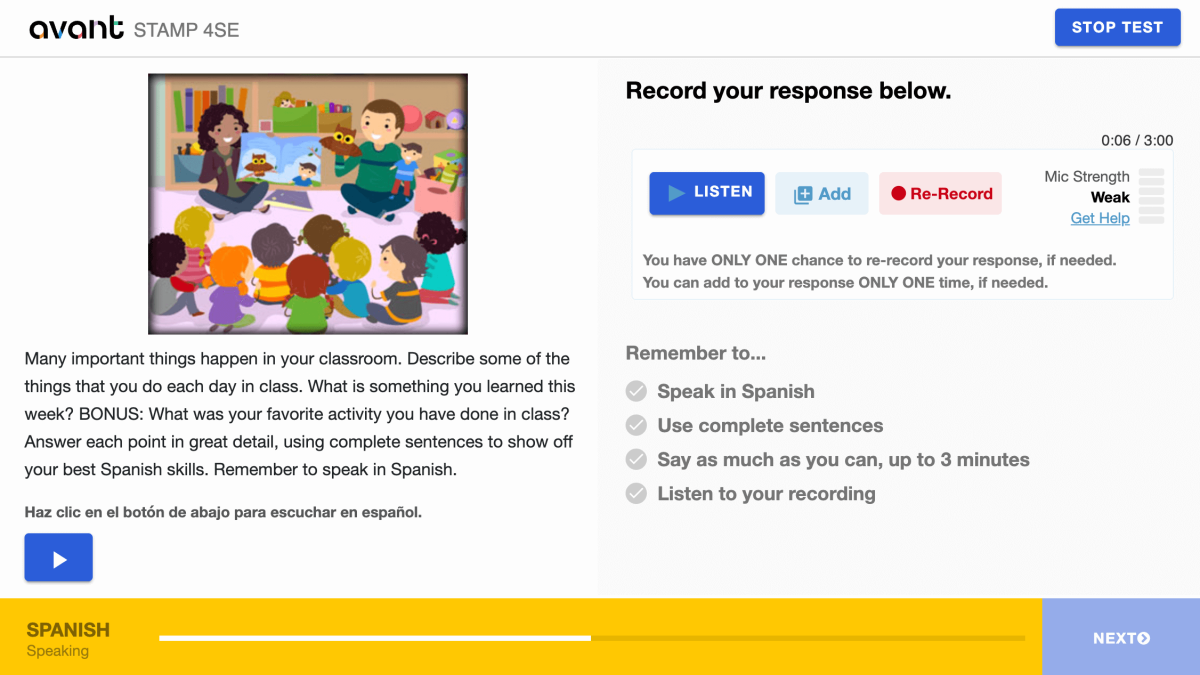
نصائح قسم التحدث:
- اقرأ الأمر بأكمله أولاً.
- تحدث باللغة التي تقوم بتجربتها. ...
- استخدم جمل كاملة.
- قل كل ما تستطيع. ادرج أكبر قدر ممكن من التفاصيل.
- قم بتنظيم أفكارك.
استئناف التقييم
إذا تم تسجيل خروجك، قم بتسجيل الدخول مرة أخرى باستخدام نفس رمز الاختبار، كلمة المرور، واسم الدخول. سيأخذك الاختبار إلى القسم الذي توقفت عنده. اتصل بمراقب الاختبار أو المعلم للمساعدة:
- انقر على متابعة الاختبار بعد إدخال كود الاختبار وكلمة المرور.
- أعد إدخال اسم المستخدم الخاص بك بالضبط كما فعلت في المرة الأولى.
أكمل جميع أقسام الاختبار حتى يتم الانتهاء من الاختبار (إلا إذا تم توجيهك بخلاف ذلك).
إكمال التقييم
عندما تكمل الاختبار، سترى رسالة "مبروك! لقد أكملت الاختبار!". يجب أن تنهي الاختبار في غضون 90 يومًا من بدء الاختبار.
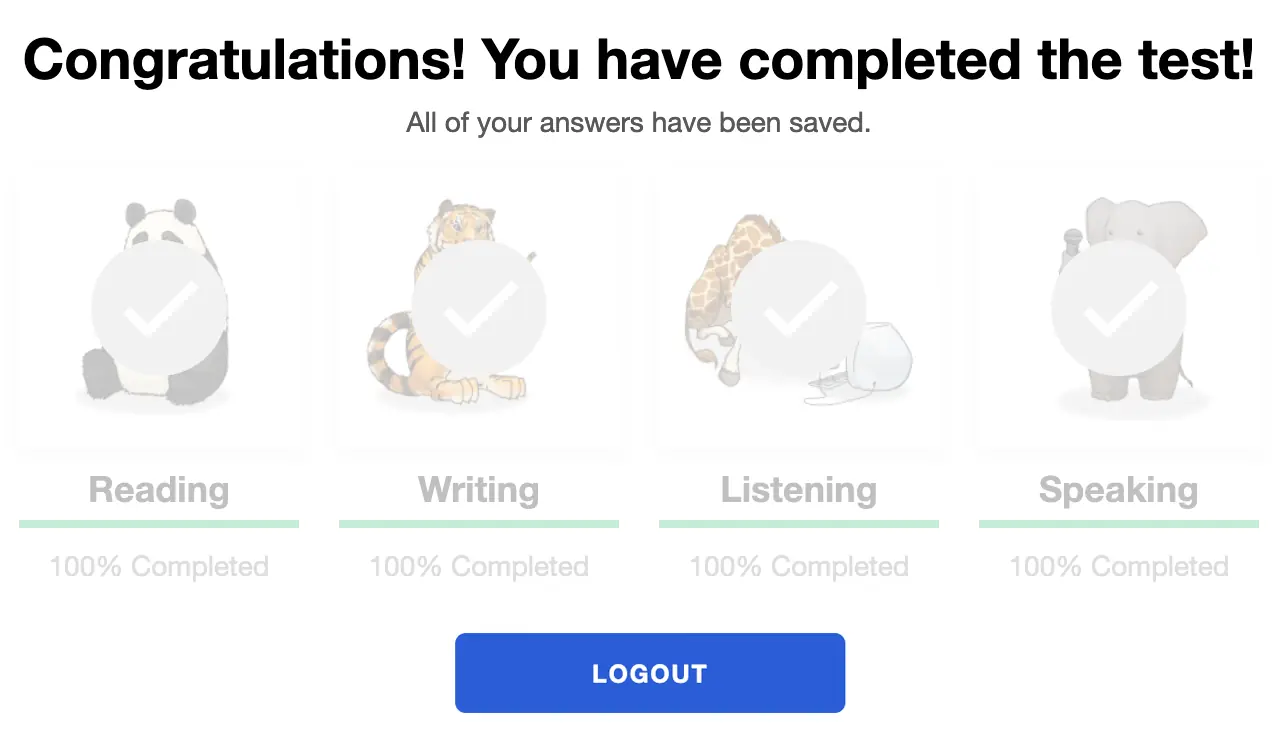
الحصول على نتائج التقييم
تتم تسليم نتائج الاختبار إلى منسق الاختبار بعد اكتمال الاختبار. يجب على الأشخاص الذين يؤدون الاختبار الاتصال بمنسق الاختبار لاستلام نتائج الاختبار.
تحقق من STAMP دليل المعايير والمعيار، و دليل تعزيز قوة الاختبار لمعرفة ما هو مطلوب لتحقيق مستوى اختبار معين.
التحضير للإختبار
Avant STAMP هو اختبار للكفاءة يقيس ما يمكن أن يفعله الشخص المتقدم للاختبار باللغة في هذا الوقت. لا توجد أجوبة "صحيحة" أو "خاطئة"، بل هو ببساطة عرض لمهاراتهم.
لمساعدة كل من يؤدي الاختبار في التحضير، لدينا العديد من الموارد للمساعدة:
اختبارات العينة
يظهر كيف سيبدو الاختبار ويعطي أمثلة على أسئلة ومواضيع للمبتدئين والمتوسطين والمتقدمين. لا يظهر الطابع التكيفي للكمبيوتر للاختبار ولن يعطي درجة في النهاية.
دروس فيديو
يساعد الشخص الذي يؤدي الاختبار على فهم كيفية تقديم أفضل ما لديهم وما يمكن توقعه أثناء الاختبار.
أمثلة الكتابة
بالنسبة للعديد من اللغات، نقدم أمثلة حقيقية على كتابة الردود لكل مستوى. يمكن للمتقدمين للاختبار مقارنة ما يعرفونه لفهم نوع اللغة المتوقع في كل مستوى.
معايير الأداء والمقاييس
يساعد هذا الدليل على فهم كيفية تقييم الاختبار ويقدم مواضيع الأسئلة التي قد تُستخدم في كل مستوى في أقسام القراءة والاستماع.
نتائج التقييم
بعد الانتهاء من التسجيل، سيتم تقديم النتائج إلى المدرسة أو المنظمة التي تدير الاختبار.
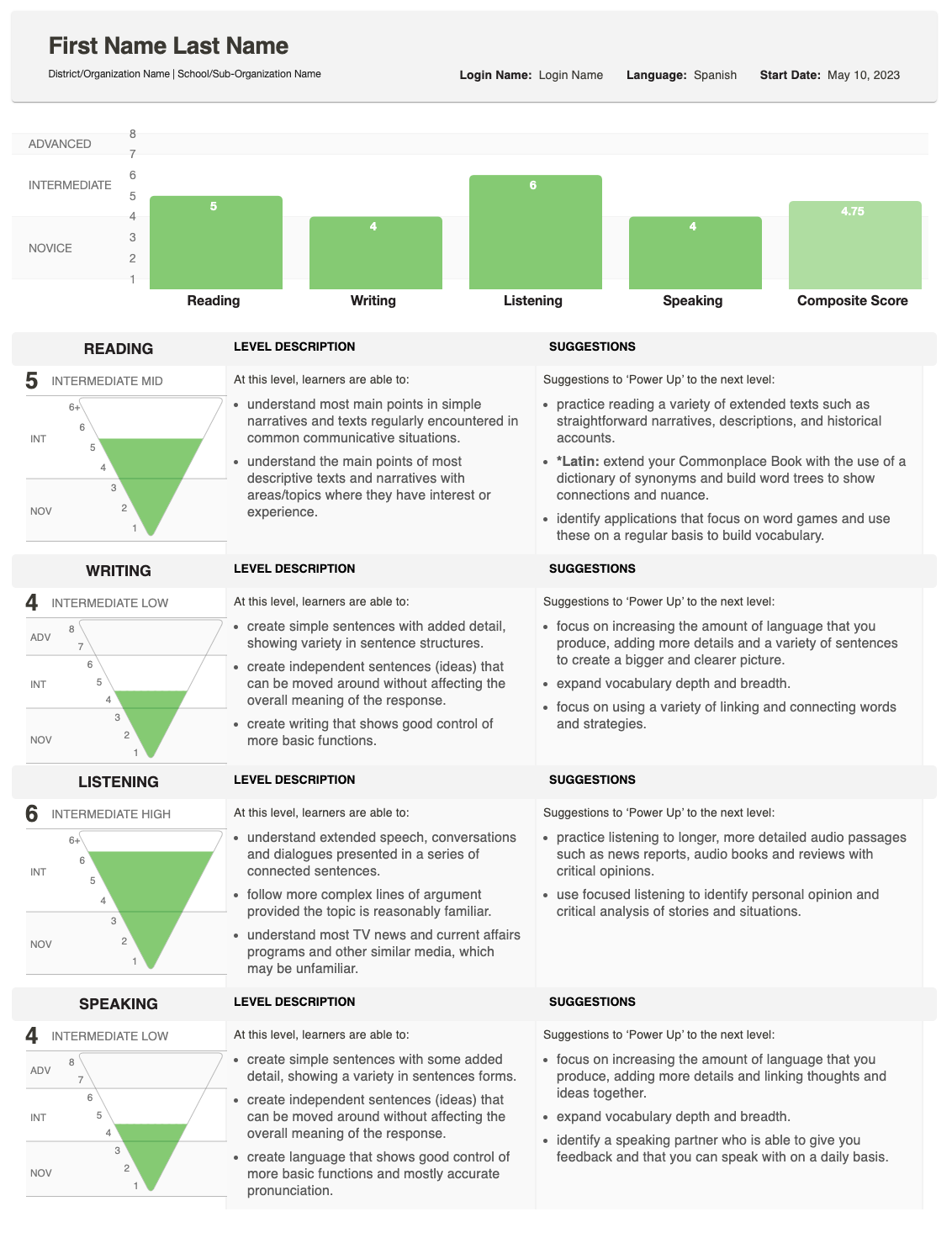
يظهر التقرير كيف أدى طالبك في الكتابة و التحدث ويعطي درجة إجمالية (مركبة).
للحصول على تفسير مفصل حول كيفية تحديد الدرجات، راجع دليل المعايير والمعيار، الذي يصف ما هو متوقع في كل مستوى. إذا كان لديك أسئلة حول درجات الطالب الفردية، يرجى الاتصال بالمدرسة أو المؤسسة التي أجرت الاختبار.
فهم النتائج
يظهر التقرير الفردي الدرجة المحرزة لكل مهارة، بالإضافة إلى الدرجة المركبة.

هرم النتيجة
يعرض الرسم البياني للهرم المقلوب كل درجة. القسم الممتلئ يظهر المستوى الذي تم الوصول إليه.
- للكتابة والتحدث، قد تظهر منطقة مظللة إضافية إذا تم تقييم إحدى الردود على مستوى أعلى.
- هذا يشير إلى أن الطالب قد يكون يؤدي في مجموعة من مستويات الكفاءة لتلك المهارة.
وصف المهارات
بجانب الهرم، سترى أوصاف للمهارة (القراءة، الكتابة، الاستماع، التحدث) وفئة المستوى (مبتدئ، متوسط، متقدم).
- إذا لم يتم الانتهاء من قسم الاختبار، ستظهر هذه المنطقة بدلاً من ذلك حالة: لم يبدأ بعد أو جاري العمل.

اقتراحات لتعزيز الطاقة
على الجانب الأقصى اليمين، يسرد التقرير اقتراحات التعزيز - نصائح عملية يمكن للطالب استخدامها للتحسين وتحقيق درجات أعلى في تلك المهارة.