
يشرح هذا الدليل كيفية إعداد جلسة اختبار مع AvantProctor.
تسجيل الدخول إلى قائمة اختبار المتقدمين
سوف ترسل لك Avant Assessment نموذج الإعداد مع أكواد الاختبار وكلمات المرور للوصول إلى تقرير النتائج لكل مجموعة اختبار. اتبع التعليمات أدناه للبدء:
- اذهب إلى https://app.avantassessment.com/login
- أدخل رمز الاختبار المقدم من Avant Assessment.
- انقر على تسجيل الدخول.
- أدخل كلمة المرور المقدمة من Avant Assessment.
- انقر على تسجيل الدخول.
قائمة اختبار الاختبار
استخدم قسم "تحكمات الاختبار" لتسجيل المتقدمين للإختبار.
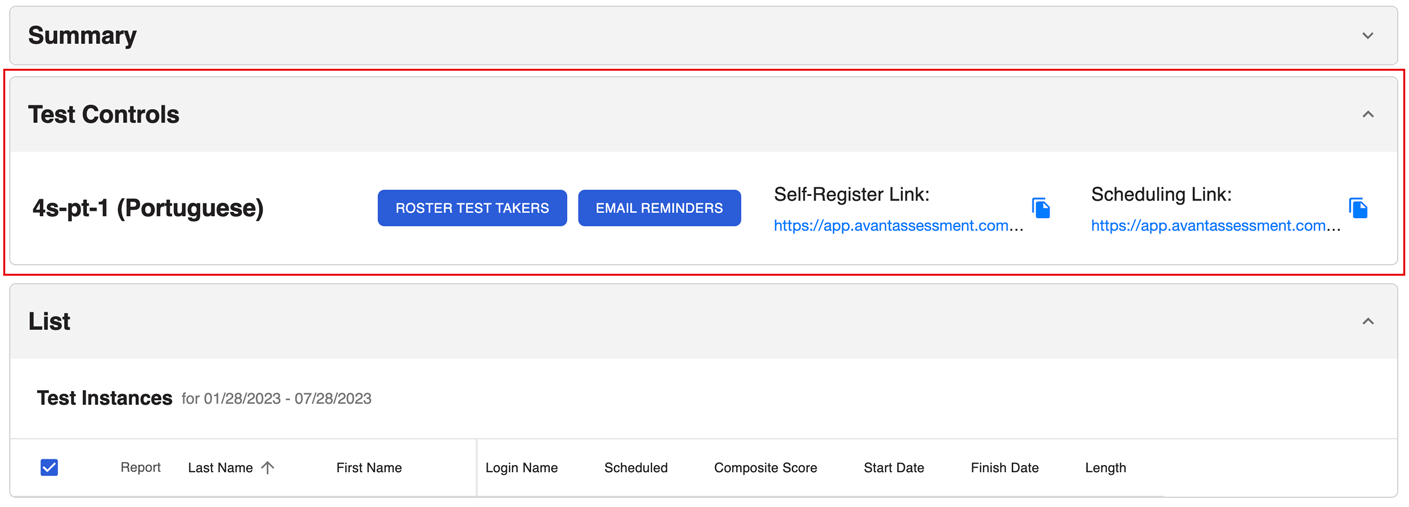
ملاحظة: PLACE و SHL الاختبارات الحالية لا تحتوي على أزرار قائمة اختبار الأشخاص و تذكيرات البريد الإلكتروني.
الخيار 1: رابط التسجيل الذاتي
- انسخ "رابط التسجيل الذاتي".
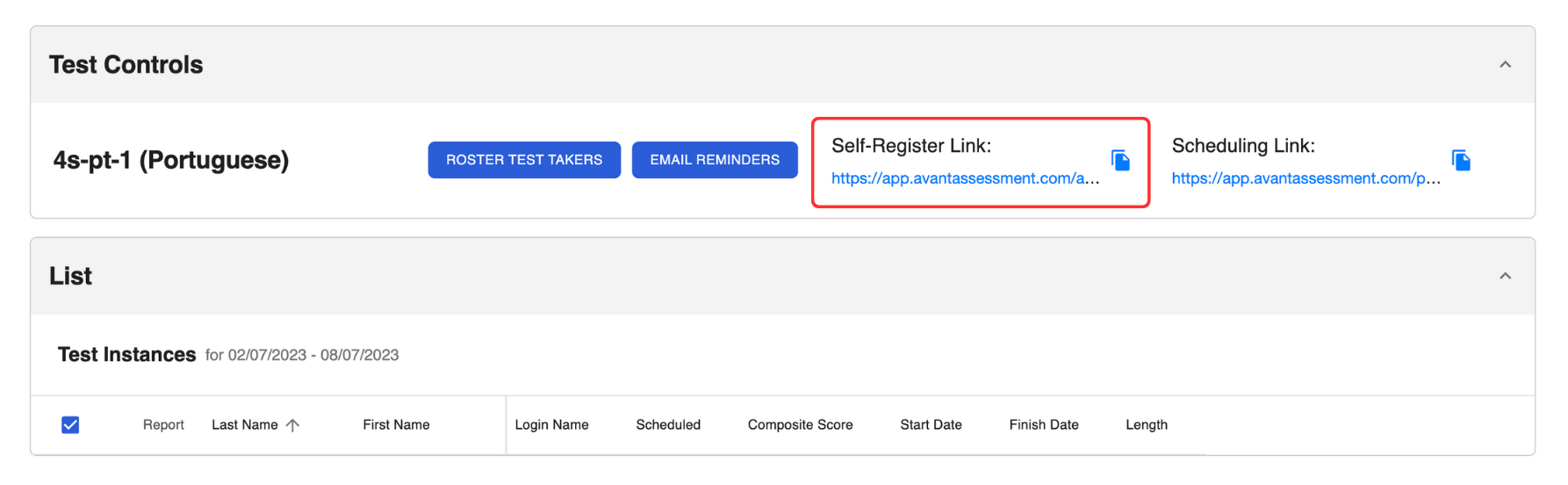
2. أرسل الرابط إلى الأشخاص الذين يخضعون للاختبار.
يرتبط الرابط الذاتي للتسجيل بالسماح للمتقدمين للامتحان بالتسجيل للامتحان الخاص بهم. بعد التسجيل:
- سيتلقى الأشخاص الذين يؤدون الاختبار رسالة بريد إلكتروني تلقائية تحتوي على رابط الجدولة والتعليمات.
- سيظهر أسماء الذين يؤدون الاختبار في تقرير النتائج.
الخيار الثاني: تسجيل المتقدمين للإختبار واحدًا تلو الآخر
هذا الخيار متاح فقط لتقييمات STAMP
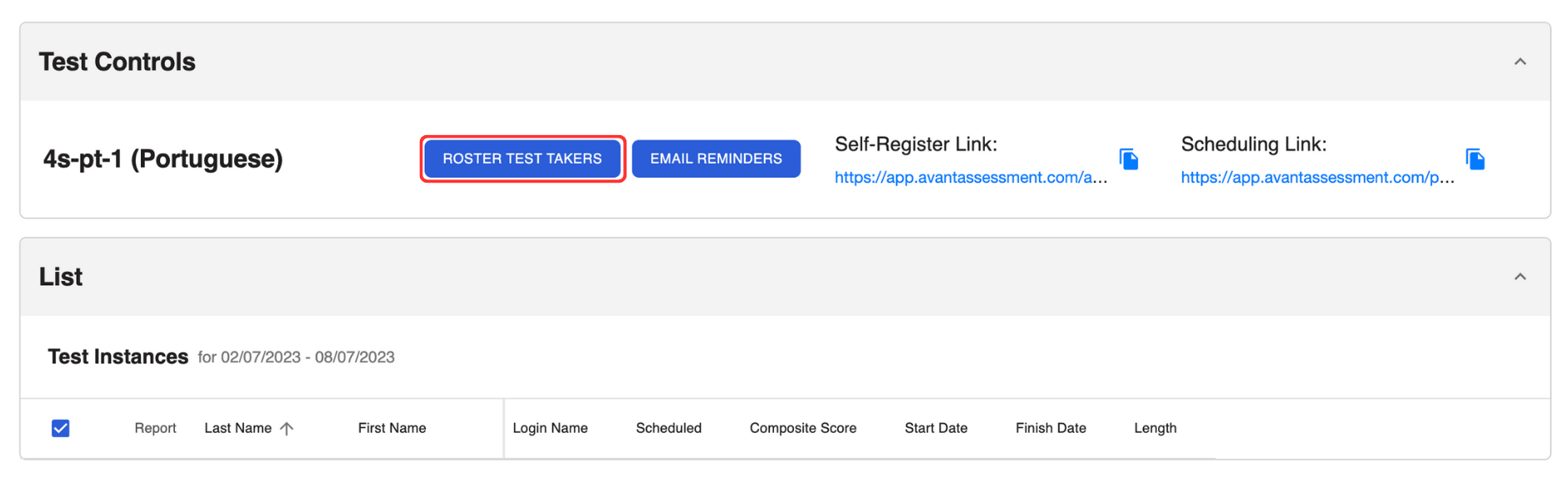
- انقر على الزر Roster Test Takers لفتح القائمة المنبثقة.
2. لكل من يأخذ الاختبار أدخل:
- الاسم الأول (الاسم الدقيق على بطاقة الهوية مع الصورة)
- الاسم الأخير (الاسم الدقيق على بطاقة الهوية مع الصورة)
- اسم الدخول (عنوان البريد الإلكتروني). ملاحظة: هذا الحقل حساس لحالة الأحرف
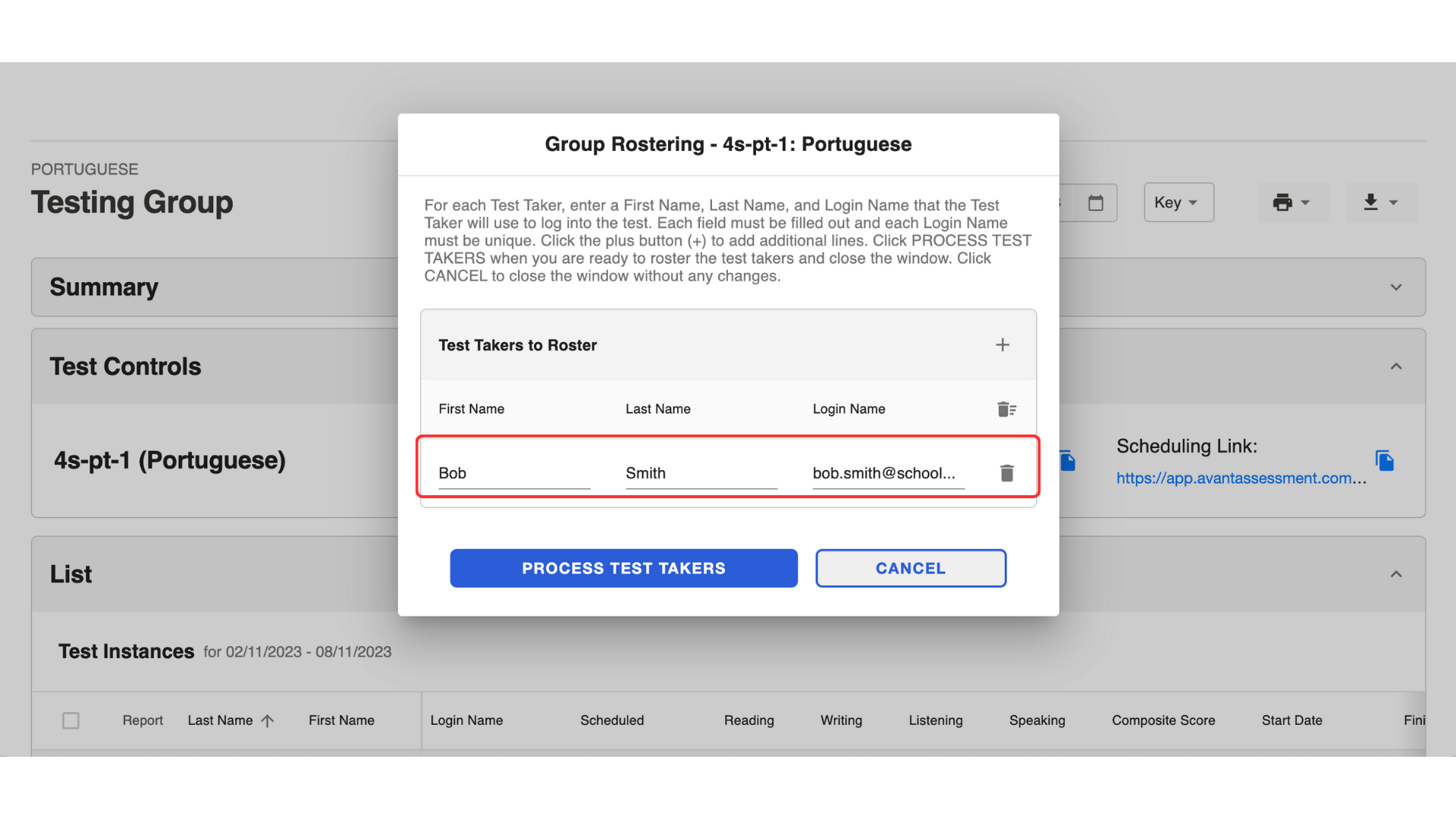
3. انقر على الزر Process Test Takers.
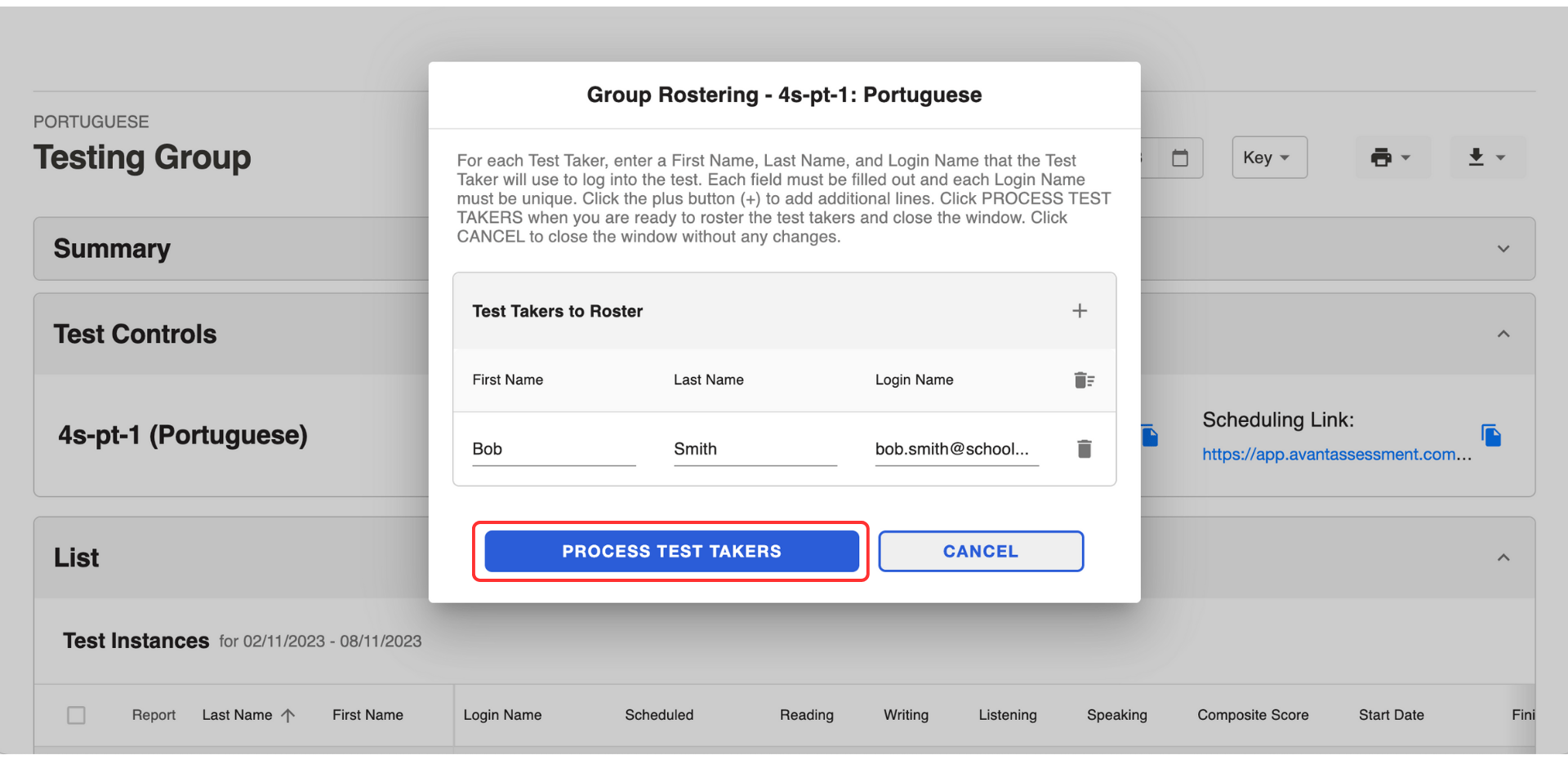
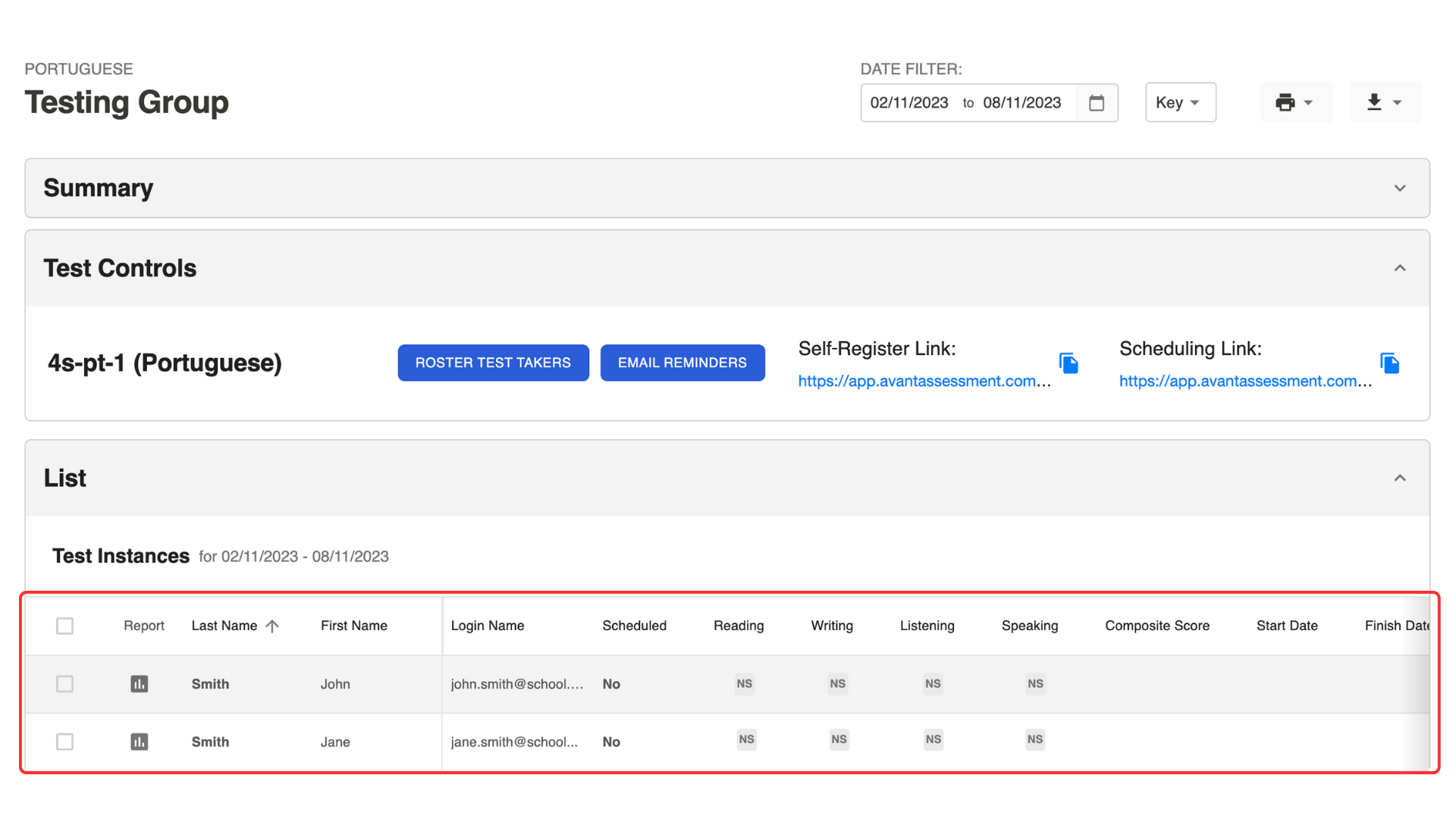
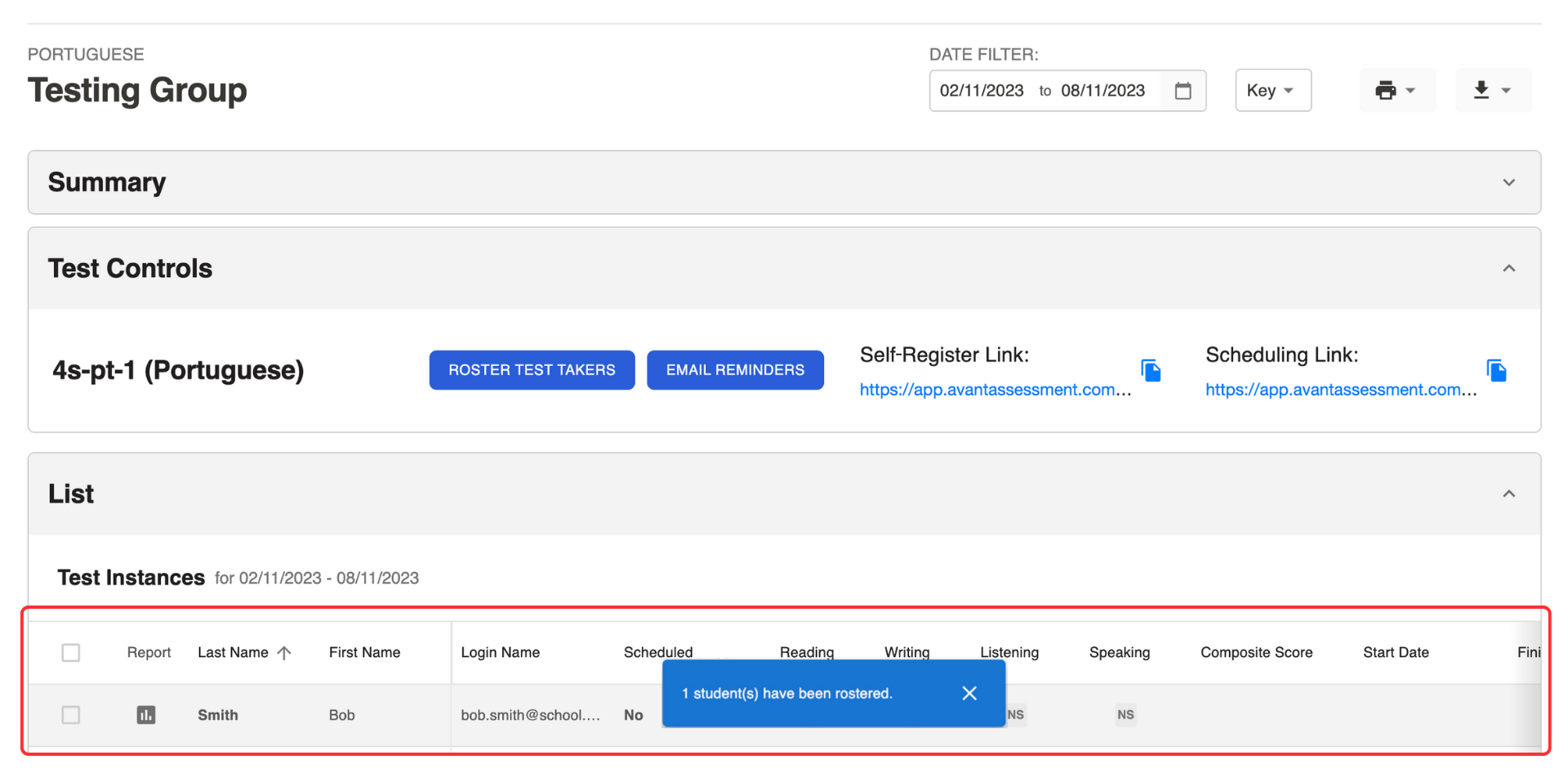
سوف تظهر معلومات الشخص الذي يؤدي الاختبار في القائمة أدناه.
الخيار 3: تسجيل المتقدمين للاختبار بكميات كبيرة
هذا الخيار مخصص فقط لتقييمات STAMP.
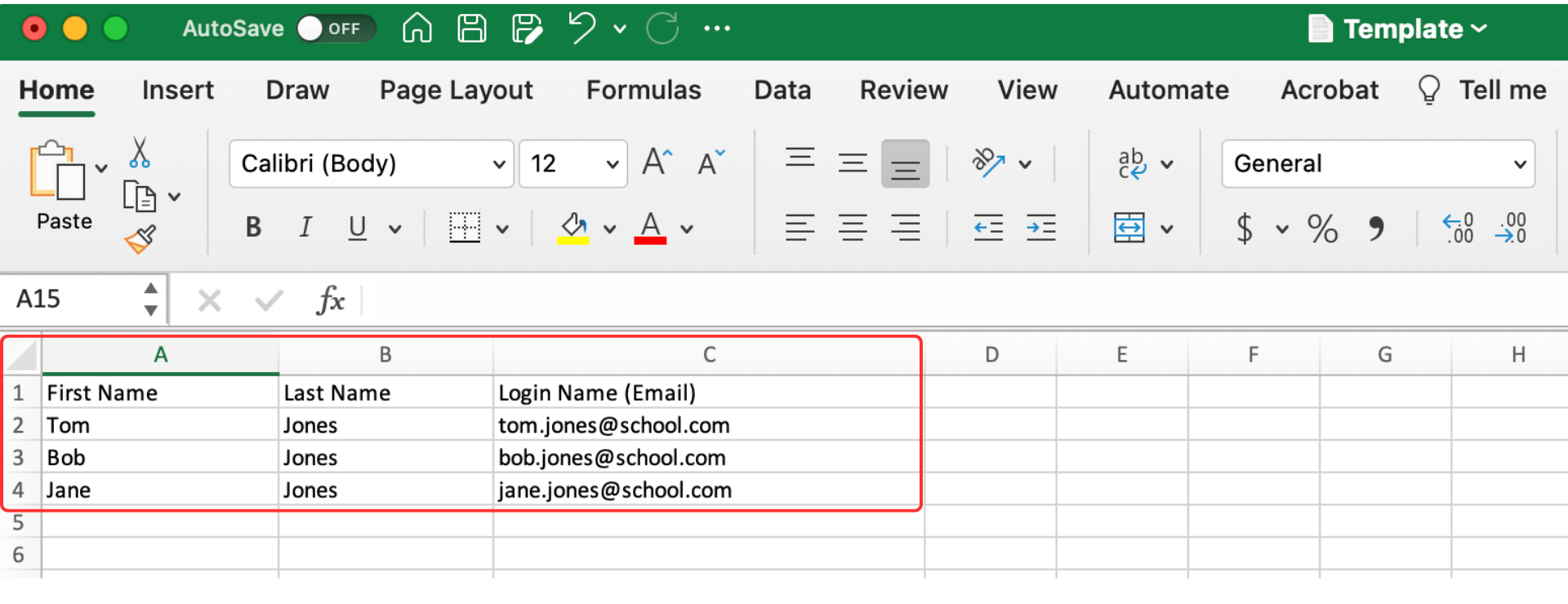
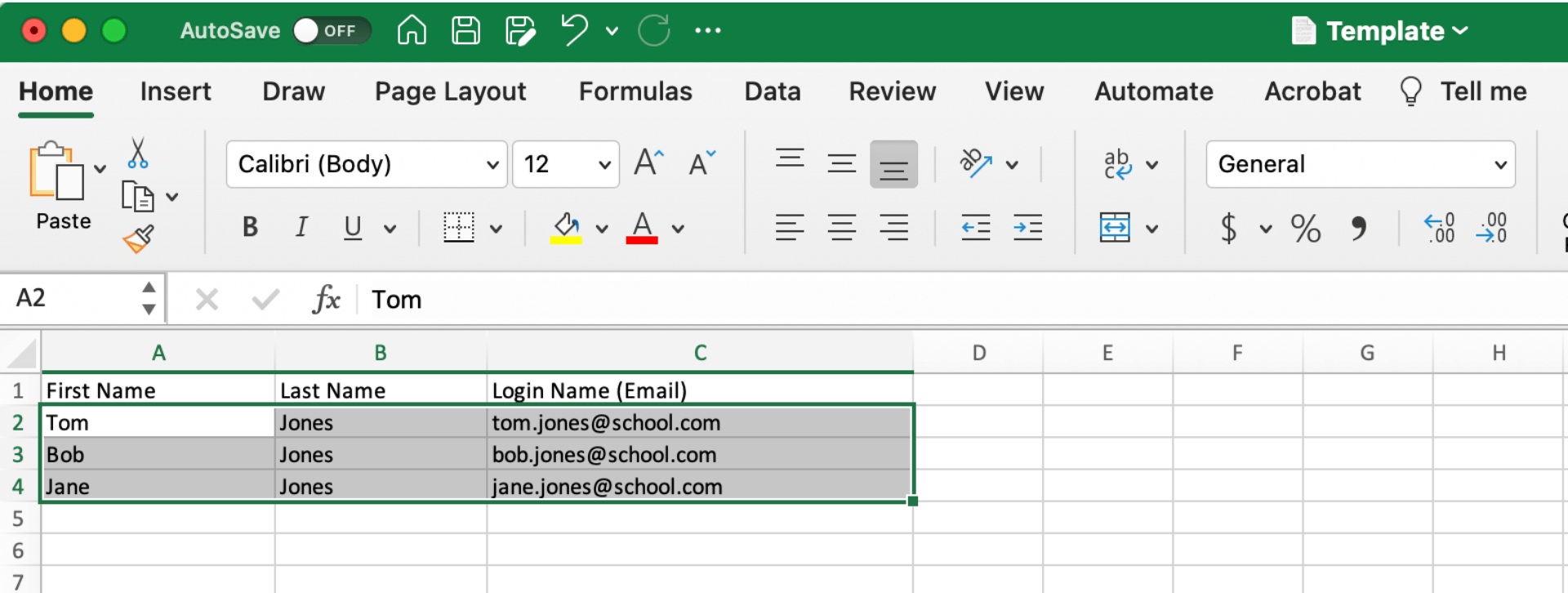
- قم بتنزيل هذا قالب الجدول الإلكتروني.
- أدخل البيانات التالية في جدول البيانات:
- الاسم الأول (الاسم الدقيق الموجود على بطاقة الهوية).
- اسم العائلة (الاسم الدقيق الموجود على بطاقة الهوية).
- اسم الدخول (عنوان البريد الإلكتروني). ملاحظة: هذا الحقل حساس لحالة الأحرف.
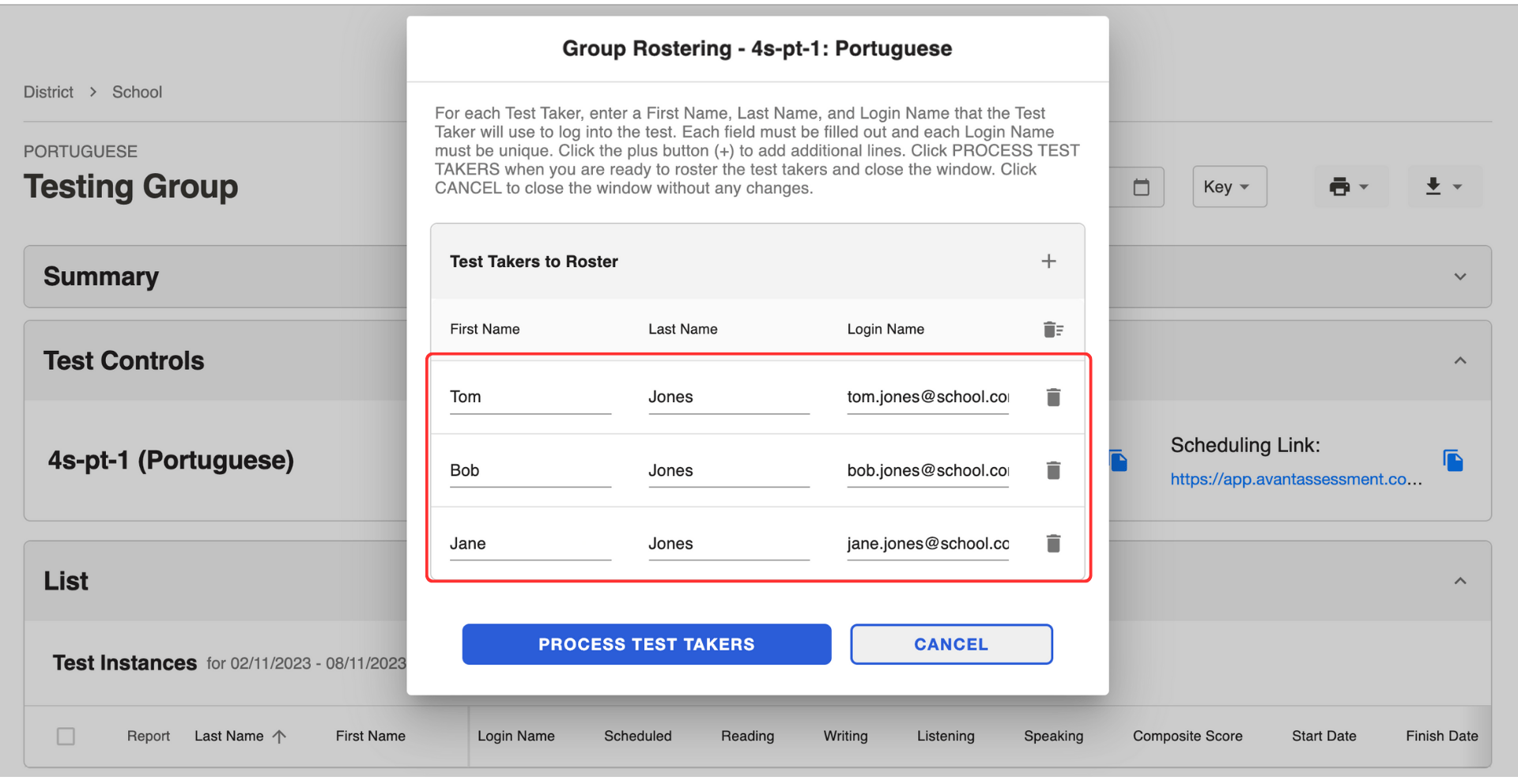
3. انقر على Roster Test Takers لفتح قائمة منبثقة.
4. انسخ والصق القائمة من جدول البيانات إلى القائمة المنبثقة.
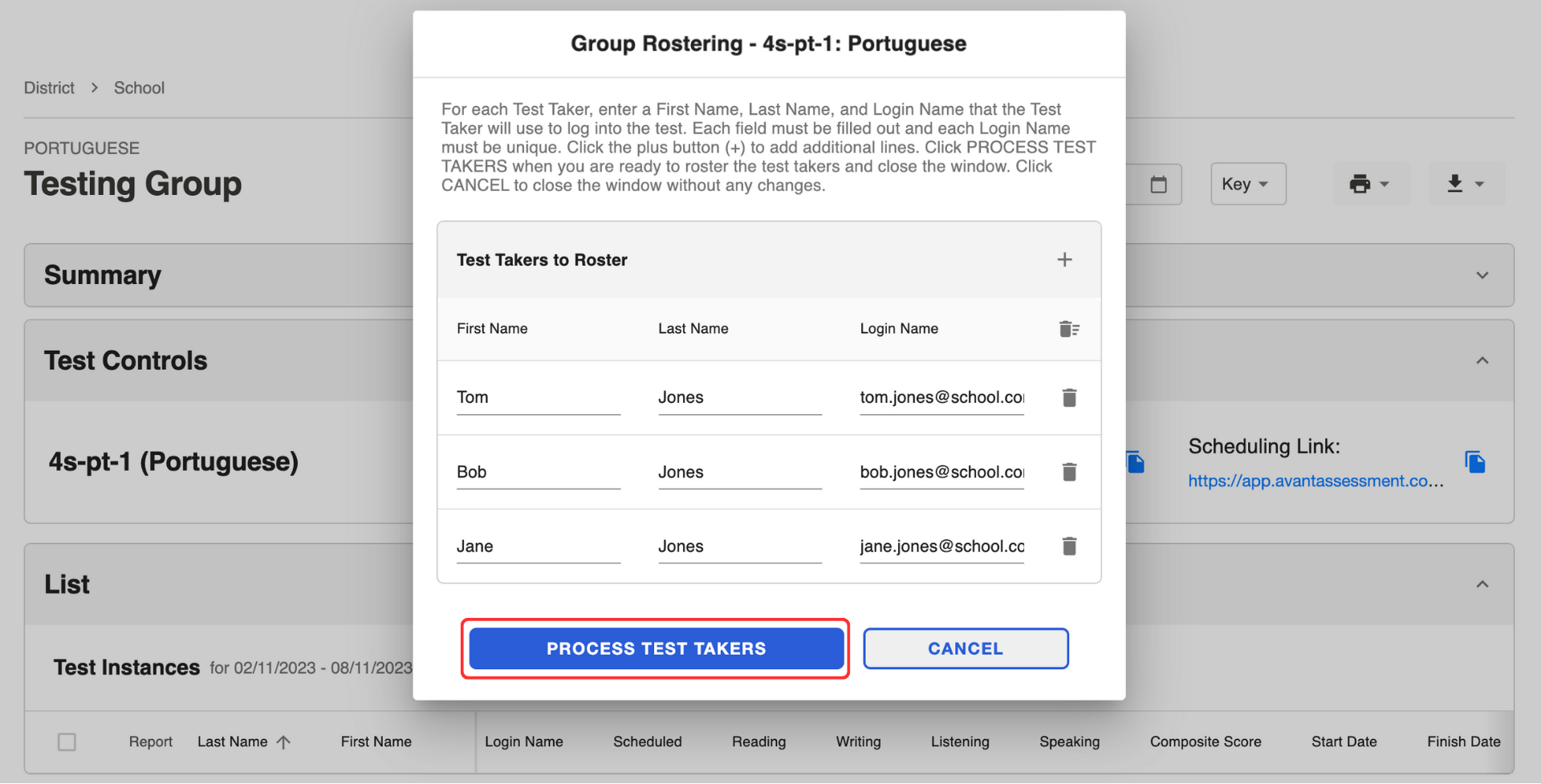
5. انقر على الزر Process Test Takers.
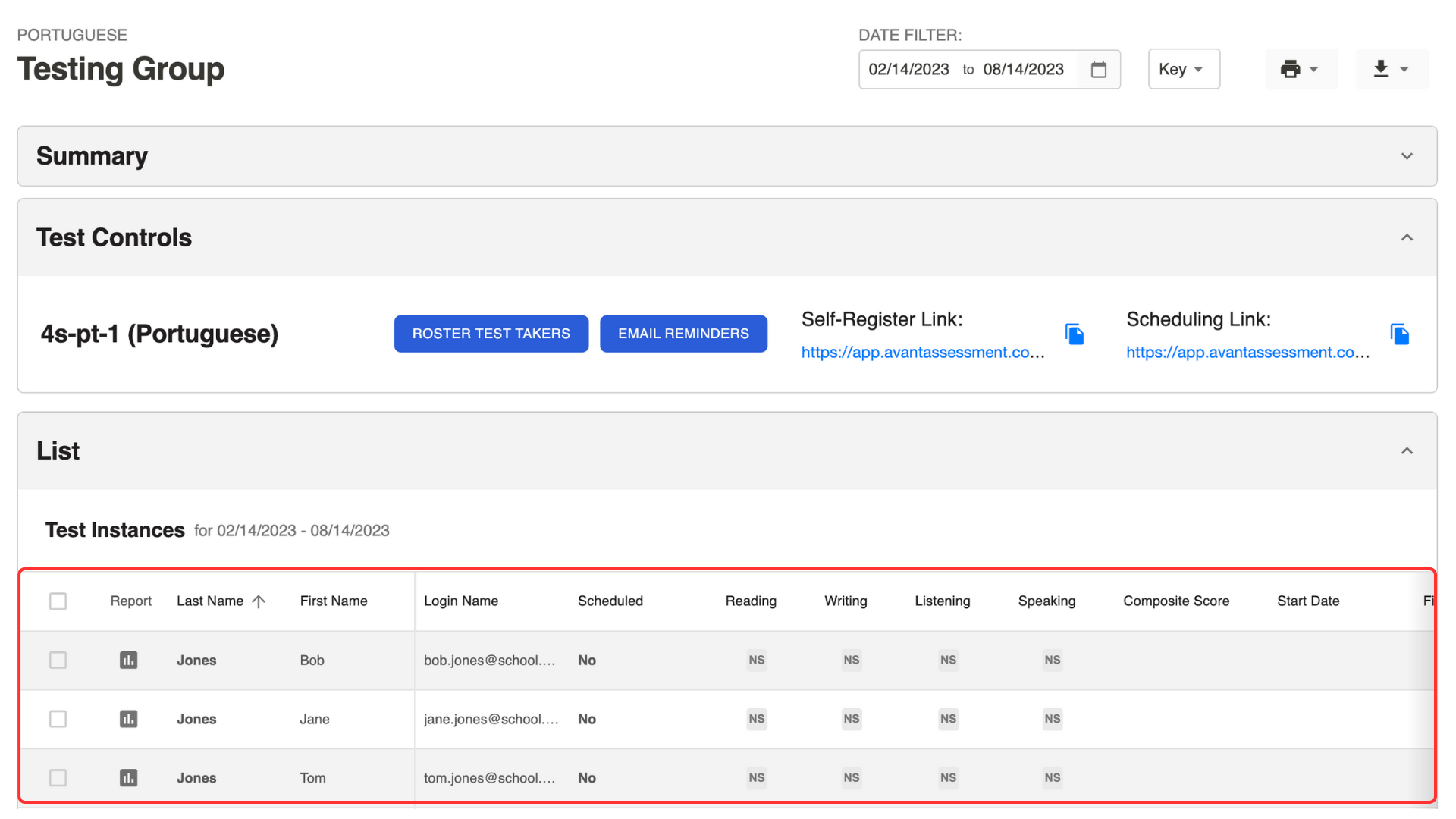
سيظهر معلومات الذين يؤدون الاختبار في القائمة أدناه.
أرسل رابط الجدولة
المتقدمين للاختبار الذين قاموا بالتسجيل بأنفسهم سيتلقون رابط الجدولة تلقائيًا.
إذا استخدمت زر "اختبار القائمة"، يجب عليك إرسال رابط الجدولة باستخدام زر "تذكيرات البريد الإلكتروني":
- حدد الذين يؤدون الاختبار من القائمة.
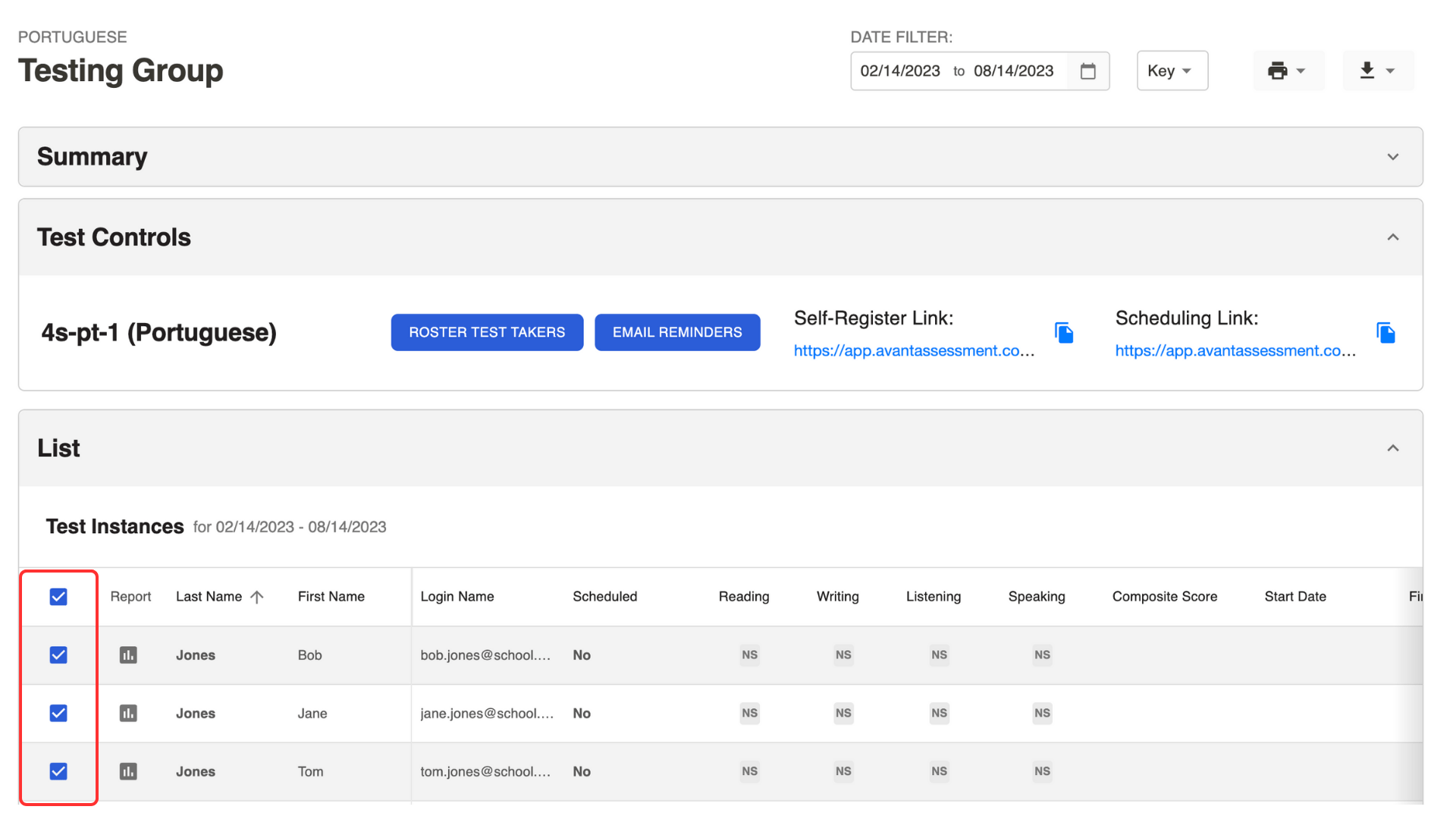
2. انقر على الزر تذكيرات البريد الإلكتروني تحت قسم تحكمات الاختبار.
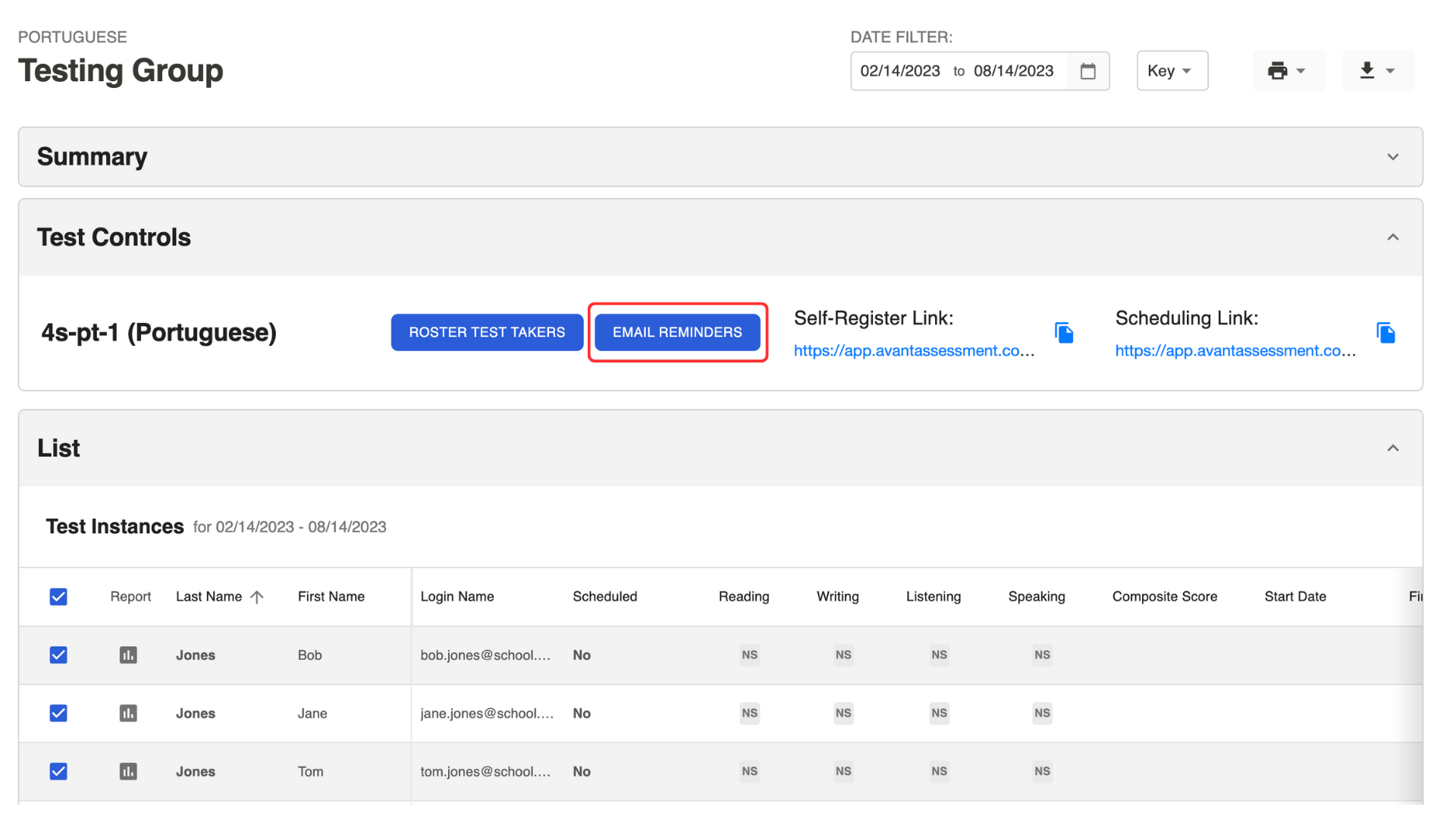
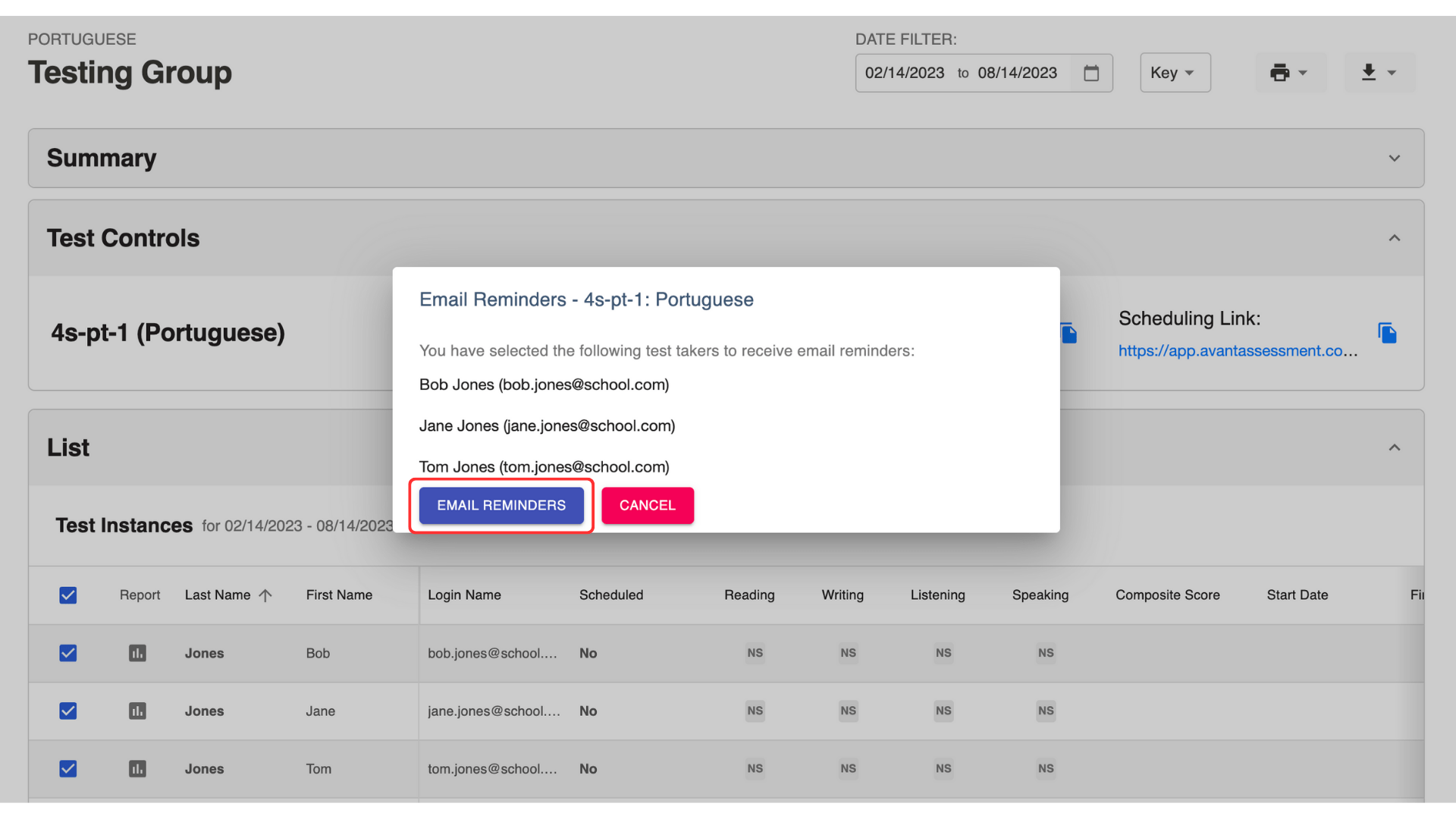
3. انقر على الزر تذكيرات البريد الإلكتروني في النافذة المنبثقة.
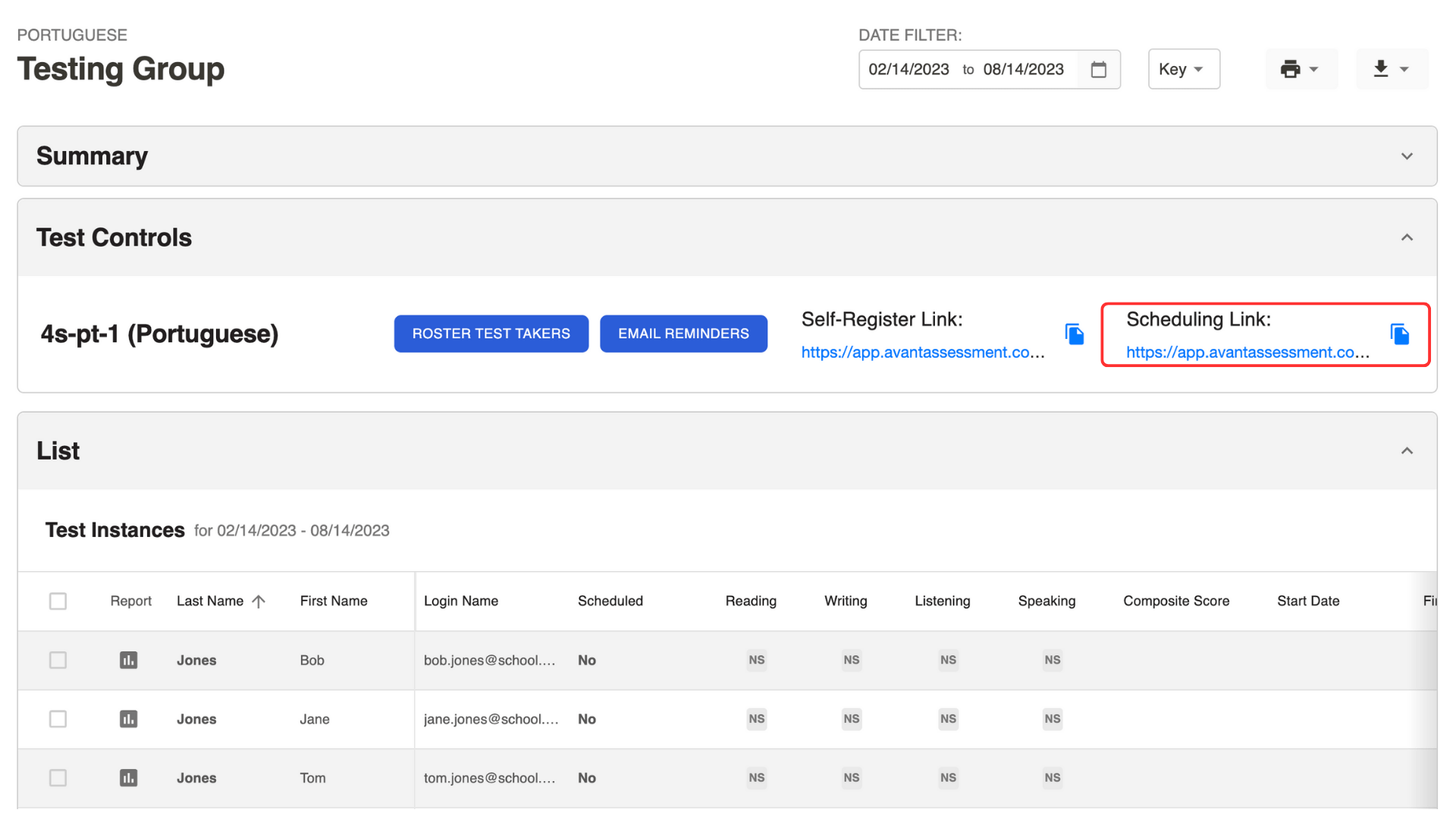
يمكنك أيضًا نسخ رابط الجدولة الموجود تحت قسم Test Controls وإرساله في بريد إلكتروني.
تحقق من الذي جدول اختبار
تحقق من العمود "مُجدول":
- لا - لم يتم جدولة جلسة اختبار.
- 08/15/2023 10:00AM - لم تبدأ جلسة الاختبار المجدولة بعد.
- 08/15/2023 11:00AM* - تم إعادة جدولة جلسة الاختبار.
- 08/15/2023 09:00AM - بدأت جلسة اختبار مجدولة ولكن الاختبار لم يكتمل بعد.
- 08/15/2023 08:00AM - تم إكمال الاختبار.
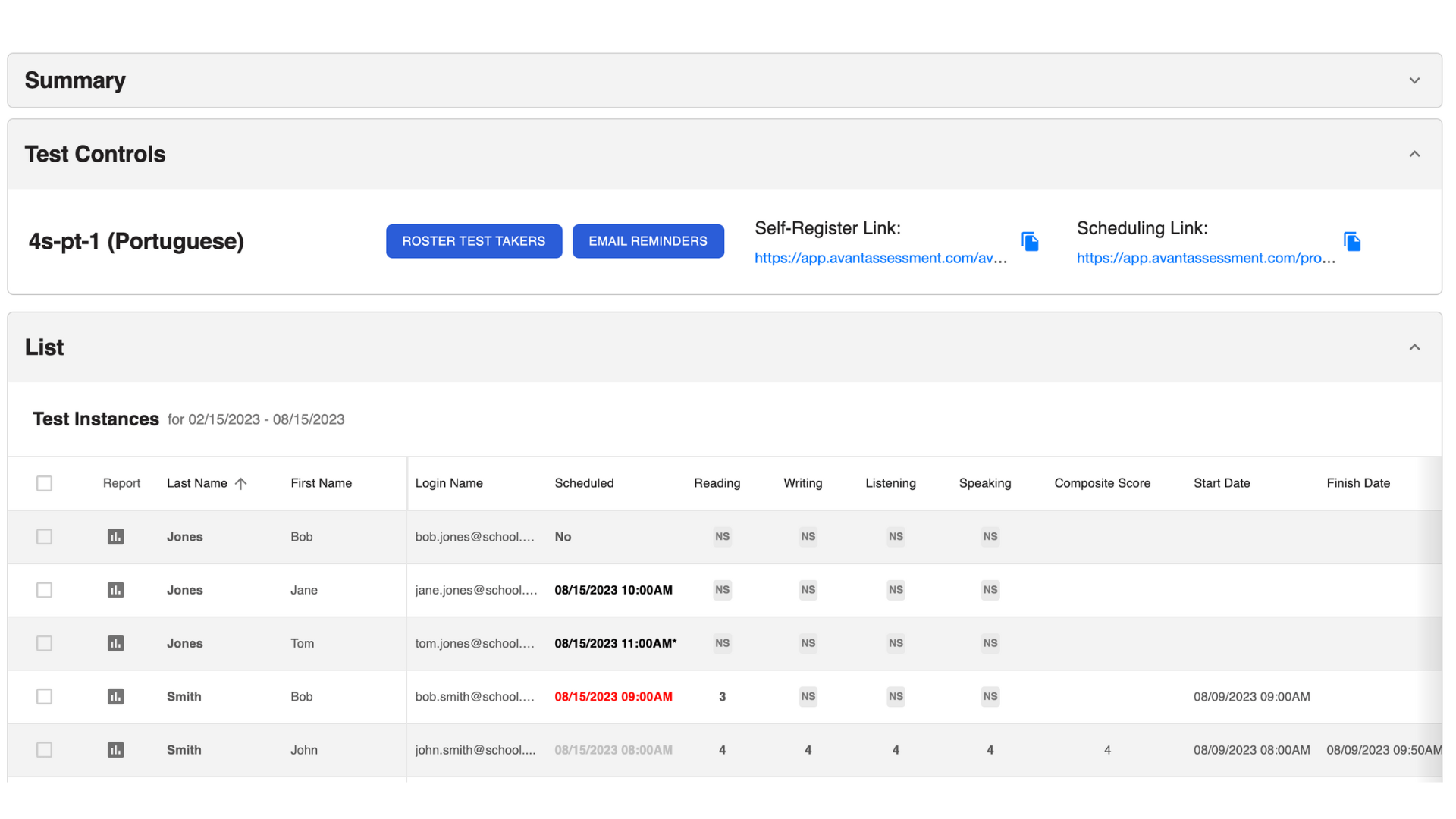
انقر على المعلومات تحت العمود "المجدول" لفتح الشريط الجانبي ومراجعة معلومات الجدول الزمني لكل من أداء الاختبار:
- مجدول (نعم/لا)
- الوقت المحدد
- رابط إلى الاختبار

أرسل التذكيرات
- حدد الذين يؤدون الاختبار من القائمة.
- انقر على زر تذكيرات البريد الإلكتروني في مربع ضوابط الاختبار.
- انقر على الزر تذكيرات البريد الإلكتروني في النافذة المنبثقة.
الأشخاص الذين حددوا موعدًا للإختبار سيتلقون بريدًا إلكترونيًا تذكيريًا يحتوي على رابط الوصول للإختبار.
الممتحنون الذين لم يحددوا موعدًا للامتحان سيتلقون بريدًا إلكترونيًا يحتوي على رابط الجدولة لتحديد موعد الاختبار.
متطلبات التكنولوجيا
راجع دلائل التكنولوجيا لتتمكن من حل أي مشاكل:
قواعد الاختبار عن بُعد (تم التحديث 1/08/2026)
عدم الامتثال لأي من القواعد أدناه أو أي سلوك غير مناسب سيتم تسجيله والإبلاغ عنه إلى منسق الاختبار الخاص بك.
منطقة الاختبار
- يجب أن تجلس على مكتب أو طاولة.
- لا يُسمح بوجود القواميس، أو الكتب الدراسية، أو الهواتف المحمولة، أو الأوراق، أو الأقلام، أو أي مواد دعم أخرى (مثل Siri، Alexa، الساعات الذكية) في منطقة الاختبار أثناء الاختبار.
يُحظر بشكل صارم أي شكل من أشكال الدعم الذكاء الاصطناعي، أو التقاط الرقمي، أو الميزات الممكنة عبر المتصفح، مثل مدقق الإملاء، وميزات الصوت الزائد، والترجمة الصوتية، وقد يؤدي ذلك إلى إغلاق الاختبار.
لا يُسمح باستخدام صندوق الدردشة الخاص بالمراقب لتحضير أو تنظيم أفكارك في أي قسم من أقسام الاختبار وقد يؤدي ذلك إلى إغلاق الاختبار. - يجب أن يكون الإضاءة في الغرفة مشرقة بما فيه الكفاية لتعتبر من نوعية "ضوء النهار". يجب أن يتمكن المراقب من رؤية وجهك ومحيطك بوضوح. يجب ألا يكون مصدر الضوء خلفك.
- يجب أن تكون الغرفة هادئة قدر الإمكان. لا يُسمح بالموسيقى الخلفية أو التلفزيون.
- لا يُسمح لأي شخص آخر بدخول الغرفة أو التفاعل مع الشخص الذي يؤدي الاختبار أثناء الاختبار. السلوك غير المناسب هو سبب لإغلاق الاختبار فورًا. لن يُسمح لك بالاستمرار، وقد لا تتلقى استردادًا للأموال.
- جميع الجلسات عن بُعد لديها مدة قياسية تبلغ 3 ساعات لأي منتج اختبار وفترة زمنية للوصول تبلغ 30 دقيقة (ما لم يُذكر خلاف ذلك من قبل منسق الاختبار الخاص بك). قد يتم منح وقت إضافي من قبل المراقب الخاص بك في ظروف معينة.
جهاز الكمبيوتر للمتقدم للإختبار
- يُسمح بشاشة واحدة فقط. لا يُسمح بالشاشات الخارجية والشاشات المقسمة.
- جوجل كروم ومايكروسوفت إيدج هما المتصفحان المدعومان فقط. لا يُسمح بوضع التصفح المتخفي.
- لا يُسمح بفتح أي تطبيقات إضافية (مثل Word، البريد الإلكتروني، الدردشة) أو نوافذ المتصفح أثناء الاختبار.
- يجب أن يكون هناك تبويب واحد فقط مفتوحًا في المتصفح.
- لا يجب أن تكون هناك أي تطبيقات تعمل في الخلفية، مثل برامج المراسلة، أدوات تطوير الكود، Zoom، أو أي شكل من أشكال تسجيل الشاشة.
- لأغراض استكشاف الأخطاء وإصلاحها، قد يشاركك المشرفون روابط مصرح بها للوصول إليها أثناء الاختبار.
- غير مسموح بالخلفيات الافتراضية والأفاتار التي يتم تمكينها من خلال المتصفح. يجب تعطيل هذا قبل وقت الاختبار.
- If you are testing for writing in a special character language, you must configure, install, and verify that you have the correct virtual keyboard prior to starting. Google Input Tools are currently unavailable for remote proctoring.
- إذا كنت تجري الاختبار على كمبيوتر من Apple، قد تحتاج إلى تكوين إعدادات الخصوصية وفقًا لذلك وتحديث علامة التبويب الخاصة بالامتحان بعد إجراء التغييرات المقترحة. يمكن العثور على التعليمات هنا.
سلوك الذي يؤدي الاختبار
- تحقق من هويتك باستخدام بطاقة هوية تحتوي على اسمك وصورتك على الجانب نفسه.
- سيتم قبول الهويات التي تحتوي على نص مسترجع فقط (أحرف لاتينية).
- بالنسبة لروسيا، يتطلب جواز سفر دولي يحتوي على أحرف رومانية أو أي شكل آخر من الهوية، كما تم التحقق منه من قبل مؤسسة الاختبار، يظهر باللغة الإنجليزية.
- الرجاء اللباس كما لو كنت في مكان عام. إزالة الملابس تعتبر سببًا لإغلاق الاختبار.
- لا تتواصل مع أي شخص آخر بأي وسيلة. قد يؤدي أي دليل على حوار هاتفي، دردشة، أو اجتماع افتراضي أثناء الاختبار إلى إغلاق الاختبار. لن يُسمح لك بالاستمرار، وقد لا تتلقى استردادًا.
بالنسبة لإدارة مركز الاختبار مع AvantProctor، قد يساعدك الرقيب الداخلي في حل مشكلات الأجهزة / البرامج، ولكن يراقبينا عن بعد لا يزالون يتحكمون في ظروف اختبارك، بما في ذلك فترات الراحة في الحمام. - لا تستخدم الهاتف لأي سبب.
- لا تقم بنسخ، تسجيل، طباعة، أخذ لقطات شاشة، أو التقاط الصوت لأي محتوى اختبار.
إذا طلب منسق الاختبارات الخاص بك دليلًا على اكتمال الامتحان، فيرجى طلب المساعدة من AvantProctor الخاص بك. - لا تغادر الغرفة أثناء الامتحان. يُسمح فقط بفترات الراحة في الحمام بين الأقسام ومحدودة بـ 5 دقائق. يجب أن تبلغ المراقب عن بُعد عبر صندوق الدردشة قبل أن تغادر.
- لا تترك الامتحان دون حراسة ومفتوحًا لأي سبب.
- يجب أن تنقر على "إيقاف الاختبار" قبل الخروج.
- أبلغ المراقب عند عودتك.
- أي لغة بذيئة أو أي عمل عنيف أثناء المراقبة من قبل AvantProctor، موجهة نحو مراقبينا أو الآخرين، قد يؤدي إلى إغلاق الاختبار. لن يُسمح لك بالاستمرار، ولن تتلقى استردادًا للأموال.
- من المتوقع من الذين يؤدون الاختبارات أن يتبعوا جميع التعليمات المقدمة من المراقب في صندوق الدردشة. بعد 3 دقائق بدون رد أو الامتثال، سيصدر صوت تنبيه، وسيظهر علامة حمراء في صندوق الدردشة تشير إلى أنك قد فاتك رسائل. قد يؤدي عدم اتباع التعليمات إلى إغلاق الامتحان. لن يُسمح لك بالاستمرار، وقد لا تتلقى استردادًا.
مهم
يتم تفويض الرقباء عن بعد لمراقبة ومراجعة وتقييم سلوكك أثناء الاختبار. قد يتم الإبلاغ عن أي سلوك غير مصرح به أو مهمل أو غير مناسب يتم التقاطه أثناء الاختبار إلى قسم مدونة سلوك مؤسستك أو منسق الاختبار.
قد يحذرك مراقبونا عن بُعد عن الممارسات غير المصرح بها عبر الدردشة أو يقدمون تعليمات إلزامية بخصوص القواعد المذكورة أعلاه مع توقعات صارمة للالتزام. قد يؤدي انتهاك القواعد إلى إنهاء وصولك للاختبار. تحتفظ Avant بالحق في تقييد وصول الاختبار ومعالجة التسجيل لأولئك الأفراد الذين لا يتبعون التعليمات كما أمر بها مراقبك عبر الدردشة (في الزاوية السفلية اليمنى من واجهة اختبارك).
قد يؤدي انتهاك هذه قواعد الاختبار إلى الحصول على درجة صفر إذا كان هناك دليل كافٍ وقاطع على السلوك غير المناسب، بما في ذلك سوء السلوك، الإهمال، أو الاستخدام غير اللائق للتكنولوجيا - مثل التعمد في تعطيل الرصد - خلال فترة الاختبار.
قواعد الاختبار العامة
المتقدمين للاختبار عن بُعد مسؤولون عن قواعد الاختبار عن بُعد وكذلك قواعد اختبار Avant العامة.

- لا تنقر خارج نافذة الاختبار. يتم تتبع هذا وسيتم تسجيل خروجك من الاختبار.

- لا تستخدم أي مواد دعم (مثل القواميس، الكتب الدراسية، الهواتف المحمولة، التطبيقات، أدوات المراسلة، أو أدوات المساعدة في الترجمة مثل Google Translate).

- لا تقم بأخذ ملاحظات (على الورق أو الكترونيا). الأوراق، الأقلام، الأقلام الرصاص، الأقلام الذكية، الخ. غير مسموح بها.

- لا تقرأ / تستخدم أي ملاحظات أو مواد دعم لردودك الشفوية / التعبيرية.

- لا تتواصل مع أي شخص باستثناء المراقب أثناء الاختبار.

- لا تشارك أسئلة الاختبار أو الأوامر. لا تقم بنسخ، طباعة، أو التقاط لقطات شاشة للاختبار.

- لا تستخدم لغة عنيفة، فاحشة، أو غير مناسبة في ردودك.
Fأسئلة شائعة
هنا بعض الأسئلة الأكثر شيوعًا بخصوص AvantProctor. الرجاء التواصل معنا بخصوص أي أسئلة أخرى قد تكون لديك.